Same media file in two different Libraries causes second Library wacky results

I have this media structure

/Media
/Television
/Kid Show 1
/Kid Show 2
/Grown-up Show 1
/Grown-up Show 2
/Movies
/Kids & Family
/Action
/Documentary
/Holiday

I have a main library “Media” that contains these folders:

/Media/Television
/Media/Movies

I have a second library “Kids” that contains these folders:

/Media/Television/Kids Show 1
/Media/Television/Kids Show 2
/Media/Movies/Kids & Family
/Media/Movies/Holiday

The first library works fine in how all the media is discovered, metadata extracted, and so on. The second library is hosed up where I see the television shows are merged together, cover art is wrong, and so on.

My intent is so that I can set the kid’s iPads with a unique Plex user ID then I share from my Plex account only the “Kids” library.

The goofed up “Kids” library shows bad whether I connect via browser using my account, via the kids account from the iPad, from my Apple TV, from my iPhone, etc.

I’ve tried recreating the Kids library but it seems to go bad whenever I reference media folders in the Kids library that are otherwise included in another library already.

Any suggestions?
You cannot mix ‘movies’ and ‘tv show’ type libraries.

You must not add the ‘show’ folder of a particular show directly to a library.
You cannot pick some shows out of your general tv show folder.
You will have to re-arrange those shows into:

/ Media
   / TV Shows kids
      / Kid Show 1
      / Kid Show 2
      ...
   / TV Shows grownups
      / Grown-up Show 1
      / Grown-up Show 2

Then add the folder TV Shows kids to the kids’ library.

Or you are using the age classifications of your shows to control to which shows your kids have access.
You have a Plex Pass, so this avenue is available to you.
https://support.plex.tv/articles/204232573-restricting-the-shares/

I misspoke and am not combining Movies and Television in one library. However I am surprised by the comment that I cannot add a show folder to a library. Confirming, you are saying that, in a structure like this:

/Television
/Kids Show 1
/Season 1
S01E01.mp4
S01E02.mp4
/Season 2

…that I cannot add folder “Kid Show 1” to a library?

Precisely. Doing so will make the title of the show folder ‘invisible’ to the scanner and cannot be used anymore to achieve a good matching.

Yes you can BUT not the way you have it structured…

I do this all the time. My friends ask if I can include some “adult content” to their kids account that has access to the KidOnlyContentLibrary. Shows like Big Bang Theory and nature documentaries shows.

Anyhow, to the meat…
Kid Show 1 would be the ROOT and therefor not used as the series name.
Take a look here.

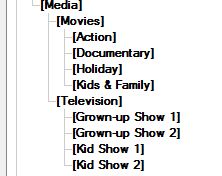
Trying to breakdown your structure
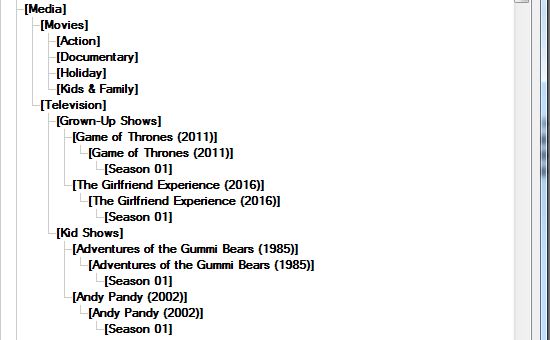
Capture

If I was going to do this I would do it this way.
Capture2

It may look a bit silly but this works very well when you want to add a particular series to select libraries.

Based on the picture above and assuming D: as the drive.

For your grown-up TVSHOW library I would add the paths

D:\Media\Television\Grown-Up Shows
D:\Media\Television\Kid Shows

This will give you(the adult) the entire collection of tvshows.

For the kids library I would add the path

D:\Media\Television\Kid Shows

This will give the kids all the shows that are in your “kid section”

If later on, you add a series that is suitable for the kids but want to add it your “Grown-Up” library then you can just add the new path for the kids.
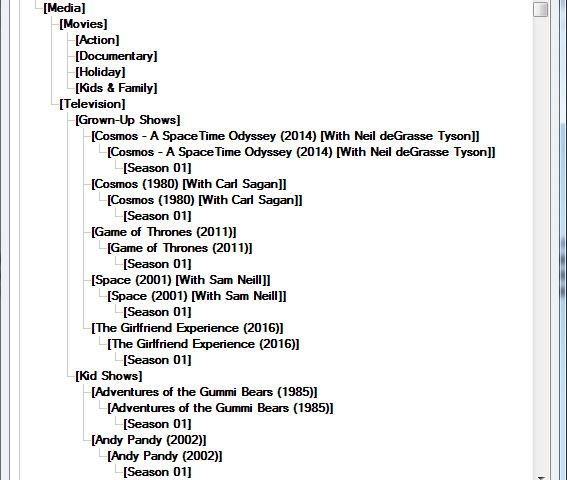
Let’s just say we added a few here…
Capture3
Then just add these paths to your kids library.

D:\Media\Television\Grown-Up Shows\Cosmos - A SpaceTime Odyssey (2014) [With Neil deGrasse Tyson]
D:\Media\Television\Grown-Up Shows\Cosmos (1980) [With Carl Sagan]
D:\Media\Television\Grown-Up Shows\Space (2001) [With Sam Neill]

That will give them access to all kid content and 3 other single series.

BTW: All my series are structured this way. Adult and kids. That way I can give access to any one series. Or create a new library and include just one series.

Thanks everyone. I hadn’t considered that the Plex scanner relied on my folders to understand the shows. I assumed it would use the metadata stored in the media files. I’ll explore some of these tips and I’m sure can find a solution.

This topic was automatically closed 90 days after the last reply. New replies are no longer allowed.