Plex combined the same show that is in two different libraries

Server Version#: 1.35.1.2632-c6783c78 running in Docker on Ubuntu 18.04 LTS.

Greetings-

I have a problematic show, This Old House. I have two libraries: TV Shows (where shows are manually added by me) and TV Shows DVR (where I only add shows that have been recorded OTA using Plex and my HD Home Run).

Up until about a month ago, these two shows were separated. If I went to the TV Shows library I saw the episodes I had manually added. If I went to TV Shows DVR, I saw the episodes that were recorded and added by Plex. Then one day the show inside TV Shows DVR disappeared.

I have another show that is similarly setup, Curious George. See this example, both shows are independent of each other (which is what I want and would expect):

The above is my desired behavior.

Instead, when I search “This Old House” I only get one result. Clicking that result takes me to the TV Shows instance of the show. Notice how it says 8 seasons available? Only 6 are shown when I go to the TV Shows instance.

And some episodes in here actually have multiple instances, like this:
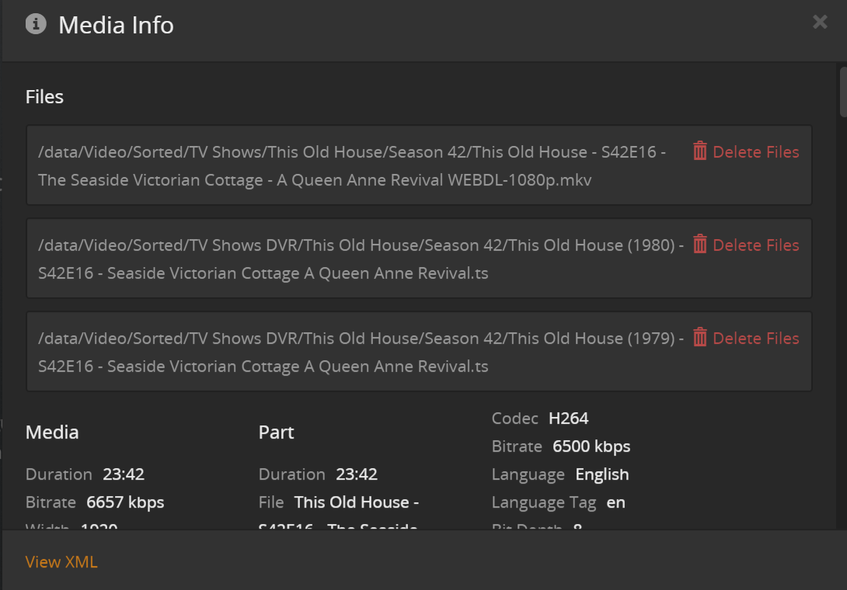
But I have only granted my TV Shows library access to “/data/Video/Sorted/TV Shows” and the TV Shows DVR library to “/data/Video/Sorted/TV Shows DVR”, so how did the TV Shows library get access to the DVR folder? Somehow Plex has “combined” the two different instances of the show into one and removed the show from the TV Shows DVR library.

I have verified on disk the TV Shows DVR library episodes of This Old house still exist. Plex still seems to see them as well , as can be seen in the “8 seasons available” in the search, which is more than available on the TV Shows library instance of TOH.

Lastly, the show has a “Split Apart” option when clicking the ellipses, which I don’t see on any other show.

Clicking this doesn’t really seem to do anything that I can tell.

I have manually run scans on both TV Show libraries. I have restarted my machine and the Plex instance itself.

I’m a bit at a loss here so hopefully someone can give some guidance on fixing this. The only thing I can think of left to do is the Plex dance, by moving both “sets” of episodes out of the Plex folders, emptying trash, then adding them both back. Now, I don’t particularly have an issue with this and suspect it would work. The real issue though is why did this happen and what is the long term fix? If I just do the Plex dance, what is to stop it from happening again (if the dance even works).

Thanks for reading all this, it’s a bit strange of an issue. Looking for guidance!

Can you verify which folders are linked to the TV Shows library?
⋮ > Manage Library > Edit... → Add Folder

Yes I have verified the TV Shows library only has one folder. And the TV Shows DVR library has only one folder. Yet the TV Shows library is accessing files in the folder that has only be added to the TV Shows DVR library.

1 Like

Any symbolic links inside the TV Shows folder that might point to this particular show in the DVR folder?

No symbolic links.

It shows that option whenever a show has been combined with items from different folders.
Which means if you click that, it will separate the show into two items.
One with the files from /TV Shows DVR and one with the items from /TV Shows.
It’d be interesting to see in which library the two show posters will end up.

I’d try the Plex Dance with each of the show’s instances.
Dance one at a time, not both together.

How this came about I can only speculate:
Do you have automatic or periodic library scanning activated?
Was the folder /TV Shows DVR previously named /TV Shows? (even if only for a few seconds)
The two version might have gotten entangled when a library scan coincided with you working on your file and folder organization.
And now it is difficult to disentagle them, because technically the files are all there and present. So the server won’t remove them upon a library scan.

I can only recommend you to disable automatic and periodic library scans while working on your media files. Whether you do adding, removing, moving, renaming or anything else to your media files.
Make sure that the server will only scan the files when you are finished with your work.

Do you have automatic or periodic library scanning activated?

Automatic.

Was the folder /TV Shows DVR previously named /TV Shows ? (even if only for a few seconds)

Never.

I will attempt the Plex dance and see how it goes.

Upon further investigation I found something even stranger. For some reason there were two different folders under my TV Shows DVR library: This Old House and This Old House (1979). So I moved both DVR folders outside of Plex folder, ran a scan on both TV Shows and TV Shows DVR libraries, emptied trash on both libraries, and verified those video files were no longer being picked up by Plex.

Next I combined both show folders that were under TV Shows DVR into a single folder called This Old House (1979) since having the year seems to be the correct way to do it (everything else in my DVR folder has the year).

I moved the newly combined DVR folder back into the TV Shows DVR library and rescanned. Everything is working just how I want it now. :slight_smile:

This topic was automatically closed 90 days after the last reply. New replies are no longer allowed.
