Yes you can BUT not the way you have it structured…
I do this all the time. My friends ask if I can include some “adult content” to their kids account that has access to the KidOnlyContentLibrary. Shows like Big Bang Theory and nature documentaries shows.
Anyhow, to the meat…
Kid Show 1 would be the ROOT and therefor not used as the series name.
Take a look here.
Trying to breakdown your structure
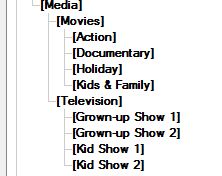
If I was going to do this I would do it this way.
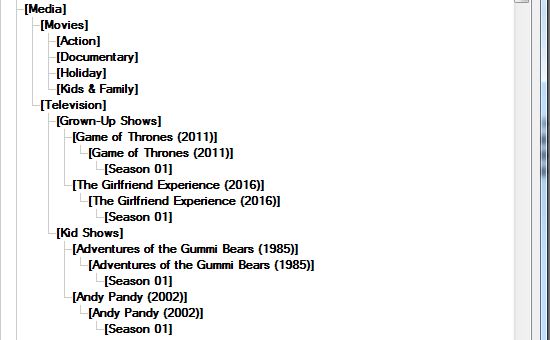
It may look a bit silly but this works very well when you want to add a particular series to select libraries.
Based on the picture above and assuming D: as the drive.
For your grown-up TVSHOW library I would add the paths
D:\Media\Television\Grown-Up Shows
D:\Media\Television\Kid Shows
This will give you(the adult) the entire collection of tvshows.
For the kids library I would add the path
D:\Media\Television\Kid Shows
This will give the kids all the shows that are in your “kid section”
If later on, you add a series that is suitable for the kids but want to add it your “Grown-Up” library then you can just add the new path for the kids.
Let’s just say we added a few here…
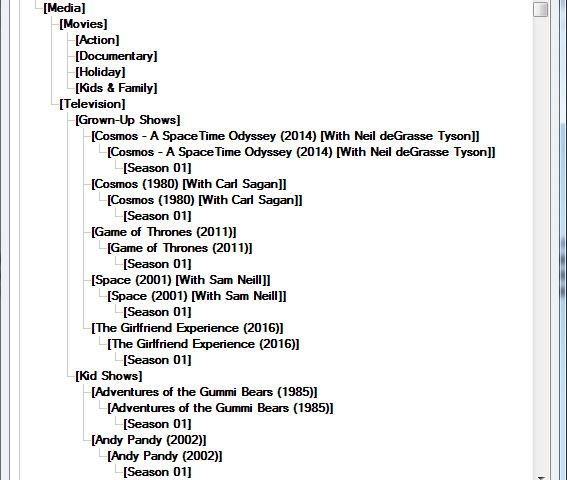
Then just add these paths to your kids library.
D:\Media\Television\Grown-Up Shows\Cosmos - A SpaceTime Odyssey (2014) [With Neil deGrasse Tyson]
D:\Media\Television\Grown-Up Shows\Cosmos (1980) [With Carl Sagan]
D:\Media\Television\Grown-Up Shows\Space (2001) [With Sam Neill]
That will give them access to all kid content and 3 other single series.
BTW: All my series are structured this way. Adult and kids. That way I can give access to any one series. Or create a new library and include just one series.
