Server Version#: 1.18.0.1846
Player Version#: 4.5.1
Tizen Version#: 3.0
Files will play if transcoded, but not directly. It also has some halting behavior. Logs attached.
Plex Media Server.log (698.2 KB)
Server Version#: 1.18.0.1846
Player Version#: 4.5.1
Tizen Version#: 3.0
Files will play if transcoded, but not directly. It also has some halting behavior. Logs attached.
Plex Media Server.log (698.2 KB)
Are you using subtitles?
If not, can you start playing something on your Samsung and then go to:
https://app.plex.tv/desktop then
Click on Settings, then on the left, scroll down to / past your Server name and then click on Dashboard. Post a screenshot of the Now Playing section.
So after a couple of server upgrades (now Version 1.18.2.2029), the problem is worse. Now it won’t play at all unless transcoded. No subtitles involved.
I took a look at the dashboard when trying to play with “direct play” and “direct stream” enabled. The show would not even launch, with no server activity. So there’s nothing to show in the dashboard.
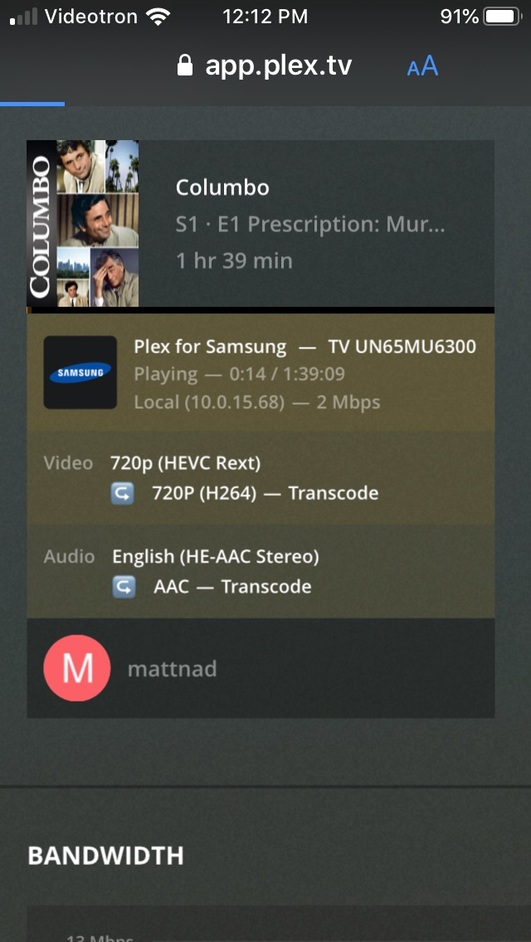
I was able to play the title with with transcoding enabled. Screen capture of the dashboard included.
These latest symptoms indicate you do not have a direct connection with your Plex server (local playback being limited to 2Mbps is the key hint here).
I’m not sure what the fix is in these situations since I’m not a networking kind of gal; let me point someone to this post for you…
EDIT: actually, on the Samsung, can you go into settings and enable local insecure connection or something like that and see if it helps?
Hi. So the Samsung TV was already set to “Prefer insecure connections” “On Local Network”. It also had the option of “Always” but that was not selected. My server and Samsung are all connected via gigabit ethernet.
Regarding the 2Mbps connection, that may just be due to the low resolution of the file. It’s SD with a total encoded bit rate of 363Kbps. I’ve attached a pic of the file info. I can’t see why it would need more than 2Mbps given how low res it is.
It actually works OK with transcoding, but my Samsung is equipped for h.265 decoding which would be preferable to using my mac’s CPU to do the work. So ideally, even if this particular codec is incompatible with the Samsung, you’d want the server to automatically fall back to transcoding after a try. That way I don’t have to change settings just to watch the HEVC Rext encoded files.
In case it matters, here are the specs on the Samsung.
Model UN65MU6300
Software version T-KTMINT-1009
The Plex Client is v. 4.5.1 with Tizen 3.0
I’m not sure but I suspect the audio format is the issue – “he-acc” – is that natively supported by Samsung? If not, then that would explain the transcoding.
(What’s the “Rext” bit about for the HEVC encode? That’s also suspicious looking)
Okay, I suspect the “Rext” is not a supported format for HEVC and Samsung. See this post from about a year ago:
Curiously, a couple of months ago it did play directly on the Samsung, but with periodically halting video and good audio. Now it doesn’t play at all.
I’m not too worried about direct play for Rext encoded files. What I think should be fixed is how the server operates when there’s incompatibility.
At this point, the Samsung client just keeps trying to load the file until I cancel the operation. Ideally if Direct Play doesn’t work, the client and server should switch to transcoded.
Hmmm… okay, how about this  Post your PMS logs (make sure DEBUG is ON and VERBOSE is OFF first) and your the Samsung app logs right after trying to play this video:
And I’ll point a dev to this thread
Thanks for your help. I just did an exercise of playing the same file allowing direct play & streaming (cannot play the file, and keeps trying until I stop it) and then changed the settings to disallow direct play & streaming so it transcoded (works fine).
I then grabbed the log file attached here.
Plex Media Server.log (2.7 MB)
Thanks!
Looks like there might be something wrong with the file. @mattnad Does this happen for many files or just this one? Can you DM me a sample clip?
The entire series (based on 10 random samples) has the same problem.
Happy to DM you a clip, but I’m not sure how I can extract a brief portion without reincoding it in another format. The HEVC Rext files were created using software I don’t have.
Could send you an entire file. Smallest one is 231MB
You can throw the smallest file on Google Drive and DM me a link to it (don’t post it here).
This topic was automatically closed 90 days after the last reply. New replies are no longer allowed.