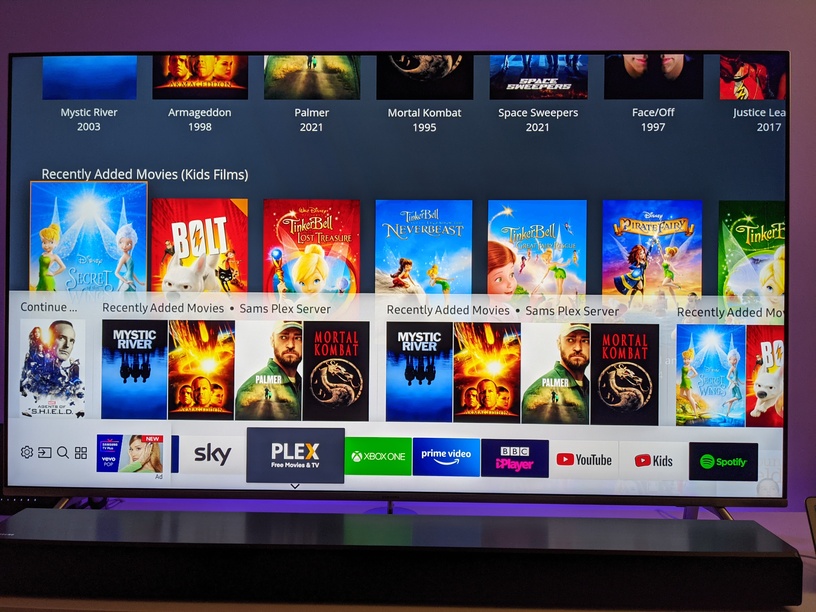
That’s super strange, since continue watching should always be at the top. A screenshot would help, please include the sidebar being open with your pinned libraries showing in the screenshot. You can just DM it to me if you don’t want it public.
Honestly not sure what else we can do at this point with it. Maybe some weird underlying data that is only occurring on your end?
Some things to try:
Reset your Home customization, and re-pinning the libraries to the sidebar
Turn off the Smart Hub integration in settings, wait for it to be removed, and turn it back on
Try renaming the libraries from the desktop app, refreshing the Samsung app to see the changes, and checking for the duplicates again. If it’s fixed, try renaming them back and see if it still occurs.
But in the app everything is perfect. It’s just the Smart Hub integration that seems to be the issue.
It’s not just me though is it? As others have posted about the same or similar issues.
As I’ve said previously, it used to be fine and I’ve not changed anything. It all started when the on deck, continue watching and recently added update error occurred.
This:
I’ve tried all but the last fix before, multiple times, but I’ll give the last one a go tomorrow. Cheers.
Still having the overlapping text on the continue watching now and again (I have no idea why its there sometime and not the next) if its only one entry but other than that, we’re all good.
It has not been a Plex application update since 12/8-2020. (v/5.1.0) client 5.11.2 - PV 4
The problem became bigger with the last two updates from Samsung. They changed something and made it worse!
From what I have noticed it is missing codecs and unsupported format/convert possibilities from the Plex application. Or can turn it around and say Samsung with their solution have some weird and unnecessary limitations!
I use dual band WiFi 900Mbps available and the steaming is flawless, IF I have set the preview setting to off, and the sound format is AC3. DTS or true-HD shows fault on missing codecs and closes the application.
Also ended up with optical cable between hub and amplifier instead of HDMI. This setup is the best I have found…
@sLumpy Hate to say, but while I’m not seeing duplicates anymore it does seem to have stopped updating as of the last update or two. I’m seeing the same content and continue watching is stuck on episodes I watched long ago…
 ) will be in 5.10.