As far as I can tell, I’m only seeing 2017 Samsung TVs (Tizen 3) with the issue. Is there anyone that is having issues that’s not on a 2017?
I’ll chime in on this, happened today. Spent some hours resetting stuff, tv, booting Synology DSM , updating server etc before finding this post.
Can confirm it works if transcoding video, but not if direct play.
Also 2017 Tizen. (log capture is what plex app on tv logs TO server - not the server log itself.)
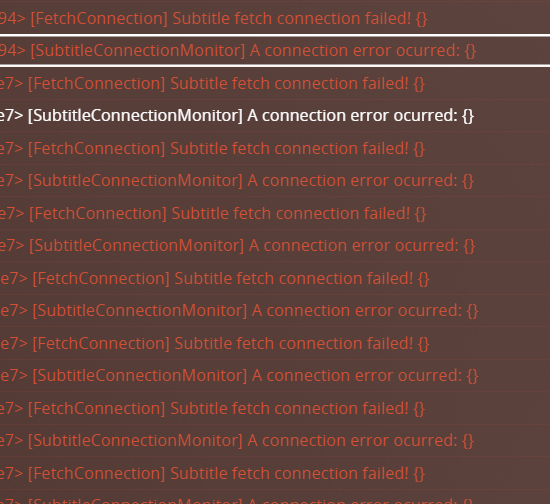
i have the same problem with series 6 model UN50MU6100GCFV Tizen 5
You mean Tizen 3? UN50MU is Tizen 3
Sorry, you are right. is Tizen 3
My issue is little bit different.
My tv is Samsung QLED 2019 (Q85 series). (sorry, i don’t know which Tizen included)
This issue happened when I play specific video.
In my case, when I play the HEVC(main 10, 1080p, audio aac) video with SRT subtitles(made of UTF-8, Korean) through Tv, It happened. I tested some cases,
Play at Samsung tv, play info
-
Play : Direct play
-
Subtitle : app renderer
→ It play well and can load subtitle, but specific line of subtitles is broken.
(not whole, just some part)
When I play same video with same SRT sub through PC or iPad or iPhone, It isn’t broken.
→ I think subtitle is not problem. I changed subtitle but same result. -
Play : Transcoding
-
Subtitle : server renderer
→ No Problem
→ I think the apprenderer of samsung plex tv app is cause of my issue…
Can you help me?
Please start a new thread as it’s unrelated. Also include logs and the .srt file.
I have a fix for the subtitles not showing up. I’ll be pushing up a hotfix shortly, assuming it all goes well.
1 Like
This should now be fixed in 5.44.4
1 Like
I’ve started a new thread!
Fixed, it’s 5.44.5 now.
Thanks for the quick update.
1 Like
Thank you for the quick fix. Very much appreciated !!
Sorry but im having exactly thr same problem on my LG C7. Is the patch also available for the LG?
1 Like
Thanks!!!
I have the same problem on my Philips AndroidTV and seems to have been introduced with latest update.
Do you think it’s related to same problem as on Samsung?
Do you need logs or maybe already know what this is?
Realized I was on beta.
Rolled back a bit.
Subtitles (SRT External) works without problems in
9.6.2.34368-beta
Problem introduced in
9.7.0.34466-beta (same version specified full support for ASS/SSA subtitle.
Not sure if related?
I still have the disappearing subtitles problem.
I have 5.44.6 on Tizen 2.4 on a Samsung 2016 KS series.
Server is 1.28.1.6104 on Synology
1 Like
In my case since last weekend external subtitles began to fade out after a couple of minutes 15-20minutes its really random…sometimes it will fade out only by the end sometimes fade out 3/4x and you need to rewind 10sec to make the subtitles show properly again…
I also have some issues with subtitles on my Samsung tv.
I also mentioned it in LG Version : 5.44.3 broke subtitles as my LG tv also issues.
The issue is that my QN90A only shows some PGS subtitles.
An older movie’s PGS subtitles are shown, but a newly added blu-ray with two audio tracks (English and native) and with two subtitles tracks (native - forced and native) does not get shown unless I switch to “Always burn-in”, without “Always burn-in” sometimes right after a forced line would have been shown I might see a line of the selected subtitle track
Both my android phone and the Windows app shows the selected subtitles for both movies without issues
Problems with disappearing SRT subtitles on both my Samsung TV’s (UE43 and QE65). Happens at least when using Direct Play. Stop/play and rewinding brings them back. Server version 1.28.1.6104 Ubuntu.
Edit: Samsung Tizen Plex client version 5.44.6
1 Like
