Version 5.45.3 now and all seems fine again
Still disappearing over here.
2020 Samsung Q70 TV…something that I’ve notice in this version is that the last line usually never appears, even if its internal srt, I’m pretty sure this wasn’t happening before…
1 Like
Looks like a different bug affecting Tizen for subs disappearing. That bug will be tracked here instead.
I am the OP of that other thread, but we didn’t have feedback of a Plex employee in that thread.
Could you please care to comment?
Tizen Client 5.45.3 and problem still remains. Subs disappear in the latter half of video
Facing this issue as well on my Samsung TV. Version is 5.46.1.
samsung tv 82nu8000 Facing this issue as well on my Samsung TV. Version is 5.46.1
Same issues here, Samsung Q70A 2021, Plex Version is 5.46.1.
This should now be fixed in 5.47.1
1 Like
No, this version is not a solution. The same file can be played directly in the previous version, at least the video stream does not need to be transcoded. But in 5.47.1, direct play is not available for same files, and the server will be forced to transcode and reason shows that ‘stream count exceeds 30 streams’. This resulted in not being able to play properly due to poor performance of my server. My source file has totally more than 30 subtitles and audios embedded in it, but I want to know if these subtitles are rendered during playback? Hopefully it will be fixed in the next release.
What model TV? When you get the 30 stream issue, it should still Direct Stream video & audio with some caveats depending on which model TV you have.
It’s Q70B 2022, Tizen 6.5.
Heard about the 30 stream limit on Samsung TVs before, but the same file issue didn’t appear in the previous version. I just tested a lot of files that could be played normally before, if the embedded audio and subtitle streams exceed a certain number, this problem will occur. The server will be forced to perform transcoding of the video stream, and my original intention was to let the TV decode it because the performance is sufficient ( As we know Tizen developer website shows that Q series 2022 have ability to handle up to 8K HEVC decoding). But my understanding is that it is only embedded but not decoding or rendering, why does it still encounter streams limit? I’m not a such professional engineer as your team :(, just wanted to say that the last version had only a little tolerable subtitle problem, and this version can’t play media properly with the same configuration. Thank you for your hard work:)
Whenever you direct play a file, the TV is sent the data directly to play. It’ll handle demuxing the container, decoding the video/audio streams, etc. Only subtitles are done manually by us. There’s an issue on the Tizen devices (since Tizen 5.5 I believe) where it has trouble playing when encountering over 30 streams in a file. Therefore, we have to remux and remove the extra streams.
Before the current version of the app, we didn’t apply the 30 stream limit to the Tizen 6.5 devices, so you might’ve gotten lucky with some of the files that you have and they played correctly.
Hello!
I have not been able to do extensive testing, but before this update i had the problem with subtitles not showing at all or disappearing after a while. After the update, when I try to watch the same movie-file, i can watch for about 2-10 minutes (very random) and then the video starts to buffer and never stops to buffer.
I check the Plex dashboard and the stream is not transcoding video(never did with the previous either), except for the audio , 7.1 truehd to acc, but it did that before also. If i turn the subtitles off the problem is solved and the buffering stops and i can watch the whole movie. Happens with both SRT and PGS.
One more weird thing with this update is PGS subtitles. Before i could never use them, cuz they made HDR not work/be transcoded to non HDR. But after the update they work with HDR (Wich is great) but the buffering problem also happens with PGS.
Samsung Q70A 2021.
Super big thanks for all the work you do!
Well, let’s put the 30 streams limit aside for now, at least I can remux it with Mkvtoolnix. Now I have the same problem as @mosmorgan , when the subtitles are running, it randomly starts to buffer endlessly and then the error message ‘Playback Error An unexpected playback problem occurred’ appears.
The time the buffering starts is random and no one knows when it starts going wrong. So I’ve attached a log for you to troubleshoot.
Plex Media Server Logs_2022-09-25_00-44-48.zip (6.2 MB)
Also attached is a screenshot of the bandwidth situation, some of the things I found that may help.
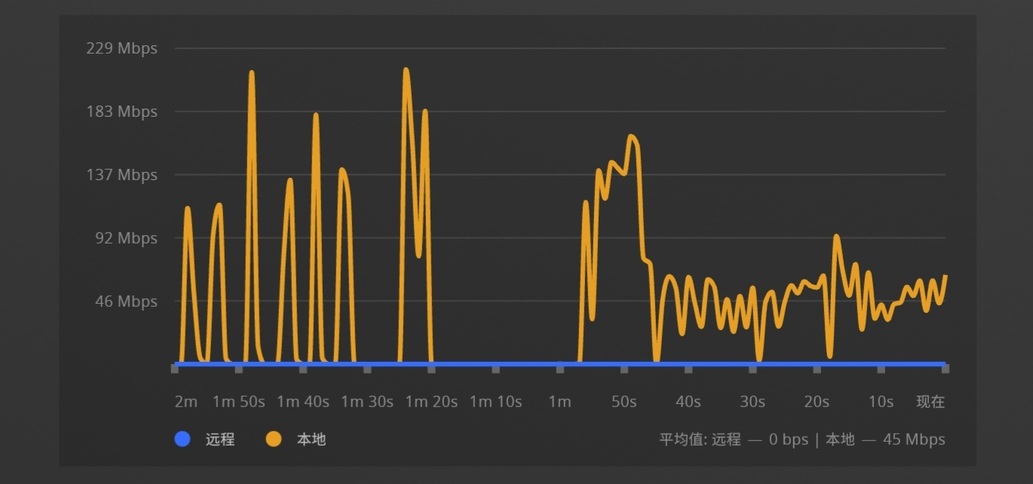
The left part of the figure is the bandwidth of the subtitles turned on, the middle is the situation where infinite buffering begins, and the right part is the bandwidth that can be played normally after the subtitles are turned off. I found a noticeable difference!
All your progress is the best, thank you!
Is this an issue with Tizen 5.5 only? I’m running the last version 5.47.1 on a Tizen 3 TV and my videos gets transcoded if it contains more than 30 streams (did not test the 30 value itself). A video with 1 video stream + 1 audio stream + 33 subtitle streams gets transcoded, but the same file with only 1 subtitle stream does not.
I’ve been having exactly the same problem as @AnthonyTan and @mosmorgan . I also have a Samsung TV. SRT subtitles used to work fine with 4K files, but after one of the last app updates (I can’t know for sure which one), the same problem started happening to me: it starts buffering endlessly and, after a while, the same Playback Error message appears.
Do you have any workarounds for this problem? Streaming works fine without subtitles, but I absolutely need subtitles for some movies…
Thanks in advance.
Set burn subtitles to ALWAYS
I already did. It says there’s not enough CPU to do that.
Anyway, I really think its a bug that started in the last version of the Plex app.
This topic was automatically closed 90 days after the last reply. New replies are no longer allowed.
