All of this subject to pair bonding. G-bonding is the most common.
It’s what I have here. 2 pair, G.bond, VDSL 20 Mbps each (due to wire length), yielding 40 Mbps.
I understand. I’m also sharing that I do understand the DSL side of the equation too (slower speeds and matching taking longer) due to the gross speed differences.
I had to buy two VDSL lines to get 50 raw (40 payload) Mbps of service.
I don’t think it is deliberate. I just encountered another problem. The login screen in the Geforce Experience Application (utility application for Nvidia GPUs) could not be loaded. Like for the media server I was able to fix this by using a VPN.
He used his Mac and his Syno (both on the same LAN) and got different results.
That’s not possible with properly configured routers & switches at the ISP
Sharing the WAN IP, LAN IPs, and MAC addresses will give them info to go on.
Even the MAC address of your modem is probably helpful. They must have some form of MAC/VLAN configured somewhere
In a german thread about this topic someone mentioned that he has no problems with the Vodafone station unlike the Fritzbox. Can anyone reproduce that? Unfortunately I only have the Fritzbox.
Sorry guys, took me way too long to answer. But SARS-Cov-2 got me working way too long the past couple of days (working in healthcare).
So a guy that called himself a technician called me on saturday morning. What can I say? He told me to gibe my 2,4 GHz and my 5 GHz network different names and change the 5 GHz from Auto-Channel to 36-50 MHz. No bull****, that’s all he said. I told him everything @ChuckPa and I discovered and that there are multiple people with the exact same issue. Even then fact that I can prove everything I say with screenshots or logs of the results didn’t convince him at all. You just can’t imagine this…
Believe it or not today I really tried this bs. Guess what? Didn’t change anything…surprisingly.
At this point I really can’t tell what to do. @bwestpha wrote me a PM with the idea of posting in the forum of the ISP which I think is our best bet right now.
@Coxeroni 6590 means you’re still using DOCSIS 3.0 instead of 3.1 which could be the whole point of this problem.
7, not 6. 7590, a non-cable FB I use after the cable modem in bridge mode. Needless to say that the modem operates in DOCSIS 3.1 mode. At least I guess so, the modem itself does not show a lot of information on its web interface.
I believe that this problem has something to do with newer Cable Fritzboxes (6591 and 6660).
Hopefully it will be adressed with a firmware update by AVM.
using any new Vodafone subscription which involves DOCSIS 3.1 and
have a FritzOs which is quite new (>7.10 or so)
this problem hits you.
The solution is quite “easy” if you know what happens and I stumbled uppon this solution by accident.
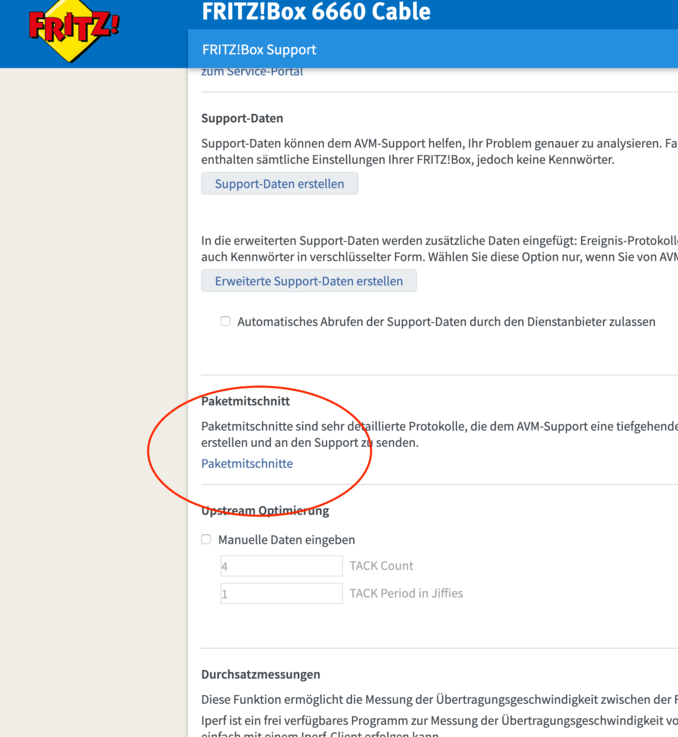
I tried to capture the network stream between my host machine and the internet via FritzBox and usually there is a button for that which outputs you the . cap File (anyone remember?).
Since a few FritzOS upgrades this buttons dissapeared to an unknown menu but nevertheless I found it :
…da werden dann IP-Adressen und auch -Ports umgeschrieben bei portbasierten Protokollen und ebenso die “L2-Adressen” (aka MAC-Adressen), die ebenfalls passen müssen, damit das richtige Ziel im LAN dieses Paket überhaupt erst erhält…
Wait what? L2 adresses, MAC filtering bla bla?
→ directly disabled the acceleration and it worked for me.
@bwestpha OMG you are a hero. It workes for me, too. Posters and metadata are loaded immediately again. Also the pictures of the cast that was missing before.
Thank you so much. Please let us know the feedback from AVM.
@preacha great. This is nevertheless a temporary solution since - already someone else reported - this Leads to slower transfer speeds.
Im still courious what exactly Plex (to be more specific, the python2 request module) is doing differently in comparison to an simple wget call from the same machine.
Maybe tomorrow I will try a sample python program which should try to reproduce this behavior. Maybe in addition with wireshark if I get the capturing working on my 6660.

 but nevertheless I found it :