Server Version#: 1.19.4.2935
Player Version#:
Tuner Make/Model: HDHomeRun CONNECT DUO
Guide/Lineup name: Freeview Central (West) OTA Broadcast
Using XMLTV?:
Channel number/Name: 81 - TPTV
Carried out a manual Guide refresh this morning and now all my scheduled recordings have vanished from the DVR Schedule.
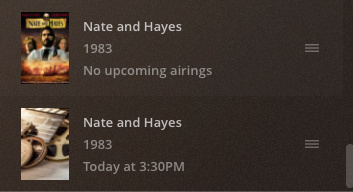
ALL entries are showing in the “Recording Priority” list but are showing as “No upcoming airings” even though they are clearly in the guide.
Anyone seen this/got any ideas? I have tried editing an entry under the “Recording Priority” section and clicking the “Save” but it still doesn’t link the recording to the guide…
Here are two entries from the Recording Priority list. The first item is the original scheduled recording, the second is a new recording I have had to schedule so I don’t miss recording the movie.
Thank you @sa2000. So I have to delete all existing 60 or so recordings and reschedule everything? I always set recordings to any channel, wouldn’t this have picked up the new programs by name?
Scheduled recordings pick up the TV Show or Episode internal ID’s - at the time the recording is scheduled. If it is a scheduled recording for the whole show/series, then it would be the series/show Internal identifier. If it is an episode that is scheduled or a movie then it would be internal identifier for that specific one
OK - i see. When i complained about the change as it impacted recordings - they reverted the change but of course you have already switched to the new ID
could you give me some titles please / channels - as the IDs should not have changed and the Nate and Hayes was supposed to have been a one-off - well the channel airings probably
That fits in with how the issue arose. Now that you have rescheduled the recordings I will inform our provider and request them not to re-instate the old IDs.