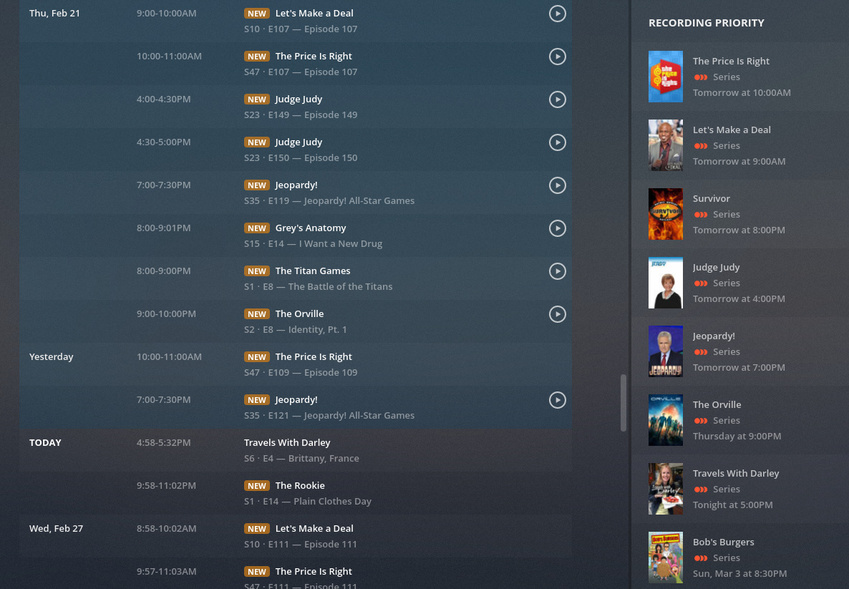
I have a problem where series recordings are not getting recorded but manual single episode recordings work. It seems there are similar topics but no resolution.
Scenario:
Find a show in Live TV & DVR specifically for > 1 day out.
Select Record
Record All Episodes and select New Airings Only
Select Recordings and see the show listed correctly on the Calendar view
Wait until day of recording (prior to show airing) and you’ll notice the show is no longer listed for Today but will show future airings on the Recording Priority panel.
Media server version: 1.15.1.707
Timezone: America/Los_Angeles (environment variable TZ)
My theory is that series recordings are not taking into account the timezone.
Show: News 8 at 5pm (CBS)
Current local time: 6:48 am
Current UTC time: 2:48 pm (14:48)
Recordings: Currently visible and shows that it will record as expected
I will check again in roughly 2 hours and 15 minutes, if my theory is correct the show will no longer appear on the recordings list and the Recording Priority panel will update to reflect the next airing date of tomorrow at 5pm.
Update 1:
DVR Settings
Minutes before start: 0
Minutes after end: 0
Enhanced Guide: unchecked
Postprocessing Script: None
Remove commercials: checked
Device
HDHomeRun CONNECT Quatro
Convert video while recording: Off
Update 2
Got caught up with work but it is now 3:03pm local time (15:03) with a UTC time of 23:03 and the expected 5pm (17:00) show is no longer in the list of scheduled recordings. I have manually added the program to record (not a series) and it shows up correctly in the scheduled recordings (Calendar View)
I do have a temporary directory specified but it does not appear to be a permissions issue. I can docker exec -it into the container and write files to the temp directory.
The thing that leads me to believe it is a timezone issue for series recordings is that the recording disappears from the list when it passes the local recording time but in UTC. For instance, let’s assume a program is set to record at 5pm (17:00) in America/Los_Angeles. If I view the list of scheduled recordings prior to 09:00 local time I will see it in the list. However, after 09:00 local the recording disappears from the list. 09:00 in America/Los_Angeles is 17:00 in UTC.
I’ve done a lot of work developing applications for reservation systems across time zones and know how big of a pain it is.
Seeing exactly the same behavior. Local timezone is Los Angeles, Linux server time zone Los Angeles, scheduled events just seem to disappear a few hours before they are scheduled to start. Manually triggered recordings work just fine.
Future Calendar View shows scheduled recordings, and past just is blank. Seems to have started on Friday 2/22.
Running in LXC container, not docker. Version 1.15.1.710 but saw same behavior with the 1.15.0.6xx release.
The guide appears to be incorrect as well. Note from the capture below for The Rookie, one of my scheduled events. The Details show airing from 10:00-11:00 but the Grid View says 10:30 is the start time.
It appears to be recording correctly as of this morning pacific time (Thursday, February 28, 2019). My server was upgraded to 1.15.1.710. Since @dschaper reported the same issue while on 1.15.1.710, I doubt it was the upgrade. Plex must have fixed something with the guide?
Plex is almost unusable for Live TV at this point, I can’t even watch some shows that are live. Half of my live channels present me with only a “Record” option.
I live in Nebraska, central time zone, having the same issues. Only workaround I’ve found is to not use series recording.
I setup NPVR on my Windows 10 desktop and it has no issues, considering setting up a second vm just for recording.
Hardware:
HDHomerun Quatro
Windows Server 2012R2 VM ESXi 5.5
Version 1.14.1.5488 – Says up to date, doesn’t match what many others have posted