Is there a way to increase the plex search time out someplace? It seems like the request is cancelled once it hits 5 seconds.
What exactly is happening? Is it staying on a spinner or something?
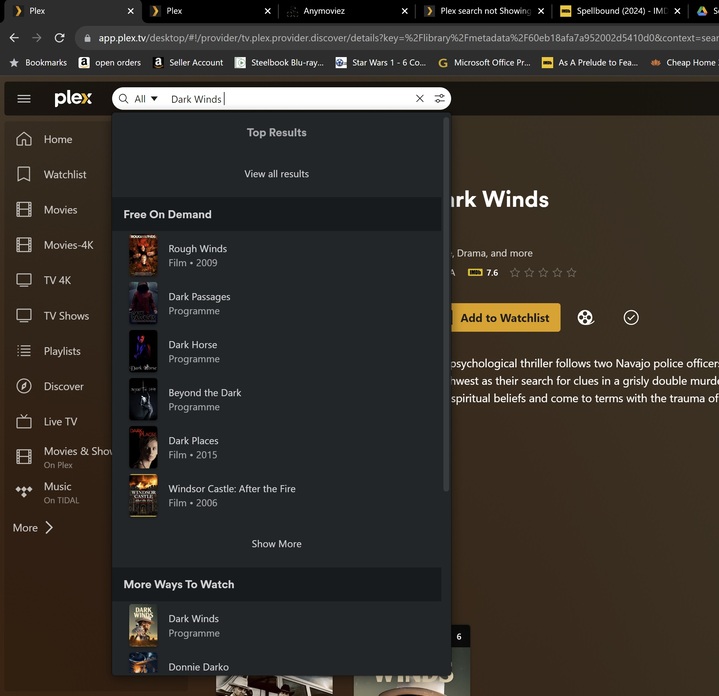
The searching just stops and if you look at the network tab it shows it being canceled at 5seconds. So if the server doesn’t respond in 5sec it appears like you don’t have the item but it doesn’t say timed out and from what I can tell there is no way to search just a specific sever if you have multiple. If I take the cancelled request and just open in browser results appear in like 7 seconds.

on the right side of search bar click the search settings button where you can select which sources to search
Unfortunately the timeout doesn’t increase searching by just one.
Does it matter if you use the local or hosted web app?
No, it more dependant on how fast the server is, or load, so the 5second max laod time doesnt really work well for like a slower nas. The UI also doesnt say it timed out it just doesnt return back any data, ideally it should say timed out and maybe a button press can run it again for up to 30seconds or have it configurable.
Did another test today after “optimizing” the db, but issue still happens.
So using “Over the Brave” as an example, this will time out, but using “Over Brave” doesn’t time out and returns results in under 5 seconds
@BigWheel any update? This should be fairly easy to test by throwing a delay in the search code to simulate a longer wait time. Is there another way/ui to search?
You don’t need to modify any code to simulate. Just use the browser’s dev tools to simulate a slow connection.

@bakes82 Thank you for reporting. I’m able to reproduce this behavior and I’ve filed an internal issue. Just so I got it correct you’re asking for:
- Messaging that a timeout has happened
- Extending the time to search before timing out
Is that the gist?
@Atomatth That would definitely help!
also getting same problem except its only happinging on the plex app it works fine on mobile app and using ip address 127. on web browser
but using https://app.plex.tv/desktop
its not appearing as if have the item after 5 sec times out or it will appear on search other sources see pics 1 and 2 search for same item one using plex app on browser other using ip address on browser it does not appear

i think this is what this person is also having
Right and that kind of makes sense. App.plex.tv is the hosted web app and the other is the bundled web app on PMS. If you’re viewing the web app ON the PMS, you better be getting results from that PMS  .
.
Maybe related or maybe not but there have been reports of users not seeing local PMSs through app.plex.tv. Some have resolved this by changing their DNS settings. This might help but there are some improvements coming to search that should help here.
@Atomatth and update when this is pushing out, still happening and super annoying to try and manually find something when you have thousands of items to narrow down in the list.
I can echo a comment made in the Plex Fireside thread. There are changes coming soon, that in my experience address the issues raised here.  they resolve your issue.
I see you’re still seeing the same issue. I don’t think we established some basic information. What version is your PMS? Are you seeing this on app.plex.tv and/or the bundled web app? Have you tried changing your DNS settings that was mentioned previously?
The 5second time out is still there, unless there is a setting I missed. The UI does show that some timed out, but this doesn’t really fix the underlying issue if you have slow responses/under powered devices or high utilization on a box. It seems mostly limited to the WebUI, I did the same search “Convicting A Murderer” on the iOS app and the server that is timing out in the webUI will appear after ~10-12 seconds. The search continues, where the webUI has a hard limit. The network tab shows it being cancelled after 5seconds, This is using the “official” plex hosted site not the local, and boxes are on the latest beta. The UI has changed so pretty sure its the new search release.

Shucks, I was hoping this would help. I do have an internal issue already filed for this and will add this extra detail. Thanks for confirming, sorry it’s still an issue.
Would you mind identifying which servers are failing here? Are they local or remote? PMS Version? PMS hosted OS? Any browser extensions? Any difference when using incognito mode (no extension)? Is this browser specific only? Which browser are you using?
@bakes82 We haven’t forgotten about you, I promise! I just checked out another possible fix for your issue and looks good to me. I don’t have an ETA for when you’ll be able to see it but there should be a release note in the near’ish future with something like.
Search: Increased search request timeout to 30 seconds
If you happen to see/get it before I can update this post, please let me know.
Edit: Please check out the latest Web release notes and retest on app.plex.tv (4.120.1). Please report back to let me know if this is resolved your issue.
