Upgrading to this version a couple days ago seems to have broken my secure connections.
Are you aware of any bugs in 1.14 that would cause this? I’m debating rolling back because required secure connections worked fine until 1.14. Now I receive an error that my server does not accept secure connections. I have now set it to preferred for secure connections so I can keep testing and allow insecure connections to resume streaming.
Behind a PFSense router with appropriate and unchanged in years NAT policies, IPv4 only, I do have hairpin NAT policies as well. Hosted on a 2012R2 Standard VM that I manage updates for via my WSUS server (separate VM). This has been a very stable deployment and should be as it’s what I do for a living. All my other streaming services and secure connectors are 100% stable. Except for Plex on 1.14.
Debating rolling back to 1.13… Haven’t had to think like that in the 4 years I’ve used Plex. Any thoughts? Should I wait for the next beta if it is due to be released soon?
Rebooting changed nothing as expected, secure connections do not work and I currently have my Plex server set for preferred secure connections so that I can allow insecure connections for now. Grabbed fresh logs for you and also grabbed some screenshots and have attached.
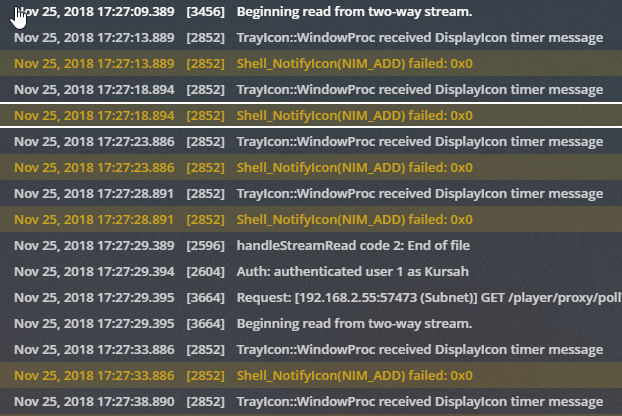
A specific error I kept seeing repeated in the console is that 2852 Shell_NotifyIcon(NIM_ADD) failed: 0x0, not sure if that’s worth noting here or not.
Here’s a quick snip of my console screen from a few seconds of monitoring. Again not sure if that’s useful or not. Hoping the logs I submitted are though.
-This is my first HTTPS access attempt (https://plex.tv/web access, receive this screen. Also shows the same error when attempting access via WAN, Dynamic DNS FQDN, and LAN IP’s with HTTPS. HTTP is of course fine.) I also added a quick snip of the cert my browser is seeing just in case that may prove helpful or not.
Let me know what else I can add to assist with this. I look forward to hearing your response and am glad you guys are suspect of an culprit already. Thanks!
I did not expect it to. I just wanted to see if you have a specific error and you did
Nov 25, 2018 17:34:19.344 [4008] DEBUG - CERT: Certificate or intermediate did not exist, fetching a new one.
Nov 25, 2018 17:34:19.344 [4008] DEBUG - HTTP requesting POST https://plex.tv/devices/92a9c0c6362f620c24d3c6baa84278d4f088858a/certificate?version=2&X-Plex-Token=xxxxxxxxxxxxxxxxxxxx
Nov 25, 2018 17:34:20.094 [4008] DEBUG - HTTP 503 response from POST https://plex.tv/devices/92a9c0c6362f620c24d3c6baa84278d4f088858a/certificate?version=2&X-Plex-Token=xxxxxxxxxxxxxxxxxxxx
Nov 25, 2018 17:34:20.094 [4008] ERROR - CERT: Could not fetch certificate from the cloud: 503
You must have purged your cached certificate files and now hit the problem I mentioned with the issuing of new certificates
I have referred this to our operations team who are already looking into it
This just tells me that you are running the Plex Media Server as a Service or Scheduled Task and you are not making use of the existing service wrapper product provided by @cjmurph - see PMS as a service
There are some bits that show in the log that I am not happy with - at some point there were overlapping processes - so service / job started whilst it is already running.
At 17:30 Plex Media Server process was running
Nov 25, 2018 17:30:49.472 [2864] DEBUG - Request: [192.168.2.55:57699 (Subnet)] GET /player/proxy/poll?deviceClass=pc&protocolVersion=1&protocolCapabilities=timeline%2Cplayback%2Cnavigation%2Cmirror%2Cplayqueues&timeout=1 (4 live) GZIP Signed-in Token (Kursah)
Nov 25, 2018 17:30:49.472 [2864] DEBUG - Beginning read from two-way stream.
Nov 25, 2018 17:30:53.900 [2924] ERROR - WinPreferences::getBoolValueWithDefault - GetRegistryValue for logDebug failed: 0x13
Nov 25, 2018 17:30:53.900 [2852] DEBUG - TrayIcon::WindowProc received DisplayIcon timer message
Nov 25, 2018 17:30:53.900 [2852] WARN - Shell_NotifyIcon(NIM_ADD) failed: 0x0
Nov 25, 2018 17:30:53.962 [3268] ERROR - WinPreferences::getStringValueWithDefault - GetRegistryValue for ProcessedMachineIdentifier failed: 0x13
but a new process was started at 17:26 - that must not happen
Nov 25, 2018 17:26:19.906 [3776] INFO - Plex Media Server v1.14.0.5468-5a0183d2c - Microsoft PC x64 - build: windows-i386 english - GMT -07:00
Nov 25, 2018 17:26:19.922 [3776] INFO - Windows version: 6.3 (Build 9600), language en-US
Nov 25, 2018 17:26:19.922 [3776] INFO - 4 3991 MHz processor(s): Architecture=0, Level=6, Revision=15363 Processor Identifier=Intel64 Family 6 Model 60 Stepping 3, GenuineIntel
Nov 25, 2018 17:26:19.922 [3776] DEBUG - "C:\Program Files (x86)\Plex\Plex Media Server\Plex Media Server.exe"
Nov 25, 2018 17:26:19.938 [2688] DEBUG - Plex for Windows Store application is not installed
Nov 25, 2018 17:26:19.969 [2688] DEBUG - BPQ: [Idle] -> [Starting]
Nov 25, 2018 17:26:19.969 [2688] DEBUG - FeatureManager: Using cached data for features list
Nov 25, 2018 17:26:19.985 [2688] DEBUG - Opening 20 database sessions to library (com.plexapp.plugins.library), SQLite 3.13.0, threadsafe=1
Nov 25, 2018 17:26:20.110 [2688] DEBUG - Running migrations. (EPG 0)
Look into how you start / stop the services. The PMS as Service wrapper I mentioned does make sure all processes are stopped when you select Stop Plex from the service tray app provided
Also make sure you do not have Plex Media Server starting outside the service on login
Glad that the cert problem you mentioned is something you guys are already looking into. I look forward to testing the fix in the next beta hopefully!
I see what you mean by the overlapping processes. That was my fault, I performed a repair install today on PMS, and then after doing the reboot I initiated an RDP session before stopping it realizing I didn’t need it. Thinking that’s what caused the standard PMS client to start as the auto start switch was reset. I disabled that right away after your findings. Thank you.
I was using a different and older PMS as a service solution, and had been for years. Shame I didn’t see the one you linked me to sooner. I removed the old service, deployed your suggested/preferred service wrapper for Plex with a dedicated service account. Works like a charm.
Any thoughts on a possible ETA for a fix on the cert issues?
All I had done was download and schedule the 1.14.0.5468 update, tried connecting the next day and ran into the issue present.
I rebooted the VM and just Plex itself on my VM, neither is resolving a secure connection. Still seeing the same error that my server does not allow secure connections.
I didn’t need a new cert for any reason that I’m aware, nor did I initiate a purge of settings. I did do a settings purge last night though, when deploying the PMS as a service stuff hoping to resolve issues. Still no luck though. Same issue as before, I have to allow insecure connections to actually connect to and use my Plex server. I did leave the secure connections settings to preferred so I can keep testing however.
I may have failed to make my previous statement clear, my apologies. The issue persists and has not changed.
I have rebooted PMS, I have rebooted the VM it is hosted on, both several times today alone in testing and because other reports are saying you must reboot to renew the cert to fix the issue. So far, not so lucky on my account.
I have attached logs after a fresh reboot, with a freshly attempted and failed secure logon for you to review. Let me know what you find and if there’s anything I may have configured incorrectly. Just like when we spoke prior, all my other remotely accessible services are 100% functional. I’ve made no NAT or routing changes, my WAN IP is the same.
Insecure remote access works, secure does not. I just continue to see the same “This server “yourservername” does not allow secure connections.” then I click Allow Once as I do not want to persistently allow insecure connections even at this point. I’m a glutton for punishment too lol.
I see a new update 1.14.0.5470 was released today, the release notes say this:
Version 1.14.0.5470
Fixes
(Butler) Reduce the amount of temp memory in processing items in certain butler tasks.
(DVR) Avoid timeouts when retrieving the best lineup during DVR setup (#9161)
(DVR) Display better error messages when tunes fail because of antenna signal issues (#7049)
(DVR) Recordings would sometimes fail at the start with “Error 3 (The recording was aborted)”. (#8871)
(Live TV) Make sure conflict dialog is always shown if Live TV session will be cancelled when recordings start. (#7659)
(Metadata) Chapters and respective images were out of order (issues#195)
(Transcoder) Resolved a rare deadlock (#9332)
Automatic port mapping could fail with some older routers (#9335)
Deletion policy for unwatched TV episodes will now use addedAt rather than originallyAvailableAt to calculate the time period of episodes to keep. (ux#440)
Fix for Server Unreachable and Remote Access issues (#9228)
Incorrect network addresses could be displayed in systems with multiple interfaces (#9109)
Updated TV deletion policy text for clarity. (#7249)
Pretty decent list of fixes, and looks like you guys have hopefully nailed the remote access issues as well which is great. However I do not see anything related to secure connections, not that I truly expected that quite yet but I was surely hopeful!
Either rate I have downloaded the update and will let it push out automatically during my scheduled service interval later this evening. If there are any changes I’ll report them. If there’s anything you guys need me to do with the existing issue, let me know.
Thanks!
Edit:
Appears that secure access is working again. I decided to run the update from the WebGUI. I have tested from Vivaldi, Chrome and FireFox. So far no issues, set secure connections back to required. So far so good!
Just as another follow up, all remote access tests have passed with secured access required. Mobile, PC, remote, local, etc. I’ve tested it all, and all is good again.
Thanks for the efforts Plex team! This is why I paid for the lifetime pass years and years ago! I appreciate the efforts!