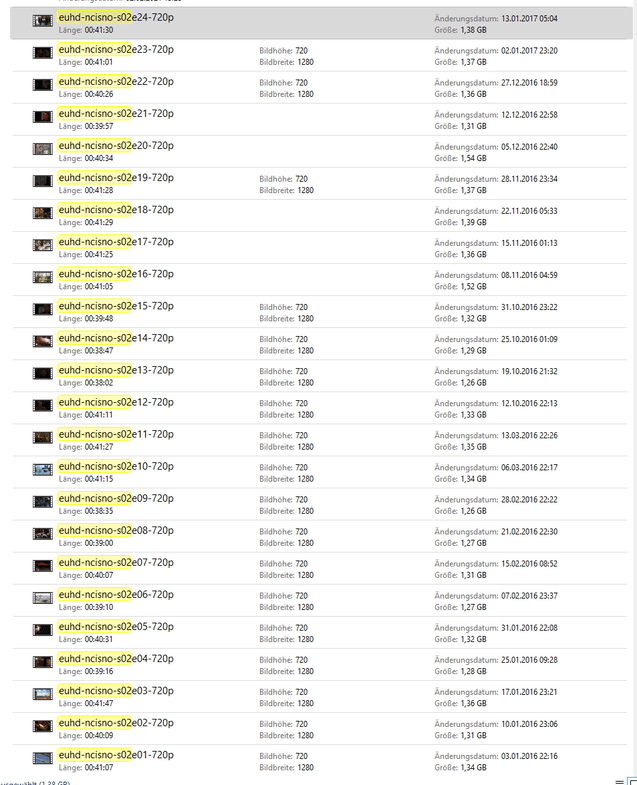
Server Version#: 4.100.1
Player Version#: N/A
Have added 3 seasons of the show 24 to my server. – for those of you counting, that’s a total of 72 files. Yet again, Plex terrible matching behavior appears to have gotten thoroughly confused and guessed wrong, this time not only deciding that a SINGLE FOLDER containing files clearly named with season numbers, etc. is actually 2 different shows both called “24”, but it also determined that 72 files actually equates to either 1653 episodes or 852 episodes, depending upon which show called “24” this is.
Lastly, since it has (arbitrarily) decided that some of the separate files are actually for the same episode it has combined them. (One might think this would then reduce the episode count, but that’s not the logic of Plex apparently)
This is literally the worst of all worlds from Plex matching
a) multiple files combined as an episode when I never asked it to do this (and have been asking for years to be able to TURN THE TERRIBLE MERGING BEHAVIOR OFF),
b) NO WAY TO OVERRIDE the stupid decisions it’s making,
c) COMPLETELY WRONG metadata, and
d) INCREDIBLY WRONG counts.
Am guessing the next step is to completely remove these files from Plex and attempt to re-add, but sick and tired of doing this kind of dance in hopes to get Plex to “guess the right answer”.
I know what show this is – if you’re going to get it so wrong just let me assign this stuff myself rather than relying on the terrible scanners.
Please, I begging – I know the on-brand Plex answer has always been the “we know better than you, stupid human, you’re just using it wrong or don’t understand just how smart it is”, but for the love of pete let me turn off the terrible scanning behavior and manage the collection myself. I know that sounds counter-intuitive to just trust that humans can actually do something themselves (and do so better than the software) – but movie management software from 2 decades ago let me do so. Get out of the way and stop screwing up my collection.
Please show how you have the TV show named and organized. Include a directory listing, screenshot, etc. Please include the full path to the files, including the file extension.
I have the same with any plex Version for QNAP after PlexMediaServer-1.31.0.6654-02189b09f-x86_64.qpkg Naming was never a problem before i updated the Server.
Thanks for listening to the problem and the ask (to be able to TURN OFF THE STUPID SCANNER GUESSING BEHAVIOR), but clearly you’re as blind to it as your Wonder-ful reference.
I would rather explicitly tell Plex what every single file is then have the scanner making bad guesses, but you aren’t listening.
This is what I referred to as the arrogance here. I suppose I should name all files with guids to trick the scanner into not doing something but that defeats the purpose of the HUMAN BEING IN CHARGE.
Again - thanks for not listening to feedback.
Though such drastic measures are generally not necessary for libraries which meticulously follow Plex’s naming guidelines for series.
There are always reasons for anomalies such as those you’re seeing. And that includes issues with Plex’s scanners and metadata sources. But those are relatively rare.
@alandye why are you unwilling to follow the naming schema Plex recommends? With a little work you can cleanup several thousand episodes in a matter of a couple hours.
All media software and most products in general come with a set of instructions you have to adhere to. Unfollowed, sometimes they just won’t work and sometimes you end up not alive anymore
I can only offer help within the framework that exists. I can’t change the product for YOU because the minimal amount of effort it takes is too much for you. You’re not immune from the arrogance you speak of here
I think that depends on what human being it is
You can criticize Plex all you want but your attitude seems to be the only dysfunctional part in this machine
Says who? at some point the file naming markup you suggest becomes human unreadable. In this user’s case the simple answer is to use spaces too. If you actually follow the standard naming schema, which isnt hard, you will not have these issues.
The issue in this case occurred because the OP does not not follow the per show folder guide and is trying to throw all episodes for all shows in a single folder expecting plex to properly deal with it.