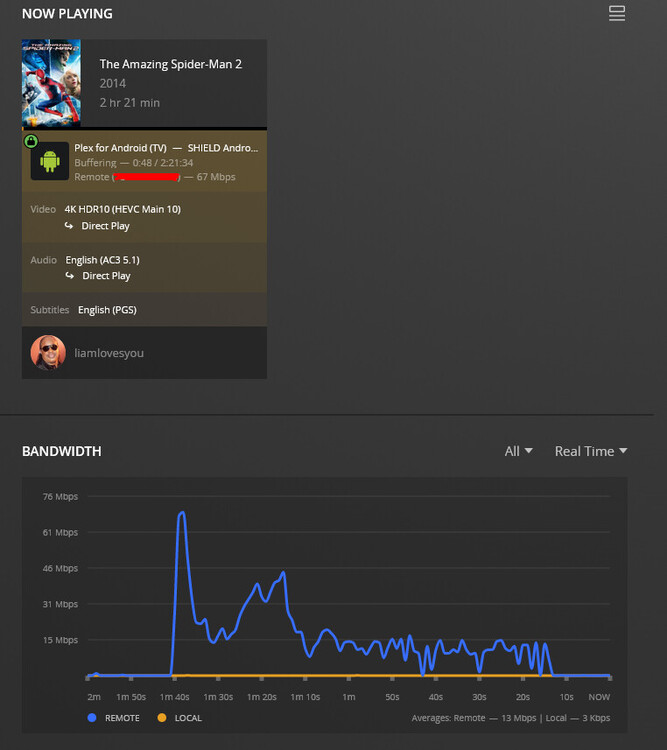
@liamlovesyou
I’m familiar with the Shield Pro 2019 because I own one.
I have no playback issues with it on LAN regardless how high the bitrates are.
Windows
- Haven’t used it in years
- Do you still have virus scanners which filter / monitor all network traffic ?
From what I see here, there are a “million” variables flying around but networking and app settings comes right to the top in my mind.
To try and start whittling down and removing some of them:
Shield Pro 2019 - Settings
- Video Quality
- Adjust automatically = OFF
- Home streaming = MAXIMUM
- Remote Streaming = MAXIMUM (let the server admin limit you)
-
Subtitles - AUTOMATIC (don’t force the server to do anything)
-
Advanced
- Passthrough - HDMI (Let the Receiver and TV do the work)
- Refresh rate switching - ON/off (your pref but I have it ON to match FPS of video )
- Resolution switching - ON/off ( I let the TV do the up sampling itself = ON )
- Allow insecure connections - NEVER ( The shield and your PMS can always be HTTPS )
- Audio - Don’t do any boost, etc – You can turn up the volume and your receiver / tv will do the rest

Next, we’ll look at the networking. A lot of ISP-provided equipment doesn’t make a good router or wifi. We’ll look at it all.
For reference - Here is a DoVi 7.1 movie playing as I write this
- DS418j (ARMv8 w/ 1GB RAM)
- DirectPlay
- Passthrough to the Onkyo receiver
- Passing video through to the TV (Dolby Vision indicator shown as playback starts)
- Shield APP Version 9.1.0.32210-794776f6)
My equipment (which should just about cover the gamut)
None of these machines have any issue DirectPlay of 2160p UHD (w/ or w/o DV)
- TV = 2021 LG C1 48" OLED - WiFi
- Wifi = Netgear WAX218 WiFi on 2.5 Gbps wired to 10 GbE switch
- PMS = ALL of these servers DirectPlay to the shield
– DS1815+ (Atom C2538) - development/QA - 1 GbE
– DS418j (ARMv8) - development/QA - 1 GbE
– TS128A (ARMv8) - development/QA - 1 GbE
– TVS-1282 (i7-7700) - development/QA / storage backup - 10 GbE
– BYO (Xeon E5-2690v4 w/ P2200) - main server w/ media storage - 10 GbE
I have no virus scanners on any of my devices, firewall is off, all that, settings match your provided, I have a similar setup as you with a 55" CX, Denon s540bt or something like that, Nvidia Shield tube connected to a 2.5gb switch alongside my windows 10 pc on the same switch. Directly connected my pc to the router, same issue. My router is a TP Link AX1800 AX20, Modem Netgear CM1000. Here’s a similar file that is playing on my Shield, as you can see it’s buffering and having issues
If it’s on your LAN, why is it remote ?
Your screenshot is showing me what looks like a very bad bottleneck (10/100 Mbps ethernet) from server → player)
What are the pieces , in order, going from server → player?
(don’t leave out any details… e.g. server - wired 1Gb - switch - wired 1Gb- wifi - 5Ghz - player)
My server is not on my LAN, my server is on a gigabit up/down connection at a family member’s house. It’s not a bottleneck as it peaked over 100mbps later and happens on any remote connection in my household. Other remote connections, such as a friend of mines, plays these files just fine
You are saying the problem is ONLY when playing from that remote server to your household ?
Correct, server is Windows 10, connected via ethernet to the router at family member’s house via a Nighthawk RAX20 on a fiber 1gig up/down connection. My switch at home where I am having the issue is a TP-Link TL-SG108 which is connected to my PC and Shield. Speedtests show full speeds (1gb down, 40 up), nothing out of the ordinary. When I play a larger file on my S22, as this issue only persists when the file is larger than ~20mpbs, it is connected via 5GHZ Wifi and has a download of ~600mpbs. All players are up to date on the latest versions respectively.
When I initially created this thread, it was happening regardless of local or remote, but as of yesterday it seems to be just my household remotely connecting. I have exhausted all I could think of, checking every little detail on my router, Shield, PC, PMS, etc.
Here’s the definitive way to test the actual throughput between the two points.
On the friend’s server (where PMS is located), install iperf3
In his modem/router’s firewall, Port-forward port 5201 (the iperf3 port) to the machine running iperf3.
Now he starts iperf3 -s (server mode) (( Windows might have a GUI for this instead of a command line.
You also install iperf3.
Open a command line window
You will now test the connection point-to-point and back.
-
iperf3 -c ip.addr.of.server (first direction)
– it will run 10 tests and then report
-
iperf3 -c ip.addr.of.server -R (reverse direction)
– it will run 10 tests and then report
To show you what it looks like, here is me testing from my workstation to my NAS.
You’ll use his WAN IP .
If there is any issues, this will not be 100%.
If you want to run longer than 10 seconds, specify the number of seconds with the
-t 60 option (this will test for 60 seconds)
[chuck@lizum ~.2003]$ iperf3 -c 192.168.0.20
Connecting to host 192.168.0.20, port 5201
[  5] local 192.168.0.13 port 55638 connected to 192.168.0.20 port 5201
[ ID] Interval           Transfer     Bitrate         Retr  Cwnd
[  5]   0.00-1.00   sec  1.08 GBytes  9.29 Gbits/sec    0   1.49 MBytes
[  5]   1.00-2.00   sec  1.09 GBytes  9.41 Gbits/sec    0   1.56 MBytes
[  5]   2.00-3.00   sec  1.10 GBytes  9.42 Gbits/sec    0   1.56 MBytes
[  5]   3.00-4.00   sec  1.09 GBytes  9.40 Gbits/sec    0   1.56 MBytes
[  5]   4.00-5.00   sec  1.09 GBytes  9.41 Gbits/sec    0   1.72 MBytes
[  5]   5.00-6.00   sec  1.09 GBytes  9.41 Gbits/sec    0   1.84 MBytes
[  5]   6.00-7.00   sec  1.10 GBytes  9.41 Gbits/sec    0   1.84 MBytes
[  5]   7.00-8.00   sec  1.09 GBytes  9.41 Gbits/sec    0   1.84 MBytes
[  5]   8.00-9.00   sec  1.09 GBytes  9.41 Gbits/sec    0   1.96 MBytes
[  5]   9.00-10.00  sec  1.09 GBytes  9.41 Gbits/sec  349   1.43 MBytes
- - - - - - - - - - - - - - - - - - - - - - - - -
[ ID] Interval           Transfer     Bitrate         Retr
[  5]   0.00-10.00  sec  10.9 GBytes  9.40 Gbits/sec  349             sender
[  5]   0.00-10.01  sec  10.9 GBytes  9.38 Gbits/sec                  receiver

iperf Done.
[chuck@lizum ~.2004]$ iperf3 -c 192.168.0.20 -R
Connecting to host 192.168.0.20, port 5201
Reverse mode, remote host 192.168.0.20 is sending
[  5] local 192.168.0.13 port 55644 connected to 192.168.0.20 port 5201
[ ID] Interval           Transfer     Bitrate
[  5]   0.00-1.00   sec  1.07 GBytes  9.23 Gbits/sec
[  5]   1.00-2.00   sec  1.07 GBytes  9.21 Gbits/sec
[  5]   2.00-3.00   sec  1.09 GBytes  9.34 Gbits/sec
[  5]   3.00-4.00   sec  1.09 GBytes  9.37 Gbits/sec
[  5]   4.00-5.00   sec  1.10 GBytes  9.43 Gbits/sec
[  5]   5.00-6.00   sec  1.09 GBytes  9.40 Gbits/sec
[  5]   6.00-7.00   sec  1.10 GBytes  9.42 Gbits/sec
[  5]   7.00-8.00   sec  1.10 GBytes  9.41 Gbits/sec
[  5]   8.00-9.00   sec  1.09 GBytes  9.39 Gbits/sec
[  5]   9.00-10.00  sec  1.10 GBytes  9.42 Gbits/sec
- - - - - - - - - - - - - - - - - - - - - - - - -
[ ID] Interval           Transfer     Bitrate         Retr
[  5]   0.00-10.01  sec  10.9 GBytes  9.35 Gbits/sec    0             sender
[  5]   0.00-10.00  sec  10.9 GBytes  9.36 Gbits/sec                  receiver

iperf Done.
[chuck@lizum ~.2005]$
Speed tests are from a main server on the backbone but this is point-to-point.
It tests how well the different ISPs connect to each other or same ISP across a distance.
My internet is quiet right now, I could PM you the details if you want to check from me (only a 1200/40 Mbps service)
Connecting to host PMS ip, port 5201
[  4] local 192.168.0.113 port 65308 connected to PMS ip port 5201
[ ID] Interval           Transfer     Bandwidth
[  4]   0.00-1.01   sec  1.23 MBytes  10.3 Mbits/sec
[  4]   1.01-2.01   sec  1.35 MBytes  11.3 Mbits/sec
[  4]   2.01-3.01   sec  1.29 MBytes  10.9 Mbits/sec
[  4]   3.01-4.01   sec  1.42 MBytes  11.8 Mbits/sec
[  4]   4.01-5.00   sec  1.35 MBytes  11.5 Mbits/sec
[  4]   5.00-6.00   sec  1.35 MBytes  11.3 Mbits/sec
[  4]   6.00-7.01   sec  1.35 MBytes  11.3 Mbits/sec
[  4]   7.01-8.00   sec  1.35 MBytes  11.5 Mbits/sec
[  4]   8.00-9.01   sec  1.35 MBytes  11.3 Mbits/sec
[  4]   9.01-10.01  sec  1.35 MBytes  11.3 Mbits/sec
- - - - - - - - - - - - - - - - - - - - - - - - -
[ ID] Interval           Transfer     Bandwidth
[  4]   0.00-10.01  sec  13.4 MBytes  11.2 Mbits/sec                  sender
[  4]   0.00-10.01  sec  13.4 MBytes  11.2 Mbits/sec                  receiver

iperf Done.

C:\iperf3>iperf3 -c PMS IP -R
Connecting to host PMS IP, port 5201
Reverse mode, remote host PMS IP is sending
[  4] local 192.168.0.113 port 65312 connected to PMS IP3 port 5201
[ ID] Interval           Transfer     Bandwidth
[  4]   0.00-1.00   sec  1.43 MBytes  12.0 Mbits/sec
[  4]   1.00-2.00   sec  1.40 MBytes  11.7 Mbits/sec
[  4]   2.00-3.01   sec  1.17 MBytes  9.72 Mbits/sec
[  4]   3.01-4.00   sec  1.47 MBytes  12.4 Mbits/sec
[  4]   4.00-5.01   sec  1.04 MBytes  8.69 Mbits/sec
[  4]   5.01-6.01   sec  1.04 MBytes  8.72 Mbits/sec
[  4]   6.01-7.00   sec  1.26 MBytes  10.6 Mbits/sec
[  4]   7.00-8.00   sec  1.35 MBytes  11.3 Mbits/sec
[  4]   8.00-9.02   sec  1.47 MBytes  12.2 Mbits/sec
[  4]   9.02-10.00  sec  1.15 MBytes  9.80 Mbits/sec
- - - - - - - - - - - - - - - - - - - - - - - - -
[ ID] Interval           Transfer     Bandwidth
[  4]   0.00-10.00  sec  12.9 MBytes  10.8 Mbits/sec                  sender
[  4]   0.00-10.00  sec  12.9 MBytes  10.8 Mbits/sec                  receiver

iperf Done.
Yea this doesn’t look right haha
Run it for a longer interval ( -t 60 ) and observe.
It IS giving you accurate results. That’s what it is able to pull / send.
C:\iperf3>iperf3 -c PMS IP -t 60
Connecting to host PMS IP, port 5201
[  4] local 192.168.0.113 port 54805 connected to PMS IP port 5201
[ ID] Interval           Transfer     Bandwidth
[  4]   0.00-1.01   sec   378 KBytes  3.08 Mbits/sec
[  4]   1.01-2.01   sec   693 KBytes  5.67 Mbits/sec
[  4]   2.01-3.01   sec   945 KBytes  7.71 Mbits/sec
[  4]   3.01-4.01   sec  1.29 MBytes  10.8 Mbits/sec
[  4]   4.01-5.00   sec  1.42 MBytes  12.0 Mbits/sec
[  4]   5.00-6.00   sec  1.35 MBytes  11.4 Mbits/sec
[  4]   6.00-7.01   sec  1.35 MBytes  11.3 Mbits/sec
[  4]   7.01-8.01   sec  1.35 MBytes  11.4 Mbits/sec
[  4]   8.01-9.01   sec  1.35 MBytes  11.3 Mbits/sec
[  4]   9.01-10.01  sec  1.35 MBytes  11.3 Mbits/sec
[  4]  10.01-11.01  sec  1.42 MBytes  11.9 Mbits/sec
[  4]  11.01-12.01  sec  1.35 MBytes  11.4 Mbits/sec
[  4]  12.01-13.00  sec  1.29 MBytes  10.9 Mbits/sec
[  4]  13.00-14.01  sec  1.42 MBytes  11.8 Mbits/sec
[  4]  14.01-15.00  sec  1.35 MBytes  11.4 Mbits/sec
[  4]  15.00-16.01  sec  1.35 MBytes  11.3 Mbits/sec
[  4]  16.01-17.01  sec  1.35 MBytes  11.3 Mbits/sec
[  4]  17.01-18.01  sec  1.35 MBytes  11.3 Mbits/sec
[  4]  18.01-19.00  sec  1.35 MBytes  11.5 Mbits/sec
[  4]  19.00-20.00  sec  1.35 MBytes  11.3 Mbits/sec
[  4]  20.00-21.00  sec  1.35 MBytes  11.4 Mbits/sec
[  4]  21.00-22.00  sec  1.42 MBytes  11.9 Mbits/sec
[  4]  22.00-23.00  sec  1.35 MBytes  11.3 Mbits/sec
[  4]  23.00-24.01  sec  1.35 MBytes  11.3 Mbits/sec
[  4]  24.01-25.00  sec  1.35 MBytes  11.4 Mbits/sec
[  4]  25.00-26.01  sec  1.35 MBytes  11.3 Mbits/sec
[  4]  26.01-27.01  sec  1.35 MBytes  11.3 Mbits/sec
[  4]  27.01-28.01  sec  1.35 MBytes  11.3 Mbits/sec
[  4]  28.01-29.01  sec  1.42 MBytes  11.8 Mbits/sec
[  4]  29.01-30.00  sec  1.29 MBytes  10.9 Mbits/sec
[  4]  30.00-31.00  sec  1.42 MBytes  11.9 Mbits/sec
[  4]  31.00-32.01  sec  1.35 MBytes  11.3 Mbits/sec
[  4]  32.01-33.01  sec  1.35 MBytes  11.3 Mbits/sec
[  4]  33.01-34.00  sec  1.35 MBytes  11.4 Mbits/sec
[  4]  34.00-35.00  sec  1.35 MBytes  11.3 Mbits/sec
[  4]  35.00-36.00  sec  1.29 MBytes  10.8 Mbits/sec
[  4]  36.00-37.01  sec  1.42 MBytes  11.9 Mbits/sec
[  4]  37.01-38.00  sec  1.35 MBytes  11.4 Mbits/sec
[  4]  38.00-39.01  sec  1.35 MBytes  11.3 Mbits/sec
[  4]  39.01-40.01  sec  1.35 MBytes  11.3 Mbits/sec
[  4]  40.01-41.00  sec  1.35 MBytes  11.5 Mbits/sec
[  4]  41.00-42.01  sec  1.35 MBytes  11.2 Mbits/sec
[  4]  42.01-43.01  sec  1.42 MBytes  12.0 Mbits/sec
[  4]  43.01-44.01  sec  1.35 MBytes  11.3 Mbits/sec
[  4]  44.01-45.00  sec  1.29 MBytes  10.9 Mbits/sec
[  4]  45.00-46.00  sec  1.35 MBytes  11.4 Mbits/sec
[  4]  46.00-47.00  sec  1.35 MBytes  11.4 Mbits/sec
[  4]  47.00-48.01  sec  1.35 MBytes  11.3 Mbits/sec
[  4]  48.01-49.00  sec  1.35 MBytes  11.4 Mbits/sec
[  4]  49.00-50.01  sec  1.35 MBytes  11.3 Mbits/sec
[  4]  50.01-51.01  sec  1.35 MBytes  11.3 Mbits/sec
[  4]  51.01-52.00  sec  1.35 MBytes  11.5 Mbits/sec
[  4]  52.00-53.01  sec  1.35 MBytes  11.3 Mbits/sec
[  4]  53.01-54.01  sec  1.35 MBytes  11.4 Mbits/sec
[  4]  54.01-55.00  sec  1.35 MBytes  11.5 Mbits/sec
[  4]  55.00-56.01  sec  1.35 MBytes  11.2 Mbits/sec
[  4]  56.01-57.01  sec  1.35 MBytes  11.4 Mbits/sec
[  4]  57.01-58.01  sec  1.35 MBytes  11.3 Mbits/sec
[  4]  58.01-59.00  sec  1.35 MBytes  11.4 Mbits/sec
[  4]  59.00-60.01  sec  1.35 MBytes  11.3 Mbits/sec
- - - - - - - - - - - - - - - - - - - - - - - - -
[ ID] Interval           Transfer     Bandwidth
[  4]   0.00-60.01  sec  79.3 MBytes  11.1 Mbits/sec                  sender
[  4]   0.00-60.01  sec  79.3 MBytes  11.1 Mbits/sec                  receiver

iperf Done.

C:\iperf3>iperf3 -c PMS IP -t 60 -R
Connecting to host PMS IP, port 5201
Reverse mode, remote host PMS IP is sending
[  4] local 192.168.0.113 port 54833 connected to PMS IP port 5201
[ ID] Interval           Transfer     Bandwidth
[  4]   0.00-1.01   sec  1.42 MBytes  11.8 Mbits/sec
[  4]   1.01-2.01   sec  1.51 MBytes  12.6 Mbits/sec
[  4]   2.01-3.00   sec  1.28 MBytes  10.9 Mbits/sec
[  4]   3.00-4.01   sec  1.32 MBytes  11.0 Mbits/sec
[  4]   4.01-5.00   sec  1.51 MBytes  12.7 Mbits/sec
[  4]   5.00-6.01   sec  1.30 MBytes  10.9 Mbits/sec
[  4]   6.01-7.00   sec  1.32 MBytes  11.1 Mbits/sec
[  4]   7.00-8.01   sec  1.20 MBytes  10.0 Mbits/sec
[  4]   8.01-9.00   sec   960 KBytes  7.92 Mbits/sec
[  4]   9.00-10.00  sec  1.03 MBytes  8.58 Mbits/sec
[  4]  10.00-11.01  sec  1.43 MBytes  12.0 Mbits/sec
[  4]  11.01-12.00  sec  1.47 MBytes  12.4 Mbits/sec
[  4]  12.00-13.00  sec  1.50 MBytes  12.6 Mbits/sec
[  4]  13.00-14.00  sec  1.44 MBytes  12.1 Mbits/sec
[  4]  14.00-15.01  sec  1.18 MBytes  9.85 Mbits/sec
[  4]  15.01-16.01  sec  1.51 MBytes  12.7 Mbits/sec
[  4]  16.01-17.00  sec  1.48 MBytes  12.5 Mbits/sec
[  4]  17.00-18.00  sec  1.50 MBytes  12.6 Mbits/sec
[  4]  18.00-19.02  sec  1.46 MBytes  12.1 Mbits/sec
[  4]  19.02-20.00  sec  1.17 MBytes  9.97 Mbits/sec
[  4]  20.00-21.01  sec  1.50 MBytes  12.6 Mbits/sec
[  4]  21.01-22.00  sec  1.30 MBytes  10.9 Mbits/sec
[  4]  22.00-23.00  sec  1.31 MBytes  11.0 Mbits/sec
[  4]  23.00-24.01  sec  1.52 MBytes  12.6 Mbits/sec
[  4]  24.01-25.00  sec  1.42 MBytes  12.0 Mbits/sec
[  4]  25.00-26.00  sec  1.52 MBytes  12.8 Mbits/sec
[  4]  26.00-27.01  sec  1.48 MBytes  12.4 Mbits/sec
[  4]  27.01-28.01  sec  1.51 MBytes  12.7 Mbits/sec
[  4]  28.01-29.00  sec  1.45 MBytes  12.2 Mbits/sec
[  4]  29.00-30.01  sec  1.20 MBytes  9.91 Mbits/sec
[  4]  30.01-31.01  sec   909 KBytes  7.51 Mbits/sec
[  4]  31.01-32.00  sec   969 KBytes  7.96 Mbits/sec
[  4]  32.00-33.00  sec  1.35 MBytes  11.4 Mbits/sec
[  4]  33.00-34.00  sec  1.33 MBytes  11.2 Mbits/sec
[  4]  34.00-35.00  sec  1.31 MBytes  11.0 Mbits/sec
[  4]  35.00-36.01  sec  1.45 MBytes  12.2 Mbits/sec
[  4]  36.01-37.01  sec  1.17 MBytes  9.75 Mbits/sec
[  4]  37.01-38.00  sec  1.19 MBytes  10.1 Mbits/sec
[  4]  38.00-39.00  sec  1.35 MBytes  11.3 Mbits/sec
[  4]  39.00-40.01  sec  1.26 MBytes  10.5 Mbits/sec
[  4]  40.01-41.00  sec  1.45 MBytes  12.3 Mbits/sec
[  4]  41.00-42.01  sec  1.51 MBytes  12.6 Mbits/sec
[  4]  42.01-43.01  sec  1.08 MBytes  8.98 Mbits/sec
[  4]  43.01-44.00  sec  1.44 MBytes  12.2 Mbits/sec
[  4]  44.00-45.00  sec  1.10 MBytes  9.18 Mbits/sec
[  4]  45.00-46.01  sec  1.00 MBytes  8.42 Mbits/sec
[  4]  46.01-47.00  sec   833 KBytes  6.85 Mbits/sec
[  4]  47.00-48.01  sec   916 KBytes  7.48 Mbits/sec
[  4]  48.01-49.01  sec  1021 KBytes  8.32 Mbits/sec
[  4]  49.01-50.00  sec  1.44 MBytes  12.2 Mbits/sec
[  4]  50.00-51.00  sec  1.42 MBytes  11.9 Mbits/sec
[  4]  51.00-52.00  sec  1.45 MBytes  12.2 Mbits/sec
[  4]  52.00-53.00  sec   764 KBytes  6.27 Mbits/sec
[  4]  53.00-54.00  sec   846 KBytes  6.91 Mbits/sec
[  4]  54.00-55.00  sec  1.24 MBytes  10.5 Mbits/sec
[  4]  55.00-56.01  sec  1.15 MBytes  9.57 Mbits/sec
[  4]  56.01-57.02  sec  1.25 MBytes  10.4 Mbits/sec
[  4]  57.02-58.00  sec  1.33 MBytes  11.3 Mbits/sec
[  4]  58.00-59.00  sec  1.17 MBytes  9.79 Mbits/sec
[  4]  59.00-60.00  sec  1.48 MBytes  12.4 Mbits/sec
- - - - - - - - - - - - - - - - - - - - - - - - -
[ ID] Interval           Transfer     Bandwidth
[  4]   0.00-60.00  sec  77.3 MBytes  10.8 Mbits/sec                  sender
[  4]   0.00-60.00  sec  77.3 MBytes  10.8 Mbits/sec                  receiver
I am curious to see if the PMS would give similar results to your connection, that would rule out a lot
Still can’t figure out this issue. Happening local play as well. speeds are still all fine, doesn’t seem like a bandwidth issue. Any help is much appreciated
To summarize the issue, it seems as if all clients, whether it be on windows, macos, Android, Android TV, etc. have an issue with getting the PMS to push more data to buffer the video playback. All clients and the PMS have more than enough bandwidth to properly buffer. Doesn’t matter if they’re local, remote, wifi or Ethernet, 200mbps down, 1gb down. PMS has a direct connection to my router which I’ve replaced in an attempt to fix this, 1gb up and down on that. It plays back properly, drops as if it’s not requesting more data, buffers. Happens only on files 20mbps+.
Jellyfin doesn’t have the issue I’ve been describing, plays back just fine
I ran into this a month ago. High definition audio and 4k is not working well with current versions of plex. Try the beta. Latest Uploads - APKMirror
More info at Nvidia Shield Dolby TrueHD playback is borked - #255 by Hitsville
Was on latest release beta for PMS, my player on my Shield is 9.3.0.32977 which is the latest beta release for the player. Do you have the issue on devices other than Android TV as I do?
The Shield Tube has issues with high bitrate files. That is a device issue and not something Plex can solve.
If you have issues with another Android device, and can reproduce the issue, I can look at the android logs to see what’s going on.
Question - You say these are all on your home network, but your screenshots above show it is all remote connections. Is that right?
I can send you android logs, but it happens on devices other than Android, such as Windows and MacOS. The problem persists both local and remote.
I understand. Looking at the Android logs is easiest for me to investigate this issue.
Can you also send me the xml info for that video you tested playing?
<?xml version="1.0" encoding="UTF-8"?>

-<MediaContainer mediaTagVersion="1652157500" mediaTagPrefix="/system/bundle/media/flags/" librarySectionUUID="c86b6848-800c-491d-8504-773e844670f9" librarySectionTitle="TV Shows" librarySectionID="2" identifier="com.plexapp.plugins.library" allowSync="1" size="1">


-<Video title="Women's Appreciation" librarySectionTitle="TV Shows" librarySectionID="2" chapterSource="media" audienceRatingImage="themoviedb://image.rating" updatedAt="1654659418" addedAt="1654654781" originallyAvailableAt="2007-05-03" duration="1741440" grandparentTheme="/library/metadata/10917/theme/1654590785" grandparentArt="/library/metadata/10917/art/1654590785" grandparentThumb="/library/metadata/10917/thumb/1654590785" parentThumb="/library/metadata/10948/thumb/1654590792" art="/library/metadata/10917/art/1654590785" thumb="/library/metadata/11401/thumb/1654659418" lastViewedAt="1654756087" viewOffset="187725" audienceRating="8.3" parentIndex="3" index="21" summary="Phyllis walked into the office looking pale and shocked. A concerned staff surrounded her for comfort. She told them she had been flashed in the parking lot. Jim alerted the police and they already had three other incidents of flashing in the area. Michael didn't think much of it, because it was Phyllis." contentRating="TV-14" parentTitle="Season 3" grandparentTitle="The Office (US)" librarySectionKey="/library/sections/2" parentKey="/library/metadata/10948" grandparentKey="/library/metadata/10917" type="episode" grandparentGuid="plex://show/5d9c0873ef619b002047fda0" parentGuid="plex://season/602e69bd535238002c35efdc" guid="plex://episode/5d9c13b602391c001f605231" grandparentRatingKey="10917" parentRatingKey="10948" key="/library/metadata/11401" ratingKey="11401">


-<Media duration="1741440" videoProfile="high" videoFrameRate="24p" container="mkv" videoResolution="1080" videoCodec="h264" audioCodec="eac3" audioChannels="6" aspectRatio="1.78" height="1080" width="1920" bitrate="19634" id="18405">


-<Part size="4266321440" duration="1741440" key="/library/parts/18405/1605399336/file.mkv" videoProfile="high" container="mkv" id="18405" requiredBandwidths="26541,24384,22626,20447,20427,20427,20427,20427" deepAnalysisVersion="6" file="F:\TV Shows\The Office (US)\Season 03\The Office (US) - S03E21 - Women's Appreciation Bluray-1080p.mkv" exists="1" accessible="1">

<Stream language="English" index="0" height="1080" width="1920" bitrate="18620" id="52722" requiredBandwidths="25456,23358,21606,19422,19412,19412,19412,19412" extendedDisplayTitle="1080p (H.264)" displayTitle="1080p (H.264)" scanType="progressive" refFrames="4" profile="high" level="41" hasScalingMatrix="0" frameRate="23.976" colorTrc="bt709" colorSpace="bt709" colorRange="tv" colorPrimaries="bt709" codedWidth="1920" codedHeight="1088" chromaSubsampling="4:2:0" chromaLocation="left" bitDepth="8" languageCode="eng" languageTag="en" codec="h264" default="1" streamType="1"> </Stream>

<Stream title="Surround 5.1" language="English" index="1" bitrate="768" id="52723" requiredBandwidths="766,766,766,766,766,766,766,766" extendedDisplayTitle="Surround 5.1 (English EAC3)" displayTitle="English (EAC3 5.1)" languageCode="eng" languageTag="en" codec="eac3" default="1" streamType="2" samplingRate="48000" audioChannelLayout="5.1(side)" channels="6" selected="1"> </Stream>

<Stream title="Commentary by Jenna Fischer, Angela Kinsey, Kate Flannery, Lee Eisenberg, and Gene Stupnitsky" language="English" index="2" bitrate="192" id="52724" requiredBandwidths="192,192,192,192,192,192,192,192" extendedDisplayTitle="Commentary by Jenna Fischer, Angela Kinsey, Kate Flannery, Lee Eisenberg, and Gene Stupnitsky (English AC3 Stereo)" displayTitle="English (AC3 Stereo)" languageCode="eng" languageTag="en" codec="ac3" streamType="2" samplingRate="48000" audioChannelLayout="stereo" channels="2"> </Stream>

<Stream language="English" index="3" bitrate="55" id="52725" requiredBandwidths="74,74,74,74,74,74,74,74" extendedDisplayTitle="English (PGS)" displayTitle="English (PGS)" languageCode="eng" languageTag="en" codec="pgs" streamType="3" selected="1" headerCompression="1"> </Stream>

</Part>

</Media>

<Director id="29230" tag="Tucker Gates" filter="director=29230"/>

<Writer id="51073" tag="Lee Eisenberg" filter="writer=51073"/>

<Writer id="51074" tag="Gene Stupnitsky" filter="writer=51074"/>

<Guid id="imdb://tt1020711"/>

<Guid id="tmdb://170177"/>

<Guid id="tvdb://328456"/>

<Rating type="audience" value="8.3" image="themoviedb://image.rating"/>

<Role role="Hunter" thumb="https://metadata-static.plex.tv/2/people/2604cd010141b4df216e8f78dd4802a2.jpg" id="50966" tag="Nicholas D'Agosto" filter="actor=50966"/>

<Role role="Karen Filippelli" thumb="https://metadata-static.plex.tv/0/people/0493d2a6b220ab89c8743a30127a6d8a.jpg" id="6867" tag="Rashida Jones" filter="actor=6867"/>

<Role role="Andy Bernard" thumb="https://metadata-static.plex.tv/2/people/2dee8a51988e3e515ba5c352dc6dff9e.jpg" id="14066" tag="Ed Helms" filter="actor=14066"/>

<Role role="Jan Levinson" thumb="https://metadata-static.plex.tv/people/5d7768254de0ee001fcc819c.jpg" id="40829" tag="Melora Hardin" filter="actor=40829"/>

<Role role="Creed Bratton" thumb="https://metadata-static.plex.tv/people/5d7768653ab0e7001f500027.jpg" id="50907" tag="Creed Bratton" filter="actor=50907"/>

<Role role="Kelly Kapoor" thumb="https://metadata-static.plex.tv/9/people/9a5228bd1b2167551f8714f334d9b637.jpg" id="6859" tag="Mindy Kaling" filter="actor=6859"/>

<Role role="Meredith Palmer" thumb="https://metadata-static.plex.tv/people/5d77682a961905001eb91f19.jpg" id="38922" tag="Kate Flannery" filter="actor=38922"/>

<Role role="Stanley Hudson" thumb="https://metadata-static.plex.tv/b/people/bd01db6a618939127ff991adf0691d55.jpg" id="47818" tag="Leslie David Baker" filter="actor=47818"/>

<Role role="Kevin Malone" thumb="https://metadata-static.plex.tv/6/people/6ed327caba218aac94ebf4b176c40470.jpg" id="21897" tag="Brian Baumgartner" filter="actor=21897"/>

<Role role="Phyllis Lapin" thumb="https://metadata-static.plex.tv/2/people/2d14ef6f4f23f229b1ec55661fd2f26e.jpg" id="6856" tag="Phyllis Smith" filter="actor=6856"/>

<Role role="Oscar Martinez" thumb="https://metadata-static.plex.tv/8/people/8ad94756f3351046333b84433e4bf9c1.jpg" id="38396" tag="Oscar Nunez" filter="actor=38396"/>

<Role role="Angela Martin" thumb="https://metadata-static.plex.tv/7/people/7df5b45ea1df84da3c44cc230bf0a5ca.jpg" id="50896" tag="Angela Kinsey" filter="actor=50896"/>

<Role role="Toby Flenderson" thumb="https://metadata-static.plex.tv/people/5d776fdcfb0d55001f5e50e0.jpg" id="50897" tag="Paul Lieberstein" filter="actor=50897"/>

<Chapter thumb="/library/media/18405/chapterImages/1" index="1" id="4" filter="thumb=4" endTimeOffset="103895" startTimeOffset="0"/>

<Chapter thumb="/library/media/18405/chapterImages/2" index="2" id="4" filter="thumb=4" endTimeOffset="796879" startTimeOffset="103895"/>

<Chapter thumb="/library/media/18405/chapterImages/3" index="3" id="4" filter="thumb=4" endTimeOffset="1088590" startTimeOffset="796879"/>

<Chapter thumb="/library/media/18405/chapterImages/4" index="4" id="4" filter="thumb=4" endTimeOffset="1702490" startTimeOffset="1088590"/>

<Chapter thumb="/library/media/18405/chapterImages/5" index="5" id="4" filter="thumb=4" endTimeOffset="1741410" startTimeOffset="1702490"/>


-<Marker type="intro" id="52964" endTimeOffset="101111" startTimeOffset="66852">

<Attributes id="52964"/>

</Marker>

<Extras size="0"> </Extras>

<Related> </Related>

</Video>

</MediaContainer>