All good now??
I will try to carve out some time today to make another enhancement to the script.
The enhancement will be a -p "/path/to/Preferences.xml"
Doing this will allow for custom & unpredictable environments like TruNAS where I can’t find the paths because of the container environment .
By adding this, I will also be able to support Docker containers in general.
2 Likes
Yes thanks.Great work.
ALL:
I have added support for containers (indirectly).
Specifically, I’ve added the ability to manually specify the path to “Preferences.xml”
To use:
- Download the updated script
- Invoke using:
./UserCredentialReset.sh -p "/path/to/Preferences.xml" optional_claim_token_here
The -p option bypasses host detection.
It does however confirm PMS is stopped and curl exists (both requirements)
I expect some issues on systems where BASH isn’t available.
I am working on that (lowering this back to /bin/sh) to improve compatibility for all.
1 Like
that did the trick indeed. thanks a bunch!  now off to fiddle with all the IP settings for all other devices… jeez fun times (not a ridgemont high) - much appreciated @ChuckPa
 )
)Hahahha yeahwe are. After switching to 10.1.20.* i didnt need the script. Server showed up and was claimable again. Few rounds of reboots later, it’s all back in working shape.
Thank you so much. You deserve a raise 
What’s your secret for getting in shape? wipes 
LOL
The usual ‘increase’ I get is an ‘increased workload’ 
Day 3 of trying to reclaim my PMS here! Nightmare. But very grateful for your various posts. I have:
- Updated version of Plex on my QNAP TVS-882 to latest version 1.28.2.6106
- Re-enabled my default QNAP Admin account (which I had previously disabled in accordance with security advice from QNAP community) because after an age trying and failing to SSH in using my own created QNAP admin account, I learned that you can only SSH into QNAP on the default admin account. (I mention this in case anyone else is stuck trying to SSH in on their own admin account they have created).
- I managed to extract UserCredentialReset.tar to ./UserCredentialReset.sh and this is sitting in my PlexData folder.
- I have managed to trigger ./UserCredentialReset.sh but like others, even though my Plex application on QNAP is stopped, ./UserCredentialReset.sh still reports that it is running.
- I have tried using your suggested kill -15 $(pidof ‘Plex Media Server’) command and then run ./UserCredentialReset.sh again but it still reports that PMS is running…so I am stuck!
Any other sage advice on how to kill the Zombie like PMS that refuses to be killed!!?
Please show me ps -ef | grep -i plex output.
I fixed the detection yesterday. It now looks expressly for Plex Media Server
Here is the code, L155:
# Make certain PMS is stopped
if [ $(ps -ef | grep  'Plex Media Server' | grep -v grep | wc -l) -gt 0 ]; then
  echo "ERROR:  PMS is running.  Please stop PMS and try again"
  exit 1
fi
If it’s sitting there as a Zombie, the only way out is (PAINFULLY) Restart QTS
QTS doesn’t handle zombies well. kill -1 1 can crash the whole NAS – bad!!!
Make certain PMS is stopped in App Center before you do
I used SSH with your command ps -ef | grep -i plex and the attached image is what I got…
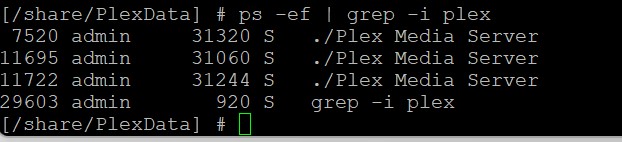
You have a mess there. 3 hung server processes when there should only be 1.
try kill -11 $(pidof 'Plex Media Server')
Many thanks. I’ll try tomorrow and report back.
when all else fails… REBOOT
Script worked great on an Asustor 6404T. Just had to login via SSH as root. Couldn’t sudo as root - probably would have worked with su instead, but I’d been fighting this for most of the day, so I didn’t want to play any more.
Great fix ChuckPa, and very clear instructions on how to make it work.
1 Like
This didn’t quite work 
Said everything was completed, it got the new credentials and displayed the correct username and email.
However, upon logging in could see the server under settings in the bottom left, and it said connecting then disappeared.
Once I find it again in the list it then says I am unauthorised
Any ideas as to what can be done?
Did you open the server by it’s IP address?
Did you use an incognito window ? (so your browser doesn’t get in the way)
What you’re describing is when the Plex/web app isn’t in sync with the new token.
Did you open the server by it’s IP address?
Yes
Did you use an incognito window ? (so your browser doesn’t get in the way)
No, will try it again…dah that worked!
You sir are a gentlemen and a scholar!
1 Like
I’m an old fart and a squaller… PLEASE get it right !!

1 Like
