The container was running before I request the token. It is a few seconds between requesting it and adding it to the config.
I just tried with the docker not running when I add the token, then immediately start it, and I get the same results. I see the blue loading bar in Safari but the app never loads.
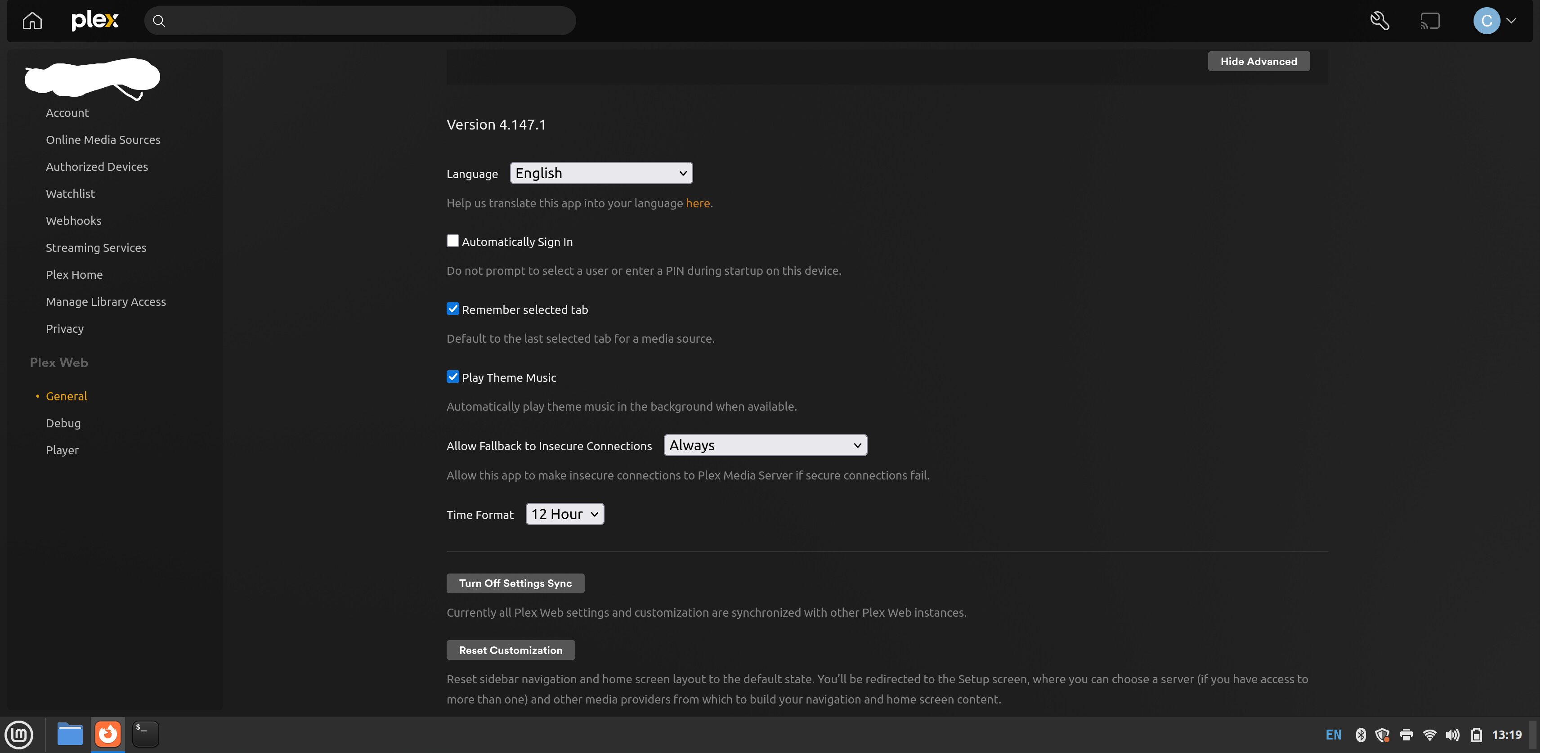
I’m having a similar issue where after the password reset, I cannot see my library. I can get a token by going to account.plex.tv/claim, but I am not given an option to enter it in the settings. Based on various posts, if I select the settings icon (wrench) and go to the general settings, I should be given a prompt to enter my token, but I don’t get that option.
I’m running the latest version of Plex Server on Synology as of today. Please see the screenshot from my settings page:
Is Plex Media Server installed via Synology Package Center or are you running it in Docker?
Option 1: Web Browser
Point a private/incognito window at the IP address of the NAS. For example, if the IP address is 10.1.2.3, use http://10.1.2.3:32400/web.
See if you can login, reach server settings, and claim the server. You should see your server name listed below the Plex Web section, and General under the server name.
The process is straightforward. You uninstall Plex, then re-install using the Plex Claim Token. This is only for authentication/claiming. Your media files, Plex settings, etc. are not touched.
Option 3: User Credential Reset Utility
If running PMS in Docker, use the User Credential Reset utility. It also works for PMS installations using Package Center.
Download the script to the NAS, login via SSH and run it as root (see the readme on GitHub for details). You will be prompted for a Plex claim token.
I’m running DSM 7 and manually installed the Plex package on Synology, not docker. I’ll look at the faq you provided and see if I get my library back. Thank you.
If I ever change my password again, do I need to do this all over again? It feels unnecessarily cumbersome.
Thank you. The first uninstall option on the FAQ didn’t work for me so I tried the second uninstall option and that worked.
I wish the Plex email that instructed me to change my password mentioned this FAQ. It’s really jarring when you open your client and don’t even see your media folders and no error message to point you in the right direction.
I agree the process was quick, however, it took me a very long time to find the reason for my missing files and find the procedure to get my server back.
I have tried the steps listed, but I still cannot access my media. When I go to a browser and try to launch https:ip:32400/web it just sits with a blank screen.
When I try to access it via the Apple TV it does show me the list of shows we’ve been watching (which I’m guessing is stored on the Plex servers), but it just spins and won’t show any content.
Copy the script into a file (COPY/PASTE works well)
Make it executable
Run it
Get token from plex.tv
If successful, it responds with your email and plex username (see above)
root@truenas:/mnt/pool/chuck# docker container list
CONTAINER ID   IMAGE                                       COMMAND                  CREATED          STATUS                    PORTS     NAMES
09208fba707a   plexinc/pms-docker:1.42.2.10156-f737b826c   "/init"                  10 minutes ago   Up 10 minutes (healthy)             ix-plex-plex-1
root@truenas:/mnt/pool/chuck# docker exec -it ix-plex-plex-1 bash
root@truenas:/# cd /
root@truenas:/# ls
bin   config  dev  healthcheck.sh  init		     lib    libexec  mnt  plex-common.sh   proc  run   srv  tmp        usr  version.txt
boot  data    etc  home		   installBinary.sh  lib64  media    opt  plex_service.sh  root  sbin  sys  transcode  var
root@truenas:/# /plex_service.sh -d
root@truenas:/# cat > Reclaim.sh
#!/bin/sh
#
# Plex credential reset and claim for Plex Media Server
#
# Author:  ChuckPa
# Version: v1.11.0
#
#
Version="v1.11.0"
#
# Set Prefs
SetPref()
{
  # Add ONLY if it doesn't already exist
  if ! grep "$1" "$Preferences"  1>/dev/null 2>/dev/null ;  then
    sed -i "s;/>; $1=\""$2"\"/>;" "$Preferences"
  fi
}

# Determine which host we are running on and set variables
HostConfig() {

  # ASUSTOR
  if [ -f /etc/nas.conf ] && grep ASUSTOR /etc/nas.conf >/dev/null && \
     [ -d "/volume1/Plex/Library/Plex Media Server" ];  then

    # Where are things
    AppSuppDir="/volume1/Plex/Library"
    Preferences="$AppSuppDir/Plex Media Server/Preferences.xml"
    HostType="ASUSTOR"
    return 0

  # Synology (DSM 7)
  elif [ -d  /var/packages/PlexMediaServer ] && \
       [ -d "/var/packages/PlexMediaServer/shares/PlexMediaServer/AppData/Plex Media Server" ]; then

    # Where is the data
    AppSuppDir="/var/packages/PlexMediaServer/shares/PlexMediaServer/AppData"
    Preferences="$AppSuppDir/Plex Media Server/Preferences.xml"
    HostType="Synology (DSM 7)"
    StartCommand="/usr/syno/bin/synopkg start PlexMediaServer"
    StopCommand="/usr/syno/bin/synopkg stop PlexMediaServer"
    return 0

  # Synology (DSM 6)
  elif [ -d "/var/packages/Plex Media Server" ] && \
       [ -f "/usr/syno/sbin/synoshare" ]; then

    # Get shared folder path
    PlexShare="$(synoshare --get Plex | grep Path | awk -F\[ '{print $2}' | awk -F\] '{print $1}')"

    # Where is the data
    AppSuppDir="$PlexShare/Library/Application Support"
    Preferences="$AppSuppDir/Plex Media Server/Preferences.xml"
    HostType="Synology (DSM 6)"
    StopCommand="synopkg stop 'PlexMediaServer'"
    StartCommand="synopkg start 'PlexMediaServer'"
    return 0

  # QNAP (QTS & QuTS)
  elif [ -f /etc/config/qpkg.conf ]; then

    # Where is the software
    PKGDIR="$(getcfg -f /etc/config/qpkg.conf PlexMediaServer Install_path)"

    # Where is the data
    AppSuppDir="$PKGDIR/Library"
    Preferences="$AppSuppDir/Plex Media Server/Preferences.xml"
    HostType="QNAP"
    StartCommand="/etc/init.d/plex.sh start"
    StopCommand="/etc/init.d/plex.sh stop"
    return 0

  # Standard configuration Linux host
  elif [ -f /etc/os-release ]          && \
       [ -d /usr/lib/plexmediaserver ] && \
       [ -d /var/lib/plexmediaserver ]; then

    # Where is the data
    AppSuppDir="/var/lib/plexmediaserver/Library/Application Support"

    # Find the metadata dir if customized
    if [ -e /etc/systemd/system/plexmediaserver.service.d ]; then

      # Glob up all 'conf files' found
      NewSuppDir="$(cd /etc/systemd/system/plexmediaserver.service.d ; \
                    cat override.conf local.conf *.conf 2>/dev/null | grep "APPLICATION_SUPPORT_DIR" | head -1)"

      if [ "$NewSuppDir" != "" ]; then
        NewSuppDir="$(echo $NewSuppDir | sed -e 's/[^.]*SUPPORT_DIR=//' | tr -d \")"
        if [ -d "$NewSuppDir" ]; then
          AppSuppDir="$NewSuppDir"
        else
          echo "Given application support directory override specified does not exist: '$NewSuppDir'". Ignoring.
        fi
      fi
    fi

    Preferences="$AppSuppDir/Plex Media Server/Preferences.xml"
    HostType="$(grep ^PRETTY_NAME= /etc/os-release | sed -e 's/PRETTY_NAME=//' | sed -e 's/"//g')"
    StartCommand="systemctl start plexmediaserver"
    StopCommand="systemctl stop plexmediaserver"
    return 0

  # Netgear ReadyNAS
  elif [ -e /etc/os-release ] && [ "$(cat /etc/os-release | grep ReadyNASOS)" != "" ]; then

    # Find PMS
    if [ "$(echo /apps/plexmediaserver*)" != "/apps/plexmediaserver*" ]; then

      PKGDIR="$(echo /apps/plexmediaserver*)"

      # Where is the code
      AppSuppDir="$PKGDIR/MediaLibrary"
      Preferences="$AppSuppDir/Plex Media Server/Preferences.xml"
      HostType="Netgear ReadyNAS"
      StartCommand="systemctl start fvapp-plexmediaserver"
      StopCommand="systemctl stop fvapp-plexmediaserver"
      return 0
    fi

  # Western Digital  (watch for semi-broken configurations with multiple drives)
  elif [ -f /etc/system.conf ] &&  grep "Western Digital Corp" /etc/system.conf >/dev/null; then

      AppSuppDir="$(echo /mnt/HD/HD*/Nas_Prog/plex_conf)"
      for i in $AppSuppDir
      do
        if [ -f "$i/Plex Media Server/Preferences.xml" ];then
          AppSuppDir="$i"
          Preferences="$i/Plex Media Server/Preferences.xml"
          HostType="Western Digital"
          return 0
        fi
      done
      echo "ERROR: Host is Western Digital but Preferences.xml not found."

  # look for SNAP (low usage)
  elif [ -f "/snap/plexmediaserver/current/Plex Media Server" ] && \
       [ -f "/var/snap/plexmediaserver/Library/Application Support/Plex Media Server/Preferences.xml" ]; then

      AppSuppDir="/var/snap/plexmediaserver/Library/Application Support"
      Preferences="/var/snap/plexmediaserver/Library/Application Support/Plex Media Server/Preferences.xml"
      HostType="Snap (Linux)"
      StartCommand="snap start plexmediaserver"
      StopCommand="snap stop plexmediaserver"
      return 0

  # Containers:
  # -  Docker cgroup v1 & v2
  # -  Podman (libpod)
  elif [ "$(grep docker /proc/1/cgroup | wc -l)" -gt 0 ] || [ "$(grep 0::/ /proc/1/cgroup)" = "0::/" ] ||
       [ "$(grep libpod /proc/1/cgroup | wc -l)" -gt 0 ]; then

    # HOTIO Plex image structure is non-standard (contains symlink which breaks detection)
    if [ -n "$(grep -irslm 1 hotio /etc/s6-overlay/s6-rc.d)" ]; then
      PLEX_SQLITE=$(find /app/bin/usr/lib/plexmediaserver /app/usr/lib/plexmediaserver /usr/lib/plexmediaserver -maxdepth 0 -type d -print -quit 2>/dev/null); PLEX_SQLITE="$PLEX_SQLITE/Plex SQLite"
      AppSuppDir="/config"
      Preferences="$AppSuppDir/Plex Media Server/Preferences.xml"

      if [ -d "/run/service/plex" ] || [ -d "/run/service/service-plex" ]; then
        SERVICE_PATH=$([ -d "/run/service/plex" ] && echo "/run/service/plex" || [ -d "/run/service/service-plex" ] && echo "/run/service/service-plex")
        HaveStartStop=1
        StartCommand="s6-svc -u $SERVICE_PATH"
        StopCommand="s6-svc -d $SERVICE_PATH"
      fi

      HostType="HOTIO"
      return 0

    # Docker (All main image variants except binhex and hotio)
    elif [ -d "/config/Library/Application Support" ]; then

      PLEX_SQLITE="/usr/lib/plexmediaserver/Plex SQLite"
      AppSuppDir="/config/Library/Application Support"
      Preferences="$AppSuppDir/Plex Media Server/Preferences.xml"

      # Miscellaneous start/stop methods
      if [ -d "/var/run/service/svc-plex" ]; then
        HaveStartStop=1
        StartCommand="s6-svc -u /var/run/service/svc-plex"
        StopCommand="s6-svc -d /var/run/service/svc-plex"
      fi

      if [ -d "/run/service/svc-plex" ]; then
        HaveStartStop=1
        StartCommand="s6-svc -u /run/service/svc-plex"
        StopCommand="s6-svc -d /run/service/svc-plex"
      fi

      if [ -d "/var/run/s6/services/plex" ]; then
        HaveStartStop=1
        StartCommand="s6-svc -u /var/run/s6/services/plex"
        StopCommand="s6-svc -d /var/run/s6/services/plex"
      fi
      HostType="Docker"
      return 0

    # BINHEX Plex image
    elif [ -e /etc/os-release ] &&  grep "IMAGE_ID=archlinux" /etc/os-release  1>/dev/null  && \
         [ -e /home/nobody/start.sh ] &&  grep PLEX_MEDIA /home/nobody/start.sh 1> /dev/null ; then

      PLEX_SQLITE="/usr/lib/plexmediaserver/Plex SQLite"
      AppSuppDir="/config"
      Preferences="$AppSuppDir/Plex Media Server/Preferences.xml"

      if grep rpcinterface /etc/supervisor.conf > /dev/null; then
        HaveStartStop=1
        StartCommand="supervisorctl start plexmediaserver"
        StopCommand="supervisorctl stop plexmediaserver"
      fi

      HostType="BINHEX"
      return 0
    fi

  fi

  # Unknown / currently unsupported host
  return 1
}

############################################### Begin here ####################################################

# Initialize
Manual=0
CustomPreferences=""
ClaimToken=""
Preferences=""
StopCommand=""
StartCommand=""
PRINTF="echo -n"
[ -e "/usr/bin/printf" ] && PRINTF="printf %s"


# Check username
if [ "$(id -u)" -ne 0 ]; then
  echo "ERROR:  This tool can only be run as the root/admin (or sudo root/admin) user"
  exit 1
fi

# Use any given command line options
while [ "$1" != "" ]
do

  # Manual path to Preferences.xml given
  if [ "$1" = "-p" ]; then

    # -p (preferences path) option
    if [ -f "$2" ]; then

      if grep ProcessedMachineIdentifier "$2" >/dev/null 2>/dev/null; then

        # Use this path.  It appears to be a Preferences.xml file
        CustomPreferences="$2"
        shift
        shift
      else
        echo "File '$2' does not appear to be a minimally valid Plex Preferences.xml file.  Cannot use.  Exiting."
        exit 1
      fi
    else
      echo "ERROR:  Cannot access given Preferences file '$2'."
      echo "Exiting."
      exit 1
    fi

    HostType="User-Defined"
    Manual=1

  # User supplied claim token on command line ?
  elif [ "$(echo $1 | grep 'claim-')" != "" ]; then

    ClaimToken="$1"
    shift

  # Unrecognized item on command line
  else
    echo "Error:  Unrecognized command line item '$1'- ignored."
    shift
  fi
done

# Get our config if not manual
if [ "$CustomPreferences" = "" ]; then

  if ! HostConfig; then
    echo " "
    echo "Unrecognized host type.  Cannot continue."
    echo "Consider using: '$0 -p /path/to/Preferences.xml' for manual override"
    exit 1
  fi
else
  Preferences="$CustomPreferences"
fi

echo " "
echo "          User credential reset & reclaim tool for Plex Media Server (Linux)  ($HostType)"
echo "                                     (Version: $Version)"
echo " "
echo "This utility will reset the server's credentials."
echo "It will next reclaim the server for you using a Plex Claim token you provide from https://plex.tv/claim"
echo " "

# Make sure curl exists
if ! command -v curl > /dev/null; then
  echo " "
  echo "This utility requires the 'curl' command which is not found."
  echo "Please install 'curl' or add it to 'path' if already installed."
  exit 1
fi

if [ ! -f "$Preferences" ]; then
  echo "ERROR:  Cannot find Preferences file at '$Preferences'. Exiting"
  exit 1
fi

# Annotate custom preferences usage
if [ "$CustomPreferences" != "" ]; then
  echo "Using given Preferences path:  '$CustomPreferences'"
fi

# Make certain PMS is stoppable or stopped
if [ "$StopCommand" = "" ] || [ $Manual -eq 1 ]; then \
  if [ $(ps -ef | grep  'Plex Media Server' | grep -v Preferences | grep -v grep | wc -l) -gt 0 ]; then
    echo "ERROR:  PMS is running.  Please stop PMS and try again"
    exit 1
  fi
fi

# Get owner UID:GID of Preferences.xml  (sed mucks with it on some machines)
Owner="$(stat -c '%u:%g' "$Preferences")"
Permissions="$(stat -c '%a' "$Preferences")"

# Ask for claim token
if [ "$ClaimToken" != "" ]; then
  echo "Using given claim token:  '$ClaimToken'"
  echo " "
else
  while [ "$ClaimToken" = "" ]
  do
    $PRINTF  "Please enter Plex Claim Token copied from http://plex.tv/claim : "
    read ClaimToken

    if [ "$(echo $ClaimToken | grep '^claim-' )" = "" ]; then

      # Not recognized claim token
      echo "Token not recognized.  Token should be 'claim-xxxxxx' form"
      ClaimToken=""
    fi
  done
fi

# Get existing ClientID (ProcessedMachineID) for use below
ClientId="$(cat "$Preferences"                          | \
            tail -1                                     | \
            sed -e 's/.*ProcessedMachineIdentifier="//' | \
            sed -e 's/".*//'                            )"

# Stop Plex
if [ "$StopCommand" != "" ]; then
  echo "Stopping PMS"
  $StopCommand
  Result=$?
  if [ $Result -ne 0 ]; then
    echo "Unable to stop Plex.  Error code $Result."
    echo "Aborting."
    exit 1
  fi
fi

# Give 5 seconds to stop
sleep 5

# Make certain PMS is stopped
if [ $(ps -ef | grep  'Plex Media Server' | grep -v Preferences | grep -v grep | wc -l) -gt 0 ]; then
  echo "ERROR:  PMS is still running.  Please stop PMS and try again"
  exit 1
fi

# Clear Preferences.xml
echo "Clearing Preferences.xml"
sed -i 's/ PlexOnlineToken="[^"]*"//'    "$Preferences"
sed -i 's/ PlexOnlineUsername="[^"]*"//' "$Preferences"
sed -i 's/ PlexOnlineMail="[^"]*"//'     "$Preferences"
sed -i 's/ PlexOnlineHome="[^"]*"//'     "$Preferences"
sed -i 's/ secureConnections="[012]"//'  "$Preferences"
sed -i 's/ AcceptedEULA="[01]"//'        "$Preferences"

# Get Credentials
echo "Getting new credentials from Plex.tv"
LoginInfo="$(curl -X POST -s \
                  -H "X-Plex-Client-Identifier: ${ClientId}" \
                  -H "X-Plex-Product: Plex Media Server"\
                  -H "X-Plex-Version: 1.1" \
                  -H "X-Plex-Provides: server" \
                  -H "X-Plex-Platform: Linux" \
                  -H "X-Plex-Platform-Version: $HostType $(uname -r)" \
                  -H "X-Plex-Device-Name: PlexMediaServer" \
                  -H "X-Plex-Device: $HostType" \
                  "https://plex.tv/api/claim/exchange?token=${ClaimToken}")"

# If errors, redo claim sequence
Result=$?
if [ $Result -ne 0 ]; then
  echo "ERROR: Could not get credentials from plex.tv (Error: $Result)"
  exit 1
fi

# Extract values
Username="$(echo "$LoginInfo" | sed -n 's/.*<username>\(.*\)<\/username>.*/\1/p')"
Email="$(echo "$LoginInfo" | sed -n 's/.*<email>\(.*\)<\/email>.*/\1/p')"
Token="$(echo "$LoginInfo" | sed -n 's/.*<authentication-token>\(.*\)<\/authentication-token>.*/\1/p')"

# Make certain we got valid data
if [ "$Username" = "" ] || \
   [ "$Email"    = "" ] || \
   [ "$Token"    = "" ]; then

  echo Incomplete credentials from Plex.tv
  echo "  Username: '$Username'"
  echo "  Email:    '$Email'"
  echo "  Token:    '$Token'"
  echo ""
  echo "Cannot continue"
  echo ""
  echo "Server credentials are cleared but server has not been reclaimed.  Claim manually"
  exit 1

fi

# Write info to Preferences and continue to start
SetPref PlexOnlineUsername           "$Username"
SetPref PlexOnlineMail               "$Email"
SetPref PlexOnlineToken              "$Token"
SetPref AcceptedEULA                 "1"
SetPref PublishServerOnPlexOnlineKey "1"

# We made it
echo "Claim completed without errors."
echo " Username: $Username"
echo " Email:    $Email"
echo " "

# Set the ownership (back) to what it was and guarantee read/write
chown $Owner "$Preferences"
chmod $Permissions "$Preferences"

# Remove existing certificate and let PMS pull fresh
# (harmless if cert unchanged but required if password change)
CertDir="$(dirname "$Preferences")/Cache"
rm -f "$CertDir"/*.p12

if [ "$StartCommand" != "" ]; then
  echo "Starting PMS"
  $StartCommand
  echo "Complete."
else
  echo "Complete.  You may restart PMS."
fi
root@truenas:/# chmod +x Reclaim.sh
root@truenas:/# ./Reclaim.sh

          User credential reset & reclaim tool for Plex Media Server (Linux)  (Docker)
                                     (Version: v1.11.0)

This utility will reset the server's credentials.
It will next reclaim the server for you using a Plex Claim token you provide from https://plex.tv/claim

Please enter Plex Claim Token copied from http://plex.tv/claim : claim-cxMk_Xvr4Zn1k6ChYzRr
Stopping PMS
Clearing Preferences.xml
Getting new credentials from Plex.tv
Claim completed without errors.
 Username: ChuckPA
 Email:    ChuckIsCrazy@loonies.com

Starting PMS
Complete.
root@truenas:/#