Hello everyone,
I am new to Plex and new to trying to fix things on my own. I do not know how to fix this. I have been having trouble getting my Plex Media Server to Launch. Then when I finally get into my server. I was updating it to latest version when I seen this. “This server is unclaimed and not secure Claiming this server will associate it with your Plex account. This helps your devices find each other and helps keep your media safe.” Yes so I panicked and clicked on the claim button. I have claimed my server but it does not display it as mine. Also I do not know if it is done updating because I didn’t wait for it to finish I guess. Anyone have any suggestions of what to do?
Has this been resolved?
What OS are you using? The more you can tell us, the better we can help with the right folks
I am running Windows 10. No the failure to launch problem has not been fixed. So I keep rebooting my system to get it to work. But then it sometimes my apps say they can’t find the server. I will get one TV to work but the other one won’t. Or sometimes I can get both to work. It is a mystery to me.
The issue with “This server is unclaimed and not secure Claiming this server will associate it with your Plex account. This helps your devices find each other and helps keep your media safe.” I think I fixed with this. I stopped the program from updating because it seemed frozen. So I just closed the web pages all together. Then I restarted my computer and logged back into my server and that seemed to fix the issue with that.
Thanks. Now to get you someone who can help. I am a linux specialist, not windows.
In the interim, can you get the log files and attach them (a zip) ?
@OttoKerner Can you take a look ?
Here are the logs. I hope they help.
Thank you for your help
@AJ66 said:
Also I do not know if it is done updating because I didn’t wait for it to finish I guess. Anyone have any suggestions of what to do?
If you want to be sure,
close Plex server with its tray icon
uninstall it using the regular Windows ‘Apps’ control panel
download a fresh copy of the installation file
install it (this time of course wait for it to finish)
Afterwards, use either Internet Explorer or better Chrome or Firefox to open http://127.0.0.1:32400/web
Don’t use the Microsoft Edge web browser.
First thing to do, after it has started up:
Settings - Server - Network - ‘Enable server support for IPv6’ ← DISABLE
I see you redirected Plex’s data folder to your drive letter D:
Is this a local drive?
Is it formatted with the NTFS file system?
The drive letter is an external hard drive. Yes it is formatted as NTFS file system. This is where I store all my movies and such. Why was I not supposed to do that? So if uninstall and reinstall I won’t lose my Plex Pass subscription ?
@AJ66 said:
The drive letter is an external hard drive. Yes it is formatted as NTFS file system. This is where I store all my movies and such. Why was I not supposed to do that?
You must differentiate between your media files and the data which Plex Server then derives from them or which it downloads.
If you have enough space on your system drive, there is no need to put Plex’s own data onto an external drive. Doing so might create a bottleneck, because during playback the media data might have to pass 3 times over this external connection.
So if uninstall and reinstall I won’t lose my Plex Pass subscription ?
Your Plex Pass is tied to your plex.tv account. You can install Plex server as many times as you like. All you need to do is to ‘sign it in’ to the same plex.tv account.
I have a 1 TB system but an 8 TB external hard drive. I am using 1.24 TB so far on my external hard drive.
So how would I go about differentiate between my media files and the data? So basically how would I go about setting this up the right way? I want all my media on the external hard drive because I still use the server as my main computer. I do download straight to the external hard drive. So should I change the setting to be my C:\ drive? Which is my main drive.
The other thing is my server is a laptop at this point. But I do plan on getting a desktop pc to be server in the near future. I reinstalled the Plex Media Server.
Now I have a new issue. I have used Plex once since reinstalling it. Now I can not get it to launch again. So I went to Plex.tv and opened it that way to login. Well this is what I got There was an unexpected error loading the dashboard. So now what do I do? I have read some people talk about problems with logs. But I know nothing of how to fix logs.
After you installed it, you added a lot of media, right?
Optimize your database.
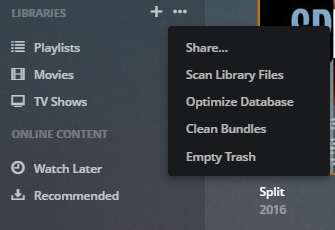
When I reinstalled it automatically added my media. I had even restarted my computer after uninstalling to try to make sure that didn’t happen. But I will uninstall and reinstall again to see if that works cause right now I can not get into it at all.
I appreciate you all trying to help me get this straightened out.
