Server Version#:1.22.3.4282
Player Version#:4.54.5 ?
I had 1.22.3.4392 working fine for the last month. last night my tv logs in NOT working.
Just now I went in and all it shows is WEB bullshit on the left side , my library does not show. as usual I got pissed uninstalled it , and went back to the earlier version.
still the screen just shows web and a plus sign ADD MEDIA. so fed up with this crap.
I NEVER plan to get crap from your web, I have Tivo and Roku and a bunch of other devices for that.
I need PLEX to just work on my media.
please tell me what is wrong , and how to upload a log as I have not done it for like 2 years. or should I go back to the old versions before the ADMIN fiasco on rights and folders ? so pissed right now. I pay for this to just WORK !!!
Step two:
Follow down the sidebar to ‘More’ and Select your server as the source, then pin your libraries. You can re-order the sidebar items (under the dots to the left) and the order stuff is pinned is the order it (somewhat) appears on the Home Screen - with some various caveats.
You can also customize what appears on the home screen here for yourself and your shared users (for each library):
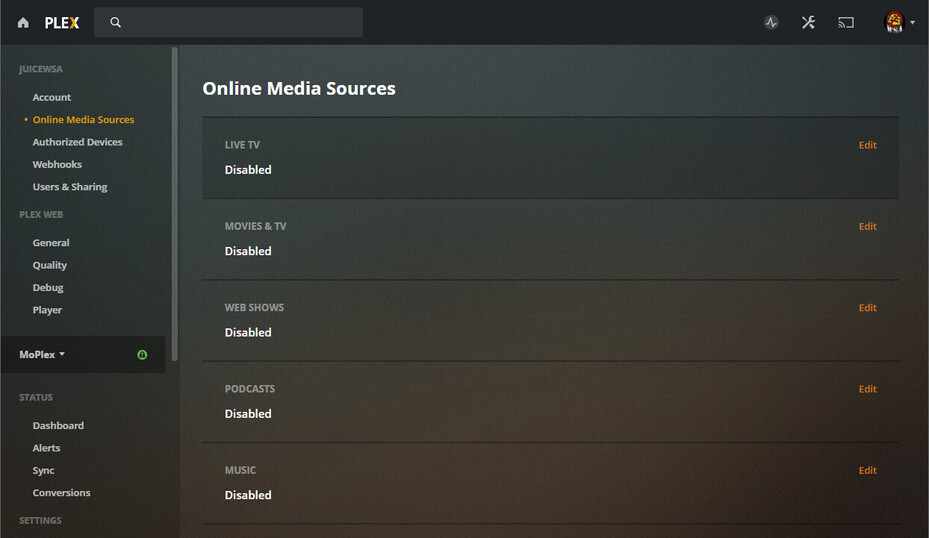
Thank you for taking time to reply to me. I did have the “online media sources” disabled and it was working fine. What I ended up doing was after a fresh reboot of synology. I uninstalled it, and downloaded " the regular " one that synology shows in it’s packages Version 1.18.5.2309 . and I’m just going to leave it there.
The only reason I was running the latest was to see if the player behave better, which it did not. I had one of my sons just redo movies in his computer. Plex lately is trying to become a media outlet and they IMO just suck at that besides the competition out there. they should stick to what most of us pay for.
anyways all is ok again, and BTW , before I uninstalled it , i ck’d all the permissions and all was ok.
yes totally disillusioned with Plex. if i don’t use for a few months everything stops working. I have done so many builds in the last 5 years. It’s flaky across platform. Agree with the comments above now they are even worse since trying to become a content provider. I’ve tried enough I’m gone!
JUST LIKE TIVO THEY HAVE BEEN AT WAR FOR 30 YEARS WITH EVERY CABLE COMPANY AROUND THE WORLD. now that I bought the latest one the edge with lifetime, they are now putting in the menu " their " content filled with wall to wall commercials . ■■■■ off . Now no one works with them or updates their app in appliances like TV sets . I like Plex , but instead of working on the player and making it as good as VLC , they are off to become a content distributor. I have over 500 movie dvd’s over the 40 years, even the beta and vhs , I have converted to play on the NAS . now Plex wants to show us commercials . nigro please !!! make that player play stuff that has not been encoded perfectly , that is why we PAY you . not f,ing commercials
Juice I HAVE DISABLED the WEB crap on the last 5 builds, it always comes back to it. you get it ? so now i am just going to leave it on a OLD version as the ONLY reason to upgrade to a new version is to see if the PLAYER can handle mis-confihured compression schemes, and it does NOT even come close to VLC . too bad VLC is not made as a APP for Samsung tv’s or I would use it to play of the NAS .
I NEVER use any thing from Plex other than the server software. so the money is going to pay for WEB CRAP DEVELOPMENT . may just look for a replacement , as the Samsung TV sees the NAS anyways FOAD
I’ve never had to re-disable any of that stuff, but I have had other stuff fly into operation on it’s own, so I wouldn’t be surprised.
Just another day in the Plexiverse.
Deal with it and move on.
Noteworthy:
Disabling Online Media Sources - ONLY works for your personal account. It is NOT a Server Wide Setting. If another shared account access your server, they’ll need to Disable Online Media Sources for their account, just like you did.
Some of my guys left it on, some turned it off.
I made it clear those settings and any foul repercussions absorbed by their failure to follow simple instructions wasn’t my fault…lol
I had this same issue, but I do not have the options to see my library at all. It’s like it’s running as a client only, even though this is running on my Synology DS218+. If I go to the “Your Media” option, all I have is the link to download PMS, even though I am running PMS.
I uninstalled Plex, installed the older version from Synology (1.18) and I could see all my content as normal. I re-downloaded the appropriate *.spk from the Plex site, did a manual install to upgrade to 1.23, and the problem came back. No libraries and no option to really add them.
If your server is signed out. mDNS names look like real FQDN names . PMS will treat as remote and block claiming. This is by design. (Security for when the server is out in a rack somewhere remote)
Ah, I think I understand. Well, I had just tried renaming my Preferences.xml file and letting it create another when you replied. I launched it using the mDNS name (from the Open button in Package Manager) and it walked me through setup, had the paths to my existing libraries, and seems to be back to normal.
I’ll be updating to DSM 7 maybe this weekend once I have a chance to read through the FAQs and articles here about it, so I’d be interested in whatever tricks you have regarding it.