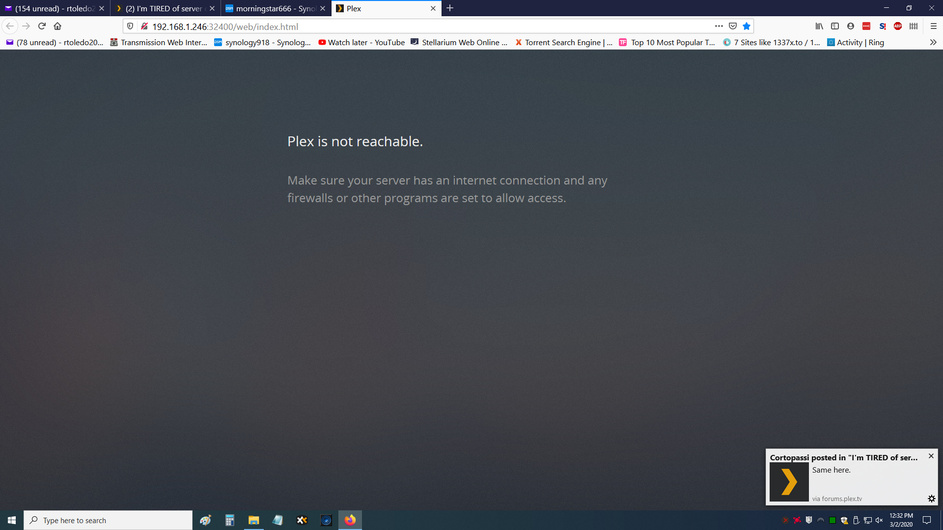
What’s going on? Can’t get Plex to work all of a sudden. My users are not shown, and my main user shows no picture and says Plex is unreachable when I click on it.
Does Plex have zero functionality if Plex disappears? If yes, I just realized that. There’s no “offline” mode?
I have been a loyal user for years on windows server and now for the last 3 years on synology .
I hate to gripe, but it’s because I’m ready to take a gun to the ■■■■■■■ server.
last night i wanted to watch movies , it was down again. FED UP I un-installed the LATEST and went back to a OLDER version from last year .
do me a favor tell me how to get the logs and send them to you. I don’t give a damn about security , because no one outside my house has access to it.
I went and gave ADMIN rights to every thing that says plex on it , even under the admin user and groups. I rebooted the NAS after re-installing the old version .
my biggest complaint is these latest versions HIDE the fing LIBRARY of my movies, ALL I see is that free ■■■■ you guys have now added ending in TIDAL . I have ZERO interest in that crap , I want my default OLD library.
now that the movie is down , guess what it’s no longer available again ? under the Tivo and new Roku ultra with the your latest player on the Roku since the TIVO is no longer supported.
WTF do I need to do to get a STABLE version and disable any future UPDATES on the NAS ?
Can’t log in to website (apparently, although I seem to be logged on here), can’t connect to server even on same PC via 127.0.0.1, can’t connect remotely. Reset, restarted, no luck. Was working earlier (last known uptime ~2pm GMT.
Pretty much the same as everyone. Server was working fine until about 8pm GMT. Crashed shortly after, and when I restarted I started to get weird issues with it being unclaimed and then unavailable. Couldn’t login to my account on Plex website, but that seems to be working now.
I think it’s certainly fair he’s ‘griping it out’. considering the circumstances. I agree, the older Plex versions had less issues, but I can’t give you specific versions. I don’t save them in a diary.
I just rebooted the Synology for the second time this morning , it came up at first it gave me the no server , see photo, then 30 seconds later I have my old style library displayed since I down graded to a old version 3 hours ago.
I’m going to make a PLEX server directory and find all my old downloads put them in that folder so i have options to go back until I find the ones that had ADMIN and just ■■■■■■■ WORKED all the time.
IF you havent dealt with a HOT HEAD like me before , welcome to my world.
OK THANKS. I need to look into Video Station , i just installed it, need to figure out IF I can use it over to the TV’s or IF I have to use a browser…
for me to come in here and gripe, I always search the web and try all I can. I’ve raided 4 kids 3 of them do coding for a living in different fields. Always used to ask my oldest som WHY he never updated his old windows server , he was always on really old versions , he’s answer was always if it works why mess with it, ME I was always tweaking engines and computers , always going with the latest I USED to think it was fun to beta test and be on the bleeding edge. Well time has passed and now I just want a OLD STABLe version. ever since Plex started adding the ONLINE section to the server things have gone BAD. funny thing is they have not thought out the plan. I would bet that 99.9 % of Plex users have Roku’s or Tivo’s or Sling or a dozen other streaming online content . I myself have those and Amazon Prime with ALL the blue ray movies that come with a code to see the media online , I have HULU , Netflix, ACORN TV , BRITT TV , Disney plus , and bunch of other crap I don’t even remember now, all PAID up .
DO I need PLEX offering me onlice content or the server doing that ? ■■■■ NO ■■■■ NO .
Plex was a ingenious idea to do one thing and do it right, just like " curly " said in City Slickers . Plex should stick to movies and content that the USER has on his network, and not ■■■■ around with onlince content. or at least offer 2 ■■■■■■■ versions , give me the " curly" version. and you can shove this one with onlince content into your ***
my youngest son told me about the ROKU MEDIA PLAYER in the Roku Ultra’s (I have 4 of them througout the house) just installed the app , it rapidly scanned 621 movies in the movie library
playing a oldie " father goose "
I will post back in the future and let you guys how well it works.
I downloaded to 1.15.xxx earlier IF things keep going bad , the oldest server I have is
Yea mine is down too, and also a friend’s. We both went down at the same time. We haven’t changed anything on our servers. Plex has done something. I agree they need to quit trying fix what isn’t broken. At the very least incorporate some decent testers if they’re making such a globally effective update.
All of a sudden when I try to access my movies via Plex on my Shield, it can’t connect. I made no changes to either Plex on my Shield or Plex on my NAS between yesterday and today. Plex is running on my Synology NAS; when I try to access my Synology directly (via ip address) it works fine; when I try to access my movie files on the NAS via my network, that works fine. I have no clue where to look to find the problem. VERY frustrating. One day it worked perfectly, and the next, I can’t even get it to see my movies!!
Based upon the few posts above, should I assume there is some large Plex controlled Plex server in the sky that plays a role when I want to watch movies in my home? If that is the case, then I don’t have control over the reliability of my movie watching system. Didn’t know that if it is accurate!! If that is the case, I will need to find another way to play my movies that doesn’t depend on some outside entity.
When I go to Plex.tv on my computer, the same thing happens, FWIW?
Here is the message when I try to access via Plex.tv