This is a little different than a basic Plex server as it powers a few different systems in my house.
I have a Dell R910 with 4 Xeon X7550 CPUs for a total of 64 threads at 2Ghz, 160G RAM, and a 24 drives in a RAID 6 for a total of 11T running Server 2012 R2. So there is a ton of CPUs, RAM, and drive available.
The issue is transcoding.
It’s bad.
I can’t really do 4k at all and even some 1080p I have to lower to a less bitrate.
I’m guessing because I have no video card for hardware transcoding.
This is a big server that was originally built for a large DB (or VMs, File/web serving, etc), not for plex although with this much CPU and RAM I am surprised I don’t run better. I’m guessing that Plex can only multi-thread so much since most of the threads are at 0%/idle.
I looked at the Plex buffering guide and looked at the “speed” number… I’m < 1.
So I’m guessing that I need a GPU for hardware transcoding.
So, my question is this, since this is a Dell R910 and I only have PCIe slots and I know that I have a few 8 slots and maybe 1 x16 available, what card would be best to run? I’m looking at NVidia. I saw a Tesla P100 on eBay that looks good or maybe a Tesla T4?
Suggestions?
I’d like to stream maybe 2x4k streams at once and let the other streams live at 1080.
Server Version#: 1.31.3.6868
Player Version#: 4.100.1
<If providing server logs please do NOT turn on verbose logging, only debug logging should be enabled>
Have a look at the following, it will tell you what codecs each card supports.
T4 will cover more than a P100.
Plenty of people here also use a P400 or T1000, however they will be limited to a maximum of 8 concurrent transcode sessions. Unless you’re serving media to lots of people then it’s not really an issue.
Thank you, I was looking at the matrix but wasn’t sure where I needed to be for Plex to be happy.
The T1000 sounds like the better option since it can do in the event that H.265 (HEVC) 4:4:4 is needed in the future.
Alright, so I picked up a T1000 and have it in the one 16x slot in the server.
However, transcoding doesn’t seem any better, I still buffer regularly.
The Xeon CPUs run at about 10% and the NVidia GPU runs at about 20%.
The main client is a 4k Fire stick and it reports transcoding due to bit rate and unsupported audio for 5.1 and higher at times. This is for a single play and not much else happening on the server, and nothing else on the RAID array that the files and cache are on.
I do have Plex set to use hardware transcoding enabled, so I’m wondering if I have a bad GPU driver or incorrect settings in the NVidia app.
Are there specific drivers or settings that should be used to enhance the transcoding performance of the T1000?
I’m running PMS in a Docker container, within an Ubuntu VM on a Proxmox host. When I was using the T1000 I just used the standard installation settings for the drivers, however that was in Ubuntu and not Windows.
Does the status in the PMS dashboard when the media is playing on your Roku and being transcoded have (hw) next to it which indicates that its using hardware acceleration as shown below?
Have you enabled Use hardware-accelerated video encoding and does the T1000 show up in list under the Hardware transcoding device options in the PMS transcoder settings. Example from mine below for my iGPU.
It appears to be using HW accelerated transcoding based on that screenshot. The T1000 should comfortably manage at least three 4K transcodes.
You’d need to upgrade to the current PMS version to see the option to select the device, although given the X7550 doesn’t have an iGPU it will be using the T1000.
Have you tried transcoding to another client device including both wired and wireless to see if it buffers? It could be something else in the chain causing it.
You’re running an unsupported operating system and you’re running the last version of PMS that works on this OS which is now coming up on being 2 years old.
I would highly recommend you install a more modern operating systems and keep PMS up to date.
You’re not seeing specific options because your PMS is too old. You’ll also start having issues when our new apps launch which won’t work with this old version.
I am seeing that as the general shows it is the current and when downloading the most recent version, it says it is not compatible.
That’s highly unfortunate as it isn’t exactly an easy process to rebuild an entire server nor is it it very cost effective to buy Server 2016 or newer…
Is there a specific reason that the new versions require 2016+ that 2012 doesn’t have?
Honestly, I wish that PMS had warnings about EOL for 2012 because I have always just checked for new versions in PMS and never saw this coming (clearly).
Now, since the entire server needs formatted and rebuilt… How do I keep all of my collections, watchlist, edited names, and everything else that have been edited and adjusted over so many years? Like a “backup” and “restore” to new server option?
Yes, I am well aware that 2012 is a W8 base. However, for a server environment it isn’t exactly cheap, easy, nor a great idea to upgrade the OS to every new reasons because of server reasons (Docker, VMs, human time, services, DFS syncs, IIS, Security management systems, etc). There are still people running W7 out there, even though recommendations have been made to update from that so… Not a huge rush typically.
As for the announcements. Ah, alright. However, please note there are SO MANY announcements that I focus on what PMS says.
For example, instead of saying “Up to date” that indicates that PMS is on the current version as it is “up to date”, just say “EOL - unsupported” or something that would be more of a flag to say… Oh? Hum, I wonder why. Ah…
Additionally, that seems to only be in forums and not in the PMS announcements, nor does an email warning seem to have been sent. So this would have only been seen if I were sitting in the forums (that I hardly touch since Plex just works typically).
Since it seems that the last update was 2 years ago, when I did update this server that was a backup Aug of last year, it updated and told me it was current.
Look, I love Plex and have been a lifetime user for many many years and have never had a single real issue, and I would suggest a tiny little bit more clarity on the update just to say “EOL” instead of “Up to date”, because it isn’t “up to date”.
I do appreciate the information that I could have seen, but I do feel that something important like an EOL device should be slightly more clear, that’s all.
Undertaking an in place upgrade of a Windows Server is not a straight forward process. Make sure you understand the steps involved and have backups available.
If your server is also a domain controller you will need to demote it first before you can upgrade it. This means you will need another active directory domain controller running somewhere that you can migrate it to first.
Your server hardware is also nearly 15 years old so you may find there are driver comparability issues or no drivers supported for 2016 or 2019. There may also be some software you’re using that could be incompatible as well.
Yup, dc demote, remove from the NFS shares, remove references for DNS, backup IIS, Hyper-V, and Docker settings. Yup. Lots of fun.
Yes, she is a 15 year old server, but I actually am still running an ancient PE2900 that is as happy today as the day it was bought. The “problem” with Dell servers is they are stupid stable and run forever so if there isn’t a specific reason to replace I keep them. Of course these are servers so the benefits of updated OSs and instruction sets don’t really add anything to the company. As for security, yes, they are hardened and VLANed so low likelihood of any security issues. I’ve actually only ever had exactly 2 Dell servers die, ever, and those were in offices that were flooded by hurricanes.
Alright, so 2019 and Plex…
I got the machine formatted and partially back up overnight. The only driver issue was the second Intel quad NIC card that I had to manually add the drivers to but the 4 onboard NICs were fine.
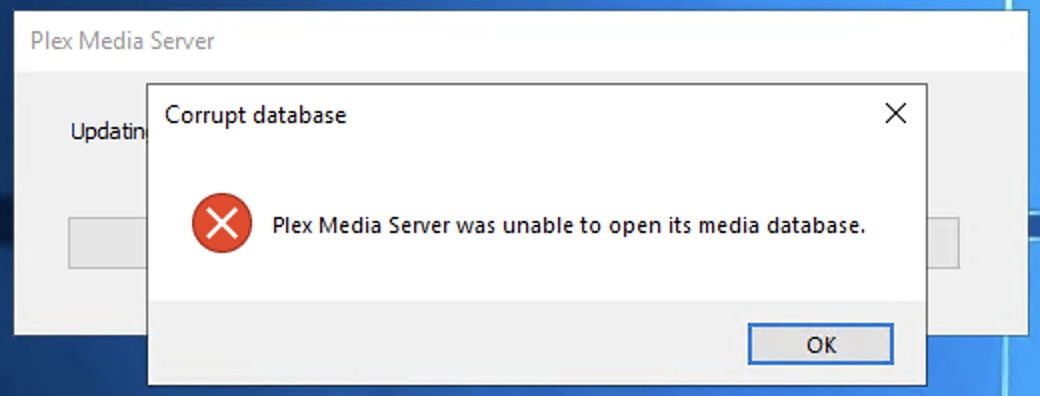
Plex in installed and the guide was followed, however there seems to be a media database issue. I’ll note here that I did move the db from %LOCALAPPDATA% to the JBOD so there is less on the OS drive per the information at https://support.plex.tv/articles/202915258-where-is-the-plex-media-server-data-directory-located/. I installed plex and restored the registry keys for Plex and got the media error, and so I uninstalled, cleared the registry and tried to add in the single key per the guide https://support.plex.tv/articles/201105343-advanced-hidden-server-settings/
HAY! That looks like it got me a lot closer. I can now see the play history and the old libraries… HOWEVER, I can’t seem to add nor edit libraries.
there are a couple of error in the browser console, not sure if that is an issue or not…
You can see in this screenshot that the language has no information and I cannot click on the library file location, and it doesn’t seem to be pulling the files yet.
Thoughts?
If you’ve copied the registry contents, make sure that you never start up the old server again. If you want to keep using it, there are some things that need to be done to it. (which I will detail later, if you require them)