Oh dear. FIOS.
You could have mentioned that earlier 
See: Cannot access server remotely... due to verizon fios DNS? - #19 by RogerPodacter
Oh dear. FIOS.
You could have mentioned that earlier
See: Cannot access server remotely... due to verizon fios DNS? - #19 by RogerPodacter
OH SONOFA… well I’ll take some solace that my google-fu hasn’t failed as that was only posted 18 hours ago. Off to download the fios app I go.
Well the setting they discuss in the fios app does not seem to exist for me, and I can not find it logging in via the computer either. Guess its time to make a support call 
Thank you so much, your a lifesaver!
Turns out I did not have HNP active, so unfortunately that was not the solution. We also tried setting the server as a DMZ host to no effect.
The final solution was to replace the router. For some reason regardless of settings verizon’s new G3100 router did not want to allow plex through (even with DMZ). Replacing the router with another one I had lying around resolved the issue.
So much for ISP-provided routers. Good that they at least don’t make it impossible to use your own!
Although bczretribution has solved this through replacing his router I have the same issue but slightly different (hence I didn’t want to create a new thread).
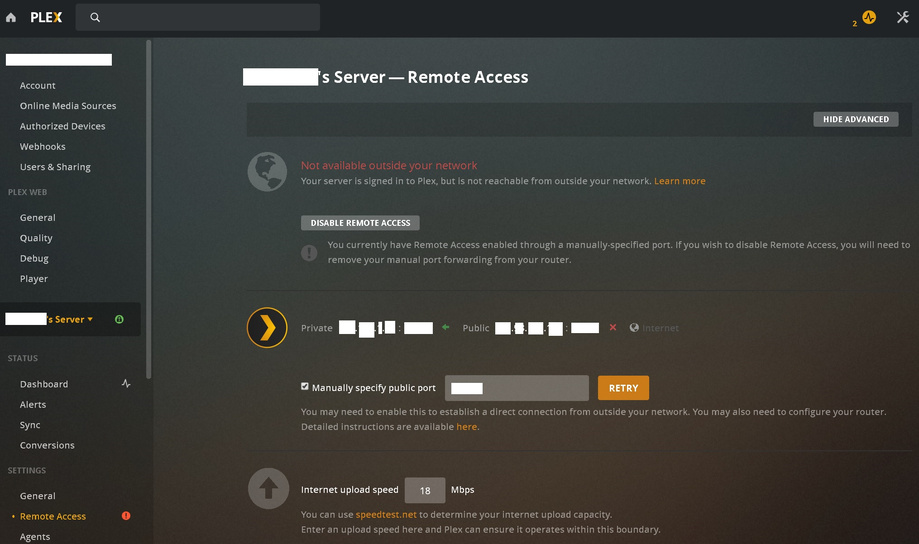
My server is also showing “Not available outside your network” however my remote streaming seems to be working fine.
As you can see I’ve got two users currently streaming at 2MB/s each but PMS still reports it’s not available outside my network. I’ve got my port forwarding set correctly and canyouseeme.org reports it can see the service on my port.
Any thoughts on what’s going on here?
Maybe you are blocking the connection tests from the plex.tv cloud in your firewall/router?
If you have set a “custom server access URL” for the remote access, the connection test will always fail.
Thank you for your response OttoKerner.
I am running Windows Server 2012 R2 with local DNS forwarding and DHCP if that would interfere with it. To further the diagnostics it seems to show it’s connected VERY briefly before changing back to ‘Not Available Outside your Network’.
Is there a particular log I could look at to provide more info?
This might play a role here. Plex is assigning a custom FQDN to your server. If your DNS is blocking this, remote access will fail.
Unfortunately I never used the Windows DNS software, so I have no idea how to fix this. (or whether it is fixable at all)
https://support.plex.tv/articles/206225077-how-to-use-secure-server-connections/
Ok, I’ve removed the DNS service from server and all devices on the LAN are using external an external DNS server but I’m still having the issue. Any other ideas?
This is not about using a specific DNS resolver. This is about how to teach this resolver to not apply “DNS rebinding protection” to one specific domain name.
This is covered for pfsense and DNSmasq in the above linked article.
This topic was automatically closed 90 days after the last reply. New replies are no longer allowed.