it is not in the registry where you mentioned

There is not a lot of information on the internet about this gpscript.exe. I have no idea where this came from or how it came to be. Nor can I find out how to disable it; the whole process is very elusive, and frustrating, to say the least.
I wonder, if I uninstalled PMS from my machine, would that remove the (phantom) launching of an unwanted process that is currently hijacking my enjoyment of personal content? If so, would re-installing return me to ‘normal?’
At this point, I am game for anything, even if it means having to rebuild my database.
I really appreciate the effort you have put into this issue.
Awaiting further instructions.
One bit
why don’t you search the whole registry for gpscript.exe
of course if it is called from within a batch file then that search will not find it.
It is your machine. You need to find out how you got to this and ended up with a script starting Pex Media Server under SYSTEM. Plex Media Server would not have done that
It is nothing to do with Plex Media Server. How would rebuilding the Plex database stop your gpscript.exe from running?
Some clues here https://www.fileinspect.com/fileinfo/gpscript-exe/
See if editing Group Policy finds something about the start up of Plex Media Server.exe with SYSTEM as the account
Ok, I have it working again.
I found a group policy script in C:\Windows\System32\GroupPolicy\Machine\Scripts and the only entry was to launch PMS. I moved and renamed it but that didn’t stop the service from running. However, I then started looking for similar entries in the registry.
I was looking around HKEY_LOCAL_MACHINE\SOFTWARE\Microsoft\Windows\CurrentVersion\ to see if there were any group policy entries. I eventually found
. I deleted this entry and no more launching PMS under System.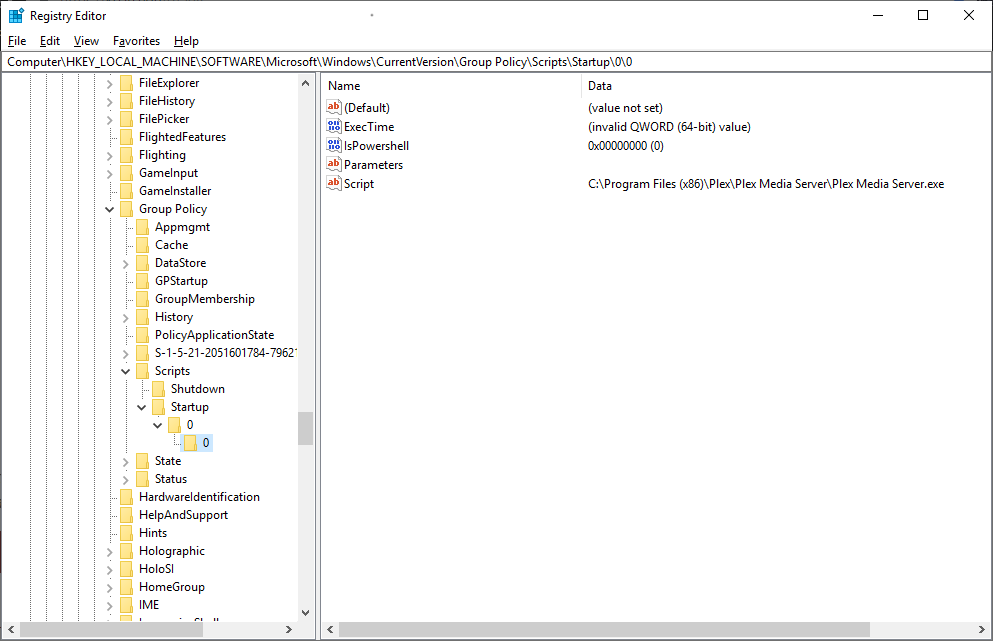
I have plex running now and I can access it externally so I think my troubles are over. This was long and painful but we prevailed.
I appreciate the time and effort sa2000 and MovieFan.plex contributed, thank you very much for your assistance and patience.
Now, to catch up with my shows.
One Bit Wonder
excellent - thanks for the feedback.
This topic was automatically closed 90 days after the last reply. New replies are no longer allowed.
