Thanks guys heading to bed will follow up tomorrow.
Wait, so did it work? Don’t leave us hanging…
I did not run the update yet because I see another issue after the repair that I bet is the source of the problem why the service is not running (and cannot find the file when starting the service manually)… the repair put the app back in the root of the drive instead of the E:[Plex Media Server] folder… which I now remember did happen before… likely a mistake I made when having to manually reinstall the app (which I only did because it would not auto update). The app path may be stored in the registry just too tired to look. Once the path is fixed I bet the service will run.

This is getting more interesting…
I did not remember making a mistake and selecting the E: root folder for installation but accepted that I could have done it by accident. I figured since I need to correct the path of the app I should just reinstall the same 5173 version into the correct folder, as it should fix the path and get everything to align again…
Then I noticed what appears to be a bug in the installer… and now I know how this happened. Check this out.
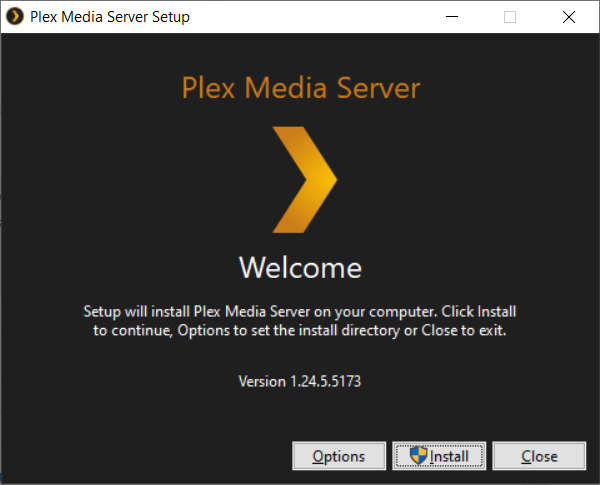
I click on options to set the correct app path…it is defaulting to the root of E:

I browse to the correct folder and click OK

but the path is NOT saving… if I click on options again, it is back to the root of E:
So this is why it installed into the root because the last time I manually installed I assumed that it remembered the path I just set it to but it did not. I tried the most recent version and the behavior is also the same.
So then I wondered if maybe the brackets are causing an issue so I created a new folder and sure enough it WILL save the path without the [brackets].

The brackets worked for my initial install but at some point this changed over time and now does not like the brackets anymore. Although maybe not typical it is a valid character for a folder/path name but the installer just does not like it. I guess I could change the folder name but suspect this is more of a installer bug.
I tested with some other characters and it only seems to have an issue with [brackets]… go figure. Is there a documented restriction on using brackets that I might have missed?
Anyway, I just created a new folder for the app E:{Plex Media Server APP} and it worked using the other kind of bracket… Installed PMS there which will now seperate the app and the appdata folders as suggested.
I checked and the Plex Update Service is running and I did a repair just to see if I would get that error again and I did not, it worked fine. It appears that the path issues are resolved.
I will try the update to the new version and report back
The update through the app worked this time 
Plex Version 1.25.0.5282 - Appreciate the help!
PS. It appears the [brackets] in the installer path may be an installer bug? I would ask if this can be reported to the devs as it may help someone in the future. TY
This is a bad idea and will give you headaches.
Don’t combine the program and the data folders of Plex.
Thanks I already seperated the folders as suggested…
But while on the subject, I certainly don’t dispute the advice (I did make the change) but I do want to try to understand why this advice is given… What is this taboo all about? I would assume (as with most apps) the paths are defined and absolute… the app should not be “roaming” right? In other words the apps wouldn’t randomly select files and folders to be used, they are all expected in a specific location defined by the devs. Why would the app ever access 2 folders deep within the same folder structure when those folders are not defined as part of the application programming? I am trying to think why this would/could be an issue… like file permissions or something?
It is good practice since about several decades in computing.
Always separate the program code from the data.
That’s why even Microsoft has enforced a clear spearation in Windows.
(with the C:\Program Files and C:\Users\<username>\AppData folders)
That way, executable code can be isolated and foreign code (i.e. malware) which often is disguised as data cannot be funneled that easily into the system.
Also, Windows can impose special permissions on the installer folder. Since your appdata folder is inside that, those permissions could end up on that too. If you want these close to each other, you can put them next to each other, just not inside.
Good
drive:\installed folder
drive:\appdata folder
Bad
drive:\installed folder
drive:\installed folder\appdata
Gotcha, thanks guys!
This topic was automatically closed 90 days after the last reply. New replies are no longer allowed.
