Server won't transcode

Server Version#: 1.31.2.6783
Player Version#: various

Hopefully a simple question.

I’ve started adding HEVC-encoded 2.5K HDR and 4K HDR content to my Plex library, in MKV containers. If the peak bitrate of one of these files remains below the client streaming threshold for direct play, all works fine.

But some of my family and friends have their Plex clients configured for a maximum bandwidth of 20 or 30 Mb/s. So even though I know that all the HDR content I’ve put up so far has an average bitrate below 20 Mb/s, some of them have brief peak bitrates higher than that.

My Plex server should transcode these videos. But it isn’t. I confirmed this by setting my client preference to limit to 20 Mb/s, and then tried playing a video with a peak bitrate of 27 Mb/s.

From the client side, it looks like it’s going to play with a bit of a delay, as the buffering wheel pops up on screen. But the buffering wheel never goes away. Sometimes, audio begins playing after 10-15 seconds, but no video ever plays.

On the server side, nothing much appears to happen. On the Dashboard, the CPU and RAM charts appear to remain exactly the same. Only the Bandwidth chart indicates anything is happening, as if it’s feeding the video to the client system.

The server is a 2018 Mac Mini with a 6-core i5. It’s a Coffee Lake CPU, with Quick Sync (I5-8500B). Here are the transcoder settings on my server:
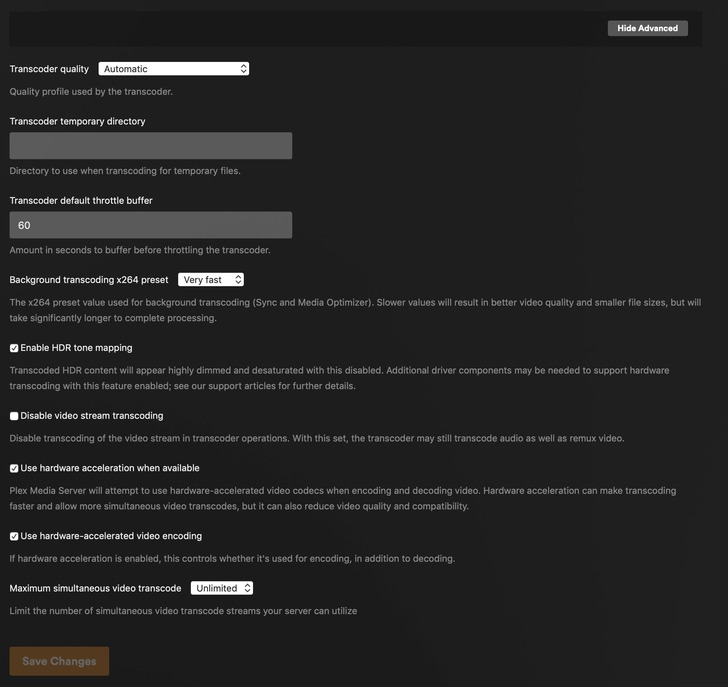
Please let me know if I’ve missed something obvious.


I experience a similar issue on Windows. I can trigger a transcode by lowering the quality but playing 4k SDR or 4k HDR on a non-HDR or lower resolution screen/device does nothing

It continues to direct play very poorly with stuttering, missed frames ect…

If you missed something obvious, I missed it too

It’s like it has no idea what it’s actually trying to play so it just tries to direct play everything even if it fails

To clarify, I’m trying to play this stuff on an HDR display. The only reason it should transcode is that the peak bitrate for the file is higher than the bandwidth limit in the client. (The overall/average bitrate is well below the bandwidth limit.)

I’m confused because it just doesn’t appear to be doing anything at all. The CPU and memory usage remain exactly the same (i.e., Low, as if the system is idle).

If the video isn’t transcoding like it should that means it’s trying to direct play it. A direct play isn’t going to garner any change in your cpu or memory. It looks just like it does when it’s idle

Right. That’s what I’m saying – it should be transcoding. It looks like it’s trying to direct play, but the client isn’t displaying anything other than the “buffering” animation.

I dug into the logs, and this is what I found for one of my attempts. I do not know how to translate all of this, but I have bolded the things I think might(?) be relevant.

<Variant id=“6b80ffda-bf9b-4786-9960-6b081c240504” targetBitrate=“19453” context=“streaming” sourceVideoCodec=“hevc” sourceAudioCodec=“dca” videoDecision=“copy” audioDecision=“copy” protocol=“hls” container=“mkv” videoCodec=“hevc” audioCodec=“dca” audioChannels=“6” transcodeHwRequested=“1” transcodeHwFullPipeline=“0”>

<Part audioProfile=“dts” deepAnalysisVersion=“6” id=“207009” requiredBandwidths=“34063,29769,18725,16145,14453,13013,10328,10328” videoProfile=“main 10” bitrate=“6449” container=“mkv” duration=“3132266” height=“1440” protocol=“hls” width=“2560” decision=“transcode” selected=“1”>
<Stream bitDepth=“10” bitrate=“4940” chromaLocation=“topleft” chromaSubsampling=“4:2:0” codec=“hevc” codedHeight=“1440” codedWidth=“2560” colorPrimaries=“bt2020” colorRange=“tv” colorSpace=“bt2020nc” colorTrc=“smpte2084” default=“1” displayTitle=“1080p HDR10 (HEVC Main 10)” extendedDisplayTitle=“1080p HDR10 (HEVC Main 10)” frameRate=“23.975999832153320” height=“1440” id=“425596” level=“150” profile=“main 10” refFrames=“1” requiredBandwidths=“32383,28089,17019,14437,12745,11302,8655,8655” streamType=“1” width=“2560” decision=“copy” location=“segments-av” />

If somebody else can figure out what’s going on, or would like me to post something additional to help figure it out, please let me know.

And this is what I see in the client. Notice the ‘buffering’ animation partially hidden by the Technical Details box.

A relevant question is: If this is supposed to be transcoding because the bitrate is too high for the available bandwidth, why is the “Video” set to “Copy?” It’s my understanding that “Copy” does nothing to change the file size/required bandwidth.

Okay, I found out some additional interesting information.

When I set the bandwidth preferences in the client software, I can get the server to transcode if I set the preferred bandwidth to a different category. What I mean is that the video preferences in the client look like this:

Maximum
40 Mbps, 4K
30 Mbps, 4K
25 Mbps, 4K
20 Mbps, 1080p HD
15 Mbps, 1080p HD
12 Mbps, 1080p HD
10 Mbps, 1080p HD
8 Mbps, 1080p HD
4 Mbps, 720p HD
3 Mbps, 720p HD

The source material is HEVC 10 bit, some of it is 2.5K (1440p) and some is 4K.

If I set the client option to any of the “4K” categories, the problem I described in my earlier posts happens. The client thinks it’s going to receive a transcoded file from the server, but the server doesn’t transcode anything, setting both “Video” and “Audio” to “Copy.”

But If I change the client option to any of the “1080p” categories, the server will transcode. Unfortunately, it’s not transcoding correctly – it’s using H264 (HW) rather than H265, and it’s not performing HDR tone mapping. The resulting video looks awful - out of gamut colors and excessive brightness, even on an HDR display that it should look alright on. So it must be putting HDR content into a trandcoded stream that isn’t properly marking it as BT2020.

So… this is currently unusable for my family with sustained WiFi speeds below 30 Mbps. Given that there’s a “25 Mbps, 4K” option, the transcode should be triggered by the “requiredBandwidth” limitation, leaving the colorspace alone. Instead, nothing useful happens – the buffering animation never goes away, and the Plex server isn’t trying to transcode.

If they set their preference to one of the 1080p options, H264 transcoding happens but the colorspace is screwed up.

Any advice would be appreciated.

Bumping the thread in the hopes that somebody will know what I’m doing wrong or will acknowledge what appears to be a bug.

Tone mapping
Quick sync with tone mapping murders cpu.

As an fyi, may not be relevant but make sure any DV files also have hdr fallback (again may be irrelevant but that’s when you see crazy color schemes (my understanding it’s a licensing issue with plex).

Lastly the one variable not mentioned (or I missed) is the end user client. Some of them simply aren’t powerful enough to play a file with super high bitrate. Even if your upload speed and they have enough download, devices will buckle under high bitrate files (Esp older steaming devices or smart tv apps(.

But as is, tone mapping one 4k movie will pin (or come close) your cpu.

Meatball – thank you for responding.

The problem appears to be a bug in Plex, not an artifact of Quick Sync or available CPU resources. I realize that might be hard to parse out of my many posts and updates. But putting it succinctly:

When the client is set with a limit – e.g., 25 Mbps, 4K – the Plex server should transcode 4K HEVC videos with a peak bitrate higher than 25 Mbps to some bitrate below 25 Mbps. But it doesn’t do that. Instead, it appears to transcode, but sets both the video and audio streams to “Copy” (which has no impact whatsoever on the required bitrate). On the client side, I never get any kind of video at all, but sometimes get audio (after a delay of 15-30 seconds).

The photo I included in post 6 on March 11 shows this pretty well.

If instead I set the client to a limit of 20 Mbps, 1080p, the server does attempt to transcode, but uses x264 rather than x265, and sets the metadata to indicate it’s a BT.709 colorspace rather than BT.2020. So what happens on the client side is that the video plays but looks awful because the colorspace is wrong. I think it’s only transcoding in this case because the category is different (1080p vs 4K).

The client I’m testing with handles super high bitrates without issue. I can feed it unmodified 4K UHD disk rips at 100+ Mbps and it works fine, as long as I set the client limit to “Maximum.” (I’m testing with an AppleTV 4K, but it applies to other clients as well.)

1 Like

that’s interesting. Obviously you’ve done your testing, I’d be curious to hear what if you learn anything different depending on the client. I gave up on tone mapping for the reasons I mentioned.

This topic was automatically closed 90 days after the last reply. New replies are no longer allowed.