Server Version#:
Player Version#:
afternoon all, Im new to these forums, but I have been stuck on server 1.20.1.3252 for some time now, when i attempt to upgrade, it does the uprade, and the following day the same message is back again, its been like this for ages, Im reclutant playing with thinngs as most of my family use plex from my PC to their TV’s mobiles and ipads etc, so Id like to try and keep the links between these devices, can anyone explain how i upgrade (im as basic terms as possible) I am not that Tech Savy, but Im willing to give it a try to get my server upgraded?
Thank you all very much (o:
Try a manual update:
- Stop/quit/end Plex Server with the tray icon
- deinstall Plex Server with the regular ‘Apps’ control panel of Windows
(do not use 3rd party ‘Uninstaller’ software like Revo etc.
do not use “Registry Cleaner/optimizer” software like CCleaner et al)
- for safety, reboot Windows
- download the installation exe of the newer version and install it
(If you want to install an older version of PMS, take a look into %LOCALAPPDATA%\Plex Media Server\Updates)
Thanks for this, if i go ahead with this and deinstall the Plex Server, will my PC keep the link between all the other PC’s its been linked to?, also will all my metadate for the files still be there when i reinstall? sorry one final question when I have deinstalled, do I simply go to the Plex website and reinstall the new Media Server from there?
appreciate your help
Yes, as long as you heed my warning about not using “uninstaller” and “registry cleaner” software.
Yes, that’s what I meant with “download the installation exe of the newer version”
Ok so Ive done the above, Plex is no longer showing in the installed programmes but its still there? when i restarted my PC it started itself back up again and continues to work off the old server? I attempted to download the new server from the plex website, but it didnt install, saying the old version was preventing it from installing? im now stuck on a engless loop? Ive no idea how to remove the old server as its not showing as being installed in my PC anymore eventhough it’s still there,
Do you have several Windows user accounts on this machine?
If you do, log out of your current account and log in to the other accounts. Desinstall Plex server under very user account.
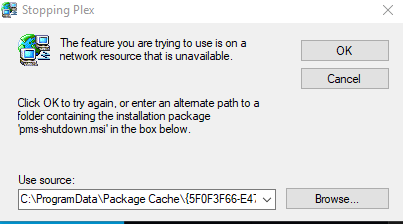
No I only have 1 account on this PC, I cant uninstall Plex as its not showing in the programmes list even though its starting itself up during a rebook, when I tried to install the plex new plex server I got the following message
Can you make a screenshot of the “Plex” which is starting up itself after a reboot?
(Full screen please)
Plex is set to start with Windows, so when i restart its sitting in the Icon Tray, I can open Plex and view my Dashboard, but its not showing as a installed programmes within Windows any longer after following the steps above, so I cant remove it, its also still showing in my list of programmes, from the start menu
here is my desktop its siting near the clock
Make a right-click on this Plex icon.
Disable its autostart.
Another thing to check:
CTRL+Shift+Esc
tab “Autostart”
Does Plex appear in there?
I’ve right clicked and stopped it from auto starting, I’ve also checked the Auto start area (image below), and Plex is not showing in there

OK, try another reboot and installation.
Ok so Plex didnt start up and its not showing in the Tray anymore, I tried to install the new server and I get the same pop up up as before
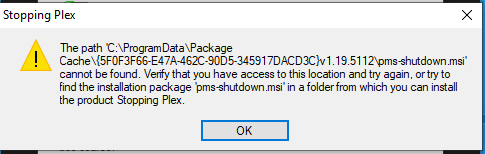
I also get another pop up after this which is this
Plex Media Server_20211005154914.log (19.7 KB)
there was a log generated if that helps?
Ive tried the tools in this link, and i still cant uninstall the old version, nor can in reinstall the new version, and now Plex has stopped working all together? any advice?
Do you have a folder named Updates inside of your Plex data folder?
Try and find the installer for server version 1.19.5112 in it.
If you find it, perform a “repair installation”.
Then close the server and try a regular uninstallation again.


