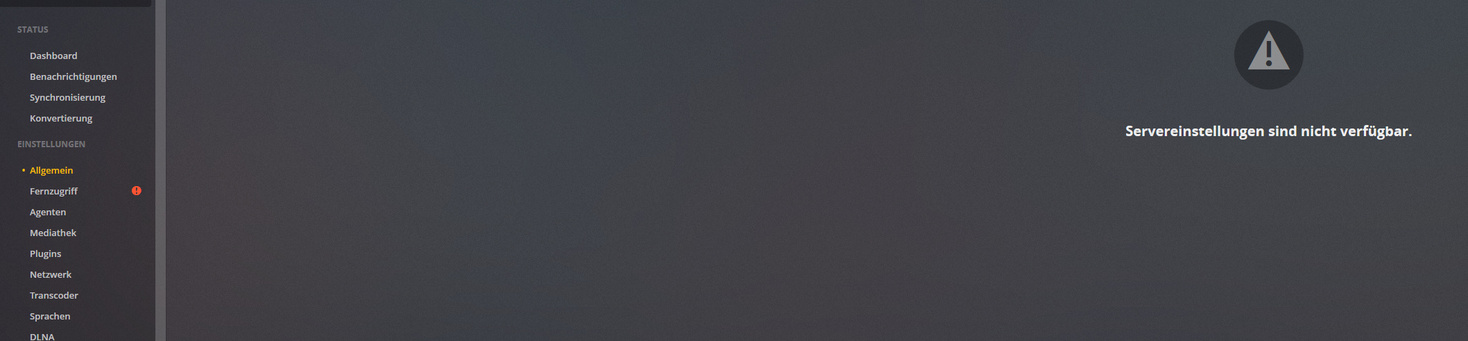
Servereinstellungen nicht verfügbar

Hallo ich habe Plex in einem Jail auf Basis FreeNAS 11.2 neu eingerichtet und habe es geschafft mich von den Servereinstellungen auszusperren.

Der Lösungsansatz aus:
[https://support.plex.tv/articles/204281528-why-am-i-locked-out-of-server-settings-and-how-do-i-get-in/](https://support.plex.tv/articles/204281528-why-am-i-locked-out-of-server-settings-and-how-do-i-get-in

funktioniert leider nicht. Trotz Anpassung der Preferences.xml kann ich nicht auf die Einstellungen zugreifen. Ich habe auch versuche secureConnections und allowedNetworks anzupassen. hat auch nicht geholfen.

Hat jemand noch eine Idee?

Danke!

Moin, habe das identische Problem.
Da ich länger nicht zu Hause war heute das update von FreeNas gemacht und dann noch PLEX und jetzt komme ich nicht mehr in die Einstellungen von PLEX “Servereinstellungen sind nicht verfügbar.”.
Wäre auch sehr dankbar für eine Lösung!
Danke und beste Grüße…

Ich habe das gleiche Problem. Servereinstellungen kann ich nicht mehr aufrufen. Auch bei den Agensts steht immer nur Agent laden, wenn ich zB einen Film Zuordnen möchte.
Hängt definitv mit dem letzten Update des Plexmediaserver zusammen.

Ich habe das Problem auch, dass ich auf die Servereinstellungen nicht mehr zugreifen kann wegen des Fehlers “Servereinstellungen sind nicht verfügbar.”

Konnte das Problem jemand von euch beheben?

So, heute 6.4.2019 das PMS Update 1.15.3876 aufgespielt.
Und das FREENAS auch gleich mal auf letzte Update gepatched.
Ich bin also super aktuell → trotzdem:

Keine Änderung.

Sorry I can’t reply in you’re own language, hopefully you can use google translator to help as I did and its seem the issue is server settings can’t be accessed.

The most common issue for this is that people used custom scripts to update in the past and that simply replaces the tarball but doesn’t actually update the start up script (rc.d)

You need to make sure this script has the correct line in “export LD_LIBRARY_PATH”

Look here https://svnweb.freebsd.org/ports/head/multimedia/plexmediaserver-plexpass/files/plexmediaserver_plexpass.in?revision=496825&view=markup&pathrev=497734 for help.

But tl;dr is that this line:

export LD_LIBRARY_PATH="${SCRIPTPATH}/lib"

is probably not correct.

#######
This is what google translate gives me:
#######

Es tut mir leid, ich kann nicht in Ihrer eigenen Sprache antworten. Hoffentlich können Sie Google Translator als Hilfe verwenden, da ich das Problem habe, dass auf die Servereinstellungen nicht zugegriffen werden kann.

Das häufigste Problem dabei ist, dass die Benutzer in der Vergangenheit zum Aktualisieren benutzerdefinierte Skripts verwendet haben, die lediglich den Tarball ersetzen, das Startskript (rc.d) jedoch nicht aktualisieren.

Sie müssen sicherstellen, dass dieses Skript die korrekte Zeile in “export LD_LIBRARY_PATH” hat.

Weitere Informationen finden Sie unter https://svnweb.freebsd.org/ports/head/multimedia/plexmediaserver-plexpass/files/plexmediaserver_plexpass.in?revision=496825&view=markup&pathrev=497734.

Aber drin ist diese Zeile:

export LD_LIBRARY_PATH="${SCRIPTPATH}/lib"

ist wahrscheinlich nicht richtig.

2 Likes

@mikec_pt
Thank you for your posting.

Yes; I always used the following script to update to the newest Plex-Pass-Version:

To which file should I add the code you have posted?

Other question: Is there a better way to regularly upgrade Plex on a FreeNAS-System?

Sorry that script doesn’t handle this!

You will need to open a Shell in the jail and manually edit /usr/local/etc/rc.d/plexmediaserver-plexpass

Hi! Thank you for helping!
You wrote: You need to make sure this script has the correct line in “export LD_LIBRARY_PATH”

What ist the correct line?

Another problem:
in my directory /usr/local/etc/rc.d/ -> there is no file plexmediaserver-plexpass…

Is there a plexmediaserver one then?

I posted the correct line above

No, there is no folder or file like “plexmediaserver” or plex…

It would be a file but if that is not present than I don’t know how you installed plex.

What’s the output of pkg info|grep plex?

grafik

I pasted the whole new rc.d-script from above to that file /usr/local/etc/rc.d/plexmediaserver-plexpass.

Unfortunately this didn`t change anything to the error that the server settings are unavailable.

What else could I do?

I’m not sure what you pasted?
The easiest way to get the correct rc.d script there is installing plex using pkg install.

No pkg is installed do pkg update and then pkg install plexmediaserver

Hi!
I tried pkg update. Then restarted NAS and PMS. No affect.

I do not understand whey I should run pkg install plexmediaserver.
I have an installed PLUGIN on NAS. When I got to “Management” -> PLEX is launched. And there I go to settings. And then I see “Serversettings not available”.
Plex itself is working. I can run everything, also remote.

The only thing I did, was to update PLEX to the latest version. As I do it since years. After the update I have this failure now.

I am not someone who is familiar with NAS settings, PLEX programming, or Shell writing or else. I just want to use PLEX as it is described on the PLEX homepage.

What I need is an update release of PLEX which fixes my problem, because in my opinion I did absoultely no change to the running system but updating PLEX for the newest release.
That really disappointing.

By the way I found the plexmediaserver_plexpass file.

I will try now to change the line:

export LD_LIBRARY_PATH="${SCRIPTPATH}/lib"

but as I wrote before: I dont know to what.

okay, in my file plexmediaserver_plexpass: it looks like this:

export LD_LIBRARY_PATH="${SCRIPTPATH}"

Im going to change it to:

export LD_LIBRARY_PATH="${SCRIPTPATH}/lib"

and restart PMS.

I give feedback.

It worked.

Serversettings are available again.

The change of the Path Line as described by mikec_pt was successful.

I thank you very much!
Really.
