I have 2 servers under the same name that are unavailable and I can’t figure out how to delete them. Any help would be greatly appreciated…
Do they show up in the list of authorized devices? If so, click on the X to delete them.
No they don’t… and when I click on the server it says that it is currently unavailable and just keeps trying to reconnect.
What version of PMS on each?
What platform - Win10, NAS, Linux, etc.?
Also, when you say “under the same name” do you mean the Plex servers have the same name or they are owned by the same Plex account?
I have version 4.22.3 or maybe its 1.19.2.2737… Not sure why it is showing 2 different Version numbers.
I have a Linux platform… The 2 shared servers are owned by the same person and listed with the same name. I have no clue what platform or version they have. I have not talked to them or used either server in close to a year. Just trying to clean things up and can’t figure out how to remove them.
So, not your servers, but shared with you.
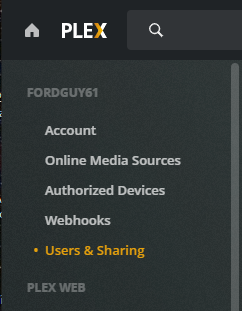
Go to Users & Sharing and remove the libraries that are shared with you.
Edit: Not sure why, but the link to Users & Sharing does not seem to be embedding correctly. I get a 500 Error when I click on it.
Using Plex Web, go to Settings -> Users & Sharing (at top, under your username). Delete the libraries that are shared with you. This should clean things up.
Thank you!!! That fixed the problem.
