Can a friend or family use an plex android app to receive sharing. I know they can through the website, but can they through the android app?
Of course.
Keep in mind that the “mobile” Plex apps are not free. They need to be either
- unlocked in the app store for a one-time fee
- used in conjunction with a plex account which has a Plex Pass
- used by a family member who is a “managed user” within the Plex Home of a Plex Pass holder
Where do you find the friend request on the mobile app?
Oh, so you want to accept an invitation via the mobile app?
Take a look at the bottom of this help article: Managing Library Access | Plex Support
Settings>Manage Library Access>Requests
I am the plex pass server that will be friending my daughter who lives elsewhere. We will be setting up wifi this weekend at her house. Then I will install the plex mobile app for her on her android tv box… So that is why I need to know how it is received once I friend her. I know how to set up the sharing on my end. I just don’t how to receive and set it up on her end. Will she need to set up a password on her mobile app after installation? And how will I know if the invitation is going through once I receive it through her email address. Will a notification show up on her app letting me know that the request has been received and accepted?
if she does not already have a Plex account she will get an email and she should follow prompts in email to create account and accept access
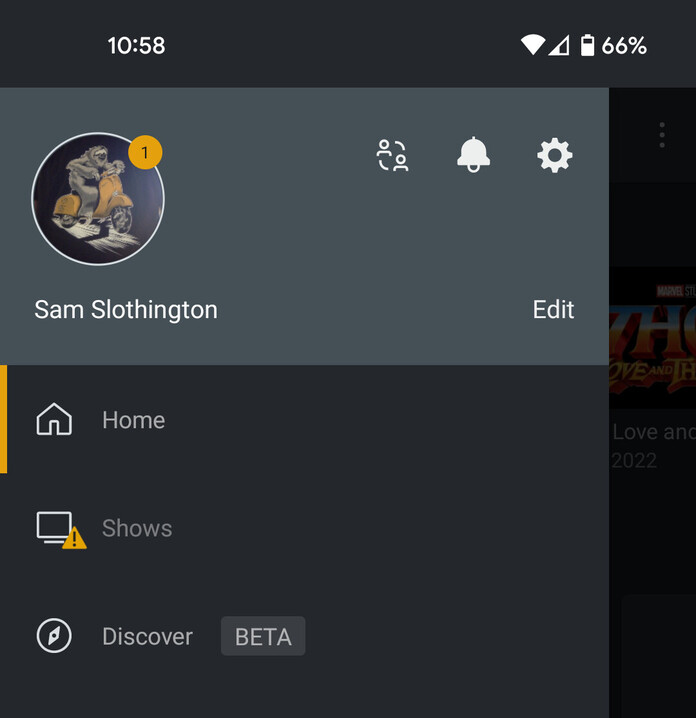
If she already has Plex account in the mobile app she will see a notification dot on her avatar in navigation side bar, she can click to get to the previously mentioned Library Access settings.
You will also see the pending request in the library access settings in the web or mobile app you are logged into. There is not a separate notification at the time it is accepted. It will just not be a pending request anymore
What she will see in mobile app if she already has an account for the pending request.
She can set up the account through the email?
Yes. The link in the email to accept invite to the access you are giving will prompt her to create an account first (or sign in with existing if not already)
ok. Thanks.
