Server Version#:1.21.1.3830
Player Version#:
Hello, I have (2) Nvidia Shield 2019 Pros. I have installed Plex/Server on both of them and have tried numerous times to move the plex database to either adopted or external SSD drives (I have ultrafast SSD drives installed on both systems as adopted (500GB) and external (1TB)
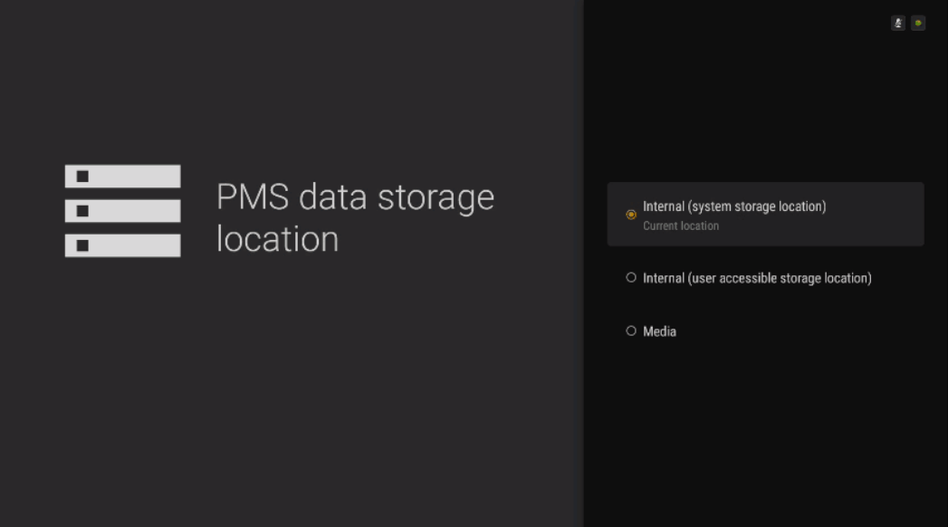
The process to move it is clear and it never asks me where to move the plex database files and just spins for hours after selecting “just do it” This occurs on both systems and I have left overnight with no luck. I have verified both the app and the server have external drive storage permissions and have read many, many google posts on how to resolve this. Most post are years old and I am getting nowhere.
I have tried Nvidia chat support numerous times last week and it just keeps timing out with nobody available.
Any help is greatly appreciated. I should note I have cleared cache, cleared cache and data, force stopped, uninstalled, reinstalled, checked for updates and so on.
Thank you and Happy Holidays
PS - I have a very minimal amount of video files so not to delay any transferring. I have thumbnails turned off for the same reason.
This link is the process I have tried using numerous times and fails. Not many posts at all on what to do when this process fails?
I also placed this on the Nvidia Shield forum and their tech support said this is a Plex issue.
It should ask if you want it on internal user accessible area or an external drive. You cannot specify an exact folder if that is what you mean.
If you use the drives as external, I would suggest letting the Shield format it first. I’ve found that to work better. If set to adopted it should just work.
Nothing’s change over the years so even older posts should still apply.
Unfortunately, when this fails, there is no information returned from the system on what caused the failure.
May I suggest starting over and trying to move the blank initial setup. This should be quick and you’ll know if it worked or failed within a few minutes.
Thank you for the quick response! I was hoping to get this working this weekend.
It does “not” ask if I want to go to internal user or external drive. I select “just do it” and it goes to the spinning wheel page about this may take a few minutes etc. This same behavior happens on both my systems - skips the part on asking where.
The Shield did format the adopted storage on both units and then moved some data over and shows as adopted just fine. I think I formatted the externals on a Windows PC as exFat and they show as available on the Shield. I am trying to move the Plex database/etc to the adopted as it is 500GB Fast SSD and I will not ever remove, but again, it does not ask.
Can you please elaborate on starting over? I have done this a few times on both systems. I clear cache, clear data, force stop on both app and server and uninstall both. I also went in to file system with XPlore and removed all Plex folders etc. In essence a clean, clean reinstall to the same outcome. On installation I have tried both to let it create folder s and chose to not let it create any folders. Still with the same results.
Thanks in advance.
If you are not seeing that screen, then the spinner is basically stuck waiting to get to that screen so it’s not doing anything and why the move never happens.
Please note that if you’ve already changed the SSD to adopted storage that the Plex database has already been moved to there, just in the private app area instead of the public area. You could leave it like this.
Very generous of you to reply on Xmas Eve - Thank you
On the reinstalls I download both Plex apps from The Google Play Store. I checked for updates in the Google Play Store/apps and it did not have an update available.
Thank you for the information on the spinning arrow waiting on the screen you show to load. I will not waste time letting it spin long anymore. I have only seen the screen you show in the numerous Internet searches I have done on the issue. It never comes up.
Yes, I have already added my 500GE Seagate Fast SSD as adopted storage on both systems long before I tried using Plex. I am somewhat familiar in the private versus user accessible portions of the adopted storage. I became more familiar after I tried to add my large music collection that is on an old Synology NAS to the Plex servers on my shields, and received low storage warnings as the 16GB potion of my internal storage was about full and ready to crash my shields. This is when my Internet research led me to move the database/etc locations to the User accessible area of my adopted storage to take advantage of the 500GB. And all efforts to use the Plex app to perform this move have resulted in what I have posted above, (no screen to choose a location to move and an endless spinning arrow.)
I actually have tried to let my shield format my external drive. The option is not there. It only will allow me to eject it which I did, and when I eject and reconnect the drive shows back up as external storage and does not have the format option on it. I have a few movies on it that I had my shield record to and it works. I would test on getting this drive to show up as a choice, but ultimately want the Plex database folder moved to adopted storage as I will never disconnect this.
Force stopped both client app and server app. Cleared cache, cleared data. Uninstalled both client and server. Deleted log and database files for server with XPlore. Deleted empty folders for server with XPlore.
Reinstalled and tried to use the move database process as before and still not given the option to choose either the adopted or external storage. (just spinning wheel) Oh forgot - I also ejected the external drive, reformatted in Windows and put back on the Shield as an external. The Plex put the external file structure back on the drive. I did this before trying to move the database.
There has to be some type of flag that needs removed during uninstall to have the Plex move database ask me which drive to choose??? I have seen this problem in my Google searches many times over, but never can find a solution.
Please help and any ideas are appreciated, I have a lot of customized work on my shield with Custom Launcher etc and really, really don’t want to put the Shield back to factory. And really should not need to. Nvidia Shield tech support says this is a Plex Issue so no help there.
I just want my database moved to my adopted storage so when I point it toward my movie and photos on my NAS it does not crash my Shield by running out of space like it very nearly did.
Thanks in advance.
Thank you for responding. The email notification went to spam so I was delayed.
Please help me understand which logs you are looking for. I see in the Plex Media Server Folder:
Plex Media Server.log
Plex Tuner Service.log
com.plex.app.system.log
Please help me understand where best to send and if I am to attach to the reply, do I just hit the upload here in the reply box?
Thank you,
For server logs, use Plex Web, go to settings / troubleshooting / download logs. You’ll get a zip file, send me that file. You can drag and drop the files to the window when writing your reply.
3/4 of the way through the process I was having trouble getting the app logs through the network logging process. I turned my VPN off (Express VPN) and BOOM - all of a sudden it gave me the option on where to move the database storage! I chose the internal user shared which is what I wanted all along and the process took all of 30 seconds to complete. In addition, I see in the Plex settings that my server was running instead of saying stopped even while running as before.
As soon as I turned the VPN back on the server showed as stopped.
My hopes are that others I have seen in Google searches come across this simple issue to a potential fix.
Now my thoughts are to a new question. Is there a configuration I need to do to make Plex work properly while the VPN is running on my Shield Pro? I am not looking for external access at this time and Plex did seem to function properly and see my other Shield, see my NAS where I am storing recordings, photos, music etc. Really the thing that was “not” working for me was the database was filling up with fan art, etc and about to crash my Shield as 16GB internal was totally filled and more.
It seems like now with my VPN running I have to maybe manually start the server from settings to get it to show up on my network?
Wow, I cannot even tell you the amount of time back and forth, uninstalling, reinstalling, etc. My fault, but if I had come across even one post to turn my VPN off…
Thank you for your help and I look forward to any advice you have on configuring my VPN (Express VPN)
Happy New Year all!
During some other testing I was doing, I found that the Shield itself seems to block PMS from working properly if it doesn’t have internet access. I’m not sure if having a VPN causes the same issue, but sounds like it might. If so, there isn’t anything you or Plex can do. Would need to bring this up with NVidia and the fix would have to come from their end.