You’re certainly way, way more expert on the nuances of how this works than me, but I’m saying I changed nothing except downgraded to v1.24.x PMS, and now everything works perfectly. That’s the only change… and my latest version iOS player didn’t change.
Others seem to be confirming what I’m saying here, so my recommendation to Plex would be to setup Experience 8 Shield Pros with v.125.x PMS and test HW transcoding to external devices. I don’t care if Plex or Shield grows or shrinks their customer base, I just want a solidly functioning device for myself, and I provide feedback to the community with as much fidelity as I can muster given my ability, because I want to be helpful to others if I can. I think we’re both on the same page as far as that goes.
If Plex or Nvidia wants to send me extra hardware, I’m happy to document my process and expose the bugs via logging.
Thanks. I do have a Shield still on Experience 8 with PMS 1.25.4 and playing back videos with hw transcoding does work for me. I was testing on Web since that doesn’t support hevc so it forces a transcode. I will check on my iPad.
Hmmm … not sure that accords with what I’m seeing.
I have had automatic updates turned off for both OS and Apps (since I got burnt last time around) so have avoided “The Horror” - I am still on Shield Experience 8.2.3 and latest beta PMS 1.25.3.5448.
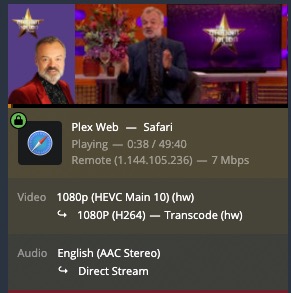
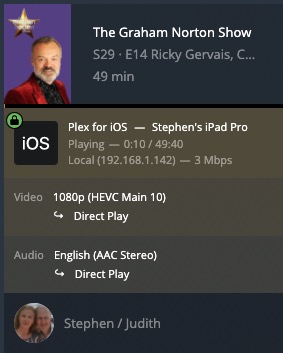
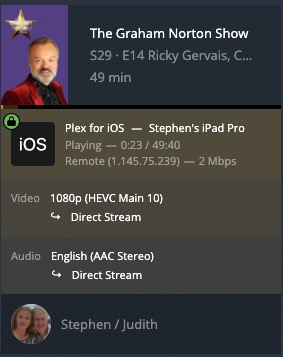
I can definitely trigger at least SOME HW transcoding (as confirmed in the Dashboard, see screenshots), either locally on a Desktop computer in a browser when trying to play HEVC, or if I “simulate” using an external device by putting my iPad on mobile data and again try and play HEVC file in a browser. Can’t definitively really say if the behaviour has changed since 1.24.x however, as usually it’s friends and family that are using it remotely/externally and they (and me) haven’t really been monitoring for regressions …
Well, I was on a fresh install of PMS v. 1.25.2.5319 (smb), which is apparently older than your build (although it was the latest just 3 weeks ago). Maybe the newer revs are working.
My PMS at that version went completely TU, so that’s when I decided to downgrade. I’m in day 3 of 4 of Plex rebuilding. Tomorrow it should settle down, and then in a few weeks we’ll see if she’s still stable and transcoding properly. So far so good.
Not sure what that would prove but …
I assume you meant the iOS/iPadOS App?
I’m using an iPad as my “Player” with latest Testflight Plex App v7.28 (1917)
Locally on Wi-Fi on same network as PMS that file is Direct Play
Remotely on mobile data that file is Direct Stream
Does anyone know the trick to get the downgrade to work. I am still on Android 9 and want back to 1.24. Currently, I am on 1.25.3.5385. I keep getting the below error:
Hello,
It’s been more than two months that Plex Media Server is completely broken on Nvidia Shield. And you say that you don’t know when it will coming back to normal.
I paid Plex Pass to use Hardware Acceleration and it’s not working for more than two months.
So now I have to ask for a refund because I paid for something that I no longer available.
How can I talk support so ask for refund?
Thank you.
Just so you’re aware the nvidia shield has always had a special partnership with Plex and hardware transcoding was always included/free. You didn’t need to pay. This is not an individualized support channel but a forum so you’ll have to email support for refunds questions. Also, you can always revert to the previous shield experience and be up and running. We all feel your frustration and I’m sure the Plex employees are working diligently to resolve this.
Really? I was under the impression I needed Plex Pass (which I don’t have) in order to have hardware transcoding. You’re saying the shield, when working as intended, is supposed to have that functional by default without any extra steps? I have the 2019 Shield Pro versions, by the way.