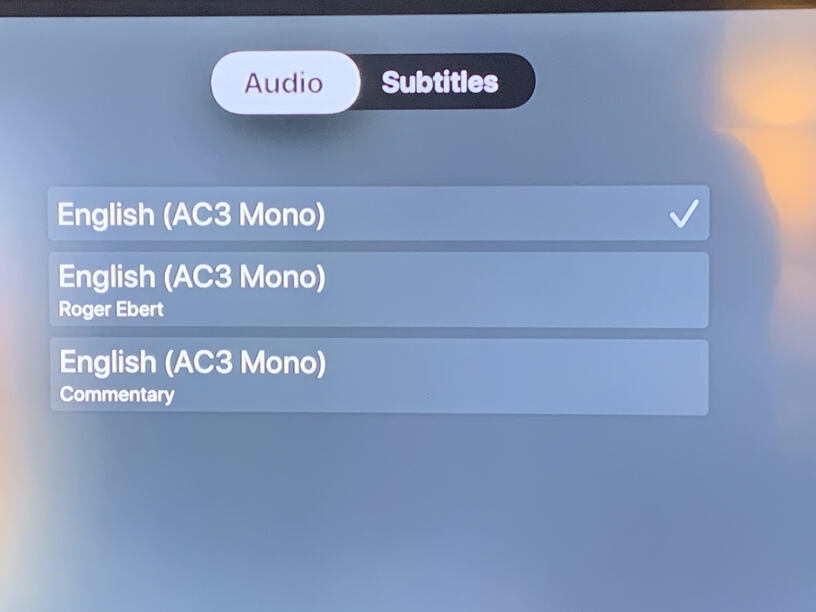
This should have been done by now. Plex is so good at usability and excellent user presentation. This is a basic request. Why would it be ignored.
Hey I have this great tool I use for movies. I want to show it off to my friends. Hey friends can you all take a bathroom break while I figure out which friggin audio track and which friggin subtitle track we need since all Plex will let me do is basic trial and error.
Seriously, it’s ridiculous that this issue still remains all these years later - literally everything else I throw my media at can read the labels, even my Blu-Ray player with MKVs. It’s shameful.
It’s not that minor. It might seem so, but there’s actually a lot of word involved, not just by 1 client. This would affect all clients and all servers. With all the platforms involved, getting features implemented is not easy even by an employee.
While it’s true that you would have to add it to every client, that’s not something you have to do all at once. Plex has already shown that feature parity on all clients really isn’t that important to them. So there’s no reason they can’t add the feature and bring it out as they update individual clients down the line. The journey of a thousand miles begins with a single step.
And that first step is to get Plex Media Server to read the track names… Oh wait, it already does.
Codec FLAC
Channels 6
Bitrate 1099 kbps
Language 日本語
Audio Channel Layout 5.1(side)
Bit Depth 16
Sampling Rate 48000 Hz
Title FLAC 5.1  <-------------------------- labeled separately
Display Title 日本語 (FLAC 5.1)

Codec FLAC
Channels 2
Bitrate 549 kbps
Language 日本語
Audio Channel Layout stereo
Bit Depth 16
Sampling Rate 48000 Hz
Title FLAC Stereo  <-------------------------- labeled separately
Display Title 日本語 (FLAC Stereo)

Codec ASS
Language English
Title Tezu (unedited)  <-------------------------- subber
Display Title English (ASS)

Codec ASS
Language English
Title Terra (Tezu+TL Check+Editing)  <---------- derivative subtitle job
Display Title English (ASS)
The next step would be to have one or two clients Plex has very close development control over add the ability. Like the web client, or PMP/Plex apps. That might be a little work.
Except, someone already figured that out, too.
Now the next step would be to start rolling it out to other clients as you update them. Might be best to roll it into a major UI improvement. I wonder when the last time Plex did one of those.
Lastly, we do have to admit that it might take a little time to get all this rolled out to all platforms. How long you think that might take? I mean we only sprang this request on you during the last presidential administration. Shall we give it a full 10 years?
You’re right. Bad example. I’ll use one of my own remuxes.
Codec FLAC
Channels 6
Bitrate 1099 kbps
Language 日本語
Audio Channel Layout 5.1(side)
Bit Depth 16
Sampling Rate 48000 Hz
Title FLAC 5.1  <-------------------------- labeled separately
Display Title 日本語 (FLAC 5.1)

Codec FLAC
Channels 2
Bitrate 549 kbps
Language 日本語
Audio Channel Layout stereo
Bit Depth 16
Sampling Rate 48000 Hz
Title FLAC Stereo  <-------------------------- labeled separately
Display Title 日本語 (FLAC Stereo)

Codec ASS
Language English
Title Tezu (unedited)  <-------------------------- subber
Display Title English (ASS)

Codec ASS
Language English
Title Terra (Tezu+TL Check+Editing)  <---------- derivative subtitle job
Display Title English (ASS)
My point still stands. Plex can already read the labels.
I’ll go edit my last post to fix that.
That you only replied to that specific mistake did not go unnoticed, btw.
I was waiting to hear how, after what would be considered an eon of time in modern app development, and the groundwork already in place, Plex is not able to implement this feature but still has time to:
Redo their whole UI – on all (?) clients.
Release a new mobile music app.
work out multiple streaming-content partnerships, and
add that feature to most of their clients instead.
I’m not on the development team so I’m not involved in implementing features.
Well yeah after all the screaming we got for trying out the other interface, we had to do something. Also, these changes were needed to allow implementing other features like the content sharing form your point 3.
That was the bosses pet project. You tell him not to work on stuff.
So is this a iOS thing only, when I look on my iPad I see the full name of the audio track that I set, for example Audio Commentary by xxx. But can’t see this meta data on my Nvidia Shield or Android Mobile device.
I confirmed that it is an iOS only feature. It’s something the app has had for a while but it’s never been fully finished since there is no spec in Plex for this feature. What you see is what you get until this becomes a feature for all Plex clients.