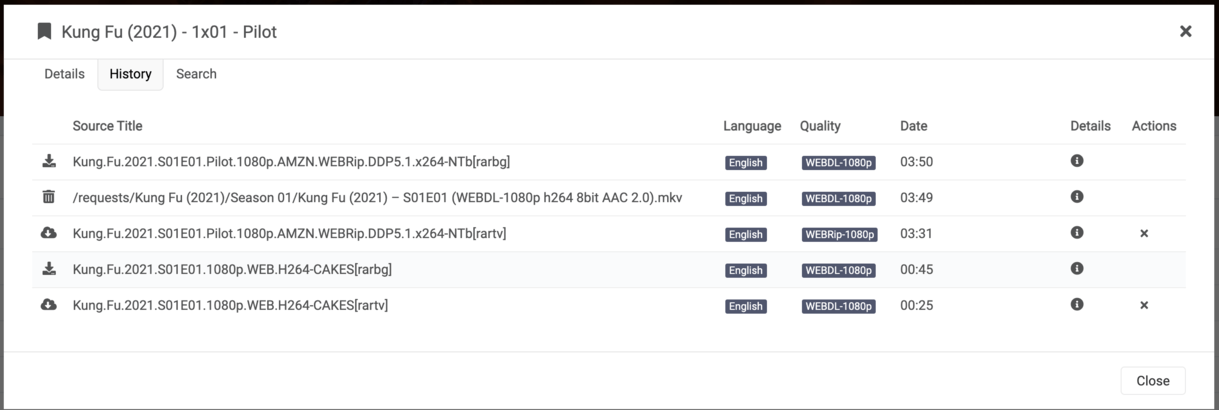
@sa2000, thanks for the reply,
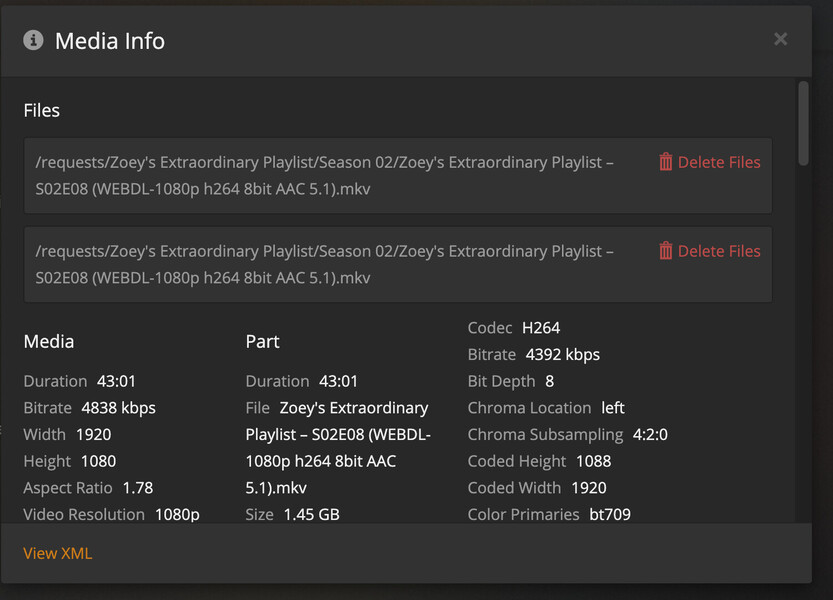
I’ll use another example to clarify, Zoey’s Extraordinary Playlist/Season 02/Zoey’s Extraordinary Playlist – S02E08
Here is Plex XML file under “Get Info”. You can see this filename (identical) appears twice, each with separate Media id:
This XML file does not appear to have any style information associated with it. The document tree is shown below.
<MediaContainer size="1" allowSync="1" identifier="com.plexapp.plugins.library" librarySectionID="7" librarySectionTitle="Requests" librarySectionUUID="431013a7-39d3-47c7-b7c7-c6bbde5782a1" mediaTagPrefix="/system/bundle/media/flags/" mediaTagVersion="1617650286">
<Video ratingKey="25958" key="/library/metadata/25958" parentRatingKey="24733" grandparentRatingKey="24732" guid="com.plexapp.agents.thetvdb://363815/2/8?lang=en" parentGuid="com.plexapp.agents.thetvdb://363815/2?lang=en" grandparentGuid="com.plexapp.agents.thetvdb://363815?lang=en" type="episode" title="Zoey's Extraordinary Birthday" grandparentKey="/library/metadata/24732" parentKey="/library/metadata/24733" librarySectionTitle="Requests" librarySectionID="7" librarySectionKey="/library/sections/7" grandparentTitle="Zoey's Extraordinary Playlist" parentTitle="Season 2" contentRating="TV-14" summary="It's Zoey's 30th birthday, but before she can celebrate properly she must confront her unresolved feelings for the men in her life." index="8" parentIndex="2" year="2021" thumb="/library/metadata/25958/thumb/1617589651" art="/library/metadata/24732/art/1617589651" parentThumb="/library/metadata/24733/thumb/1616986171" grandparentThumb="/library/metadata/24732/thumb/1617589651" grandparentArt="/library/metadata/24732/art/1617589651" duration="2581653" originallyAvailableAt="2021-04-04" addedAt="1617589611" updatedAt="1617589651">
<Media id="46836" duration="2581653" bitrate="4838" width="1920" height="1080" aspectRatio="1.78" audioChannels="6" audioCodec="aac" videoCodec="h264" videoResolution="1080" container="mkv" videoFrameRate="24p" audioProfile="lc" videoProfile="high">
<Part accessible="1" exists="1" id="57253" key="/library/parts/57253/1617589544/file.mkv" duration="2581653" file="/requests/Zoey's Extraordinary Playlist/Season 02/Zoey's Extraordinary Playlist – S02E08 (WEBDL-1080p h264 8bit AAC 5.1).mkv" size="1562036332" audioProfile="lc" container="mkv" deepAnalysisVersion="4" indexes="sd" requiredBandwidths="5849,5655,5159,5159,5159,5159,5159,5159" videoProfile="high">
<Stream id="205762" streamType="1" default="1" codec="h264" index="0" bitrate="4392" bitDepth="8" chromaLocation="left" chromaSubsampling="4:2:0" codedHeight="1088" codedWidth="1920" colorPrimaries="bt709" colorRange="tv" colorSpace="bt709" colorTrc="bt709" frameRate="23.976" hasScalingMatrix="0" height="1080" level="40" profile="high" refFrames="4" requiredBandwidths="5404,5209,4718,4718,4718,4718,4718,4718" scanType="progressive" width="1920" displayTitle="1080p (H.264)" extendedDisplayTitle="1080p (H.264)"> </Stream>
<Stream id="205763" streamType="2" selected="1" default="1" codec="aac" index="1" channels="6" bitrate="445" language="English" languageCode="eng" audioChannelLayout="5.1" profile="lc" requiredBandwidths="445,445,445,445,445,445,445,445" samplingRate="48000" displayTitle="English (AAC 5.1)" extendedDisplayTitle="English (AAC 5.1)"> </Stream>
<Stream id="205764" streamType="3" selected="1" codec="srt" index="2" bitrate="0" language="English" languageCode="eng" requiredBandwidths="1,1,1,1,1,1,1,1" displayTitle="English (SRT)" extendedDisplayTitle="English (SRT)"> </Stream>
</Part>
</Media>
<Media id="46837" duration="2581653" bitrate="4838" width="1920" height="1080" aspectRatio="1.78" audioChannels="6" audioCodec="aac" videoCodec="h264" videoResolution="1080" container="mkv" videoFrameRate="24p" audioProfile="lc" videoProfile="high">
<Part accessible="1" exists="1" id="57254" key="/library/parts/57254/1617589544/file.mkv" duration="2581653" file="/requests/Zoey's Extraordinary Playlist/Season 02/Zoey's Extraordinary Playlist – S02E08 (WEBDL-1080p h264 8bit AAC 5.1).mkv" size="1562036332" audioProfile="lc" container="mkv" deepAnalysisVersion="4" indexes="sd" requiredBandwidths="5849,5655,5159,5159,5159,5159,5159,5159" videoProfile="high">
<Stream id="205759" streamType="1" default="1" codec="h264" index="0" bitrate="4392" bitDepth="8" chromaLocation="left" chromaSubsampling="4:2:0" codedHeight="1088" codedWidth="1920" colorPrimaries="bt709" colorRange="tv" colorSpace="bt709" colorTrc="bt709" frameRate="23.976" hasScalingMatrix="0" height="1080" level="40" profile="high" refFrames="4" requiredBandwidths="5404,5209,4718,4718,4718,4718,4718,4718" scanType="progressive" width="1920" displayTitle="1080p (H.264)" extendedDisplayTitle="1080p (H.264)"> </Stream>
<Stream id="205760" streamType="2" selected="1" default="1" codec="aac" index="1" channels="6" bitrate="445" language="English" languageCode="eng" audioChannelLayout="5.1" profile="lc" requiredBandwidths="445,445,445,445,445,445,445,445" samplingRate="48000" displayTitle="English (AAC 5.1)" extendedDisplayTitle="English (AAC 5.1)"> </Stream>
<Stream id="205761" streamType="3" selected="1" codec="srt" index="2" bitrate="0" language="English" languageCode="eng" requiredBandwidths="1,1,1,1,1,1,1,1" displayTitle="English (SRT)" extendedDisplayTitle="English (SRT)"> </Stream>
</Part>
</Media>
<Extras size="0"> </Extras>
<Related> </Related>
</Video>
</MediaContainer>
And here is the directory listing for this Series/Season, notice there is only one copy:
Docker# ll /Requests/Zoey\'s\ Extraordinary\ Playlist/Season\ 02/
total 16G
drwxrwxrwx+ 1 root root 1.4K Apr  5 05:07  @eaDir
drwxrwxr-x  1 root root 2.2K Apr  4 21:26  .
-rw-rw-r--  1 root root 1.5G Apr  4 21:25 'Zoey'\''s Extraordinary Playlist – S02E08 (WEBDL-1080p h264 8bit AAC 5.1).mkv'
-rw-rw-r--  1 root root 2.9G Mar 30 03:56 'Zoey'\''s Extraordinary Playlist – S02E07 (WEBDL-1080p x264 8bit EAC3 5.1).mkv'
-rw-rw-r--  1 root root  55K Feb 15 12:34 'Zoey'\''s Extraordinary Playlist – S02E06 (WEBDL-1080p h264 8bit AAC 5.1).en.srt'
-rw-rw-r--  1 root root 1.3G Feb  9 21:12 'Zoey'\''s Extraordinary Playlist – S02E06 (WEBDL-1080p h264 8bit AAC 5.1).mkv'
-rw-rw-r--  1 root root  58K Feb  6 21:23 'Zoey'\''s Extraordinary Playlist – S02E05 (WEBDL-1080p h264 8bit AAC 5.1).en.srt'
-rw-rw-r--  1 root root 1.4G Feb  2 21:02 'Zoey'\''s Extraordinary Playlist – S02E05 (WEBDL-1080p h264 8bit AAC 5.1).mkv'
-rw-rw-r--  1 root root  52K Feb  1 19:16 'Zoey'\''s Extraordinary Playlist – S02E04 (WEBDL-1080p x264 8bit EAC3 5.1).en.srt'
-rw-rw-r--  1 root root 3.1G Jan 27 06:45 'Zoey'\''s Extraordinary Playlist – S02E04 (WEBDL-1080p x264 8bit EAC3 5.1).mkv'
-rw-rw-r--  1 root root  54K Jan 22 19:27 'Zoey'\''s Extraordinary Playlist – S02E03 (WEBDL-1080p h264 8bit AAC 5.1).en.srt'
-rw-rw-r--  1 root root  53K Jan 20 11:47 'Zoey'\''s Extraordinary Playlist – S02E02 (WEBDL-1080p h264 8bit AAC 5.1).en.srt'
-rw-rw-r--  1 root root 1.2G Jan 19 22:11 'Zoey'\''s Extraordinary Playlist – S02E03 (WEBDL-1080p h264 8bit AAC 5.1).mkv'
-rw-rw-r--  1 root root 1.4G Jan 12 23:34 'Zoey'\''s Extraordinary Playlist – S02E02 (WEBDL-1080p h264 8bit AAC 5.1).mkv'
-rw-rw-r--  1 root root  50K Jan 12 00:30 'Zoey'\''s Extraordinary Playlist – S02E01 (WEBDL-1080p x264 8bit EAC3 5.1).en.srt'
drwxrwxr-x  1 root root   36 Jan  8 03:56  ..
-rw-rw-r--  1 root root 3.0G Jan  7 23:23 'Zoey'\''s Extraordinary Playlist – S02E01 (WEBDL-1080p x264 8bit EAC3 5.1).mkv'
root@Synology:/Docker#