I don’t know if it’s related but I see that you are also downloading from a remote location. I can’t really try it myself but maybe if you are in the local network it makes a difference?
Thanks for noticing that, I looked into my network environment and set my local network range in the plex server network setting “Lan Networks” as plex is running in docker.
Now its showing as LAN, but no change to the experience.
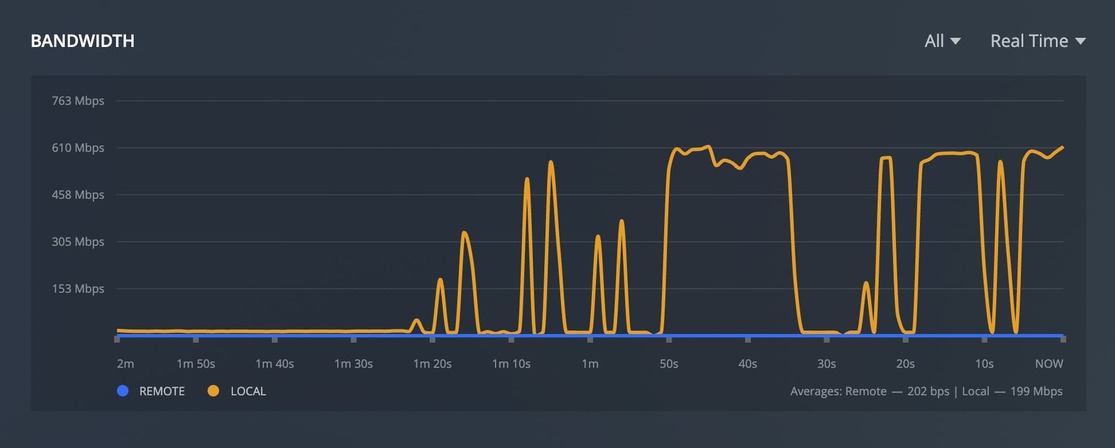
@anon18523487 I captured logs again. I started a download again, first few minutes with app open, and second few minutes with app in background.
Plex Media Server Logs_2021-11-24_21-39-16.zip (1.7 MB)
PlexDebugInfo-timpotter-7.25-1615 (2021-11-24 21.39.36 -0800).zip (2.7 MB)
One thing that I noticed in the dashboard when streaming something is this:
(the screenshot is while my phone is streaming, but its the same message on all devices).

Any chance this bandwidth restriction is affecting the download when the app is active? I don’t see any options to control that.
What? That is not a Plex message. It’s not even a complete sentence. 
It’s a tooltip from the plex server, it’s describing what I’m highlighting. Sorry my mouse pointer isn’t showing in the screenshot.
Ah, I never noticed that before.
That is the amount of bandwidth being used to stream. That doesn’t apply for Downloads, or at least it shouldn’t. We are looking into this.
Edit - If it is a bandwidth limitation, that shouldn’t change if the app is backgrounded.
As well as the DNS rebinding issue I hope?
Can I ask. Is the already set cutoff date for the completely broken “Downloads” feature becoming the default over “Downloads & Sync” completely static despite being so broken?
I hesitate to use the words “I don’t care” on these forums in case I get another 30 day ban.
But honestly I don’t really care at least while it’s so broken. Infuse exists if I really wanna use something that works to download to my iPhone for while I’m offline at work.
TL;DR
Does Plex ever get to a point when announced set dates for feature changes actually changes after that when so much stuff is broken.
When i attempt download music using Plex for Android i have same issue, but Plexamp works fine. I’m using Plex Media server 1.25.0.5246 on Debian and Plex for Android 8.26.2.29389 on a Moto g7 Power with Android 11 (LineageOS). Here are my logs
Plex Media Server Logs_2021-11-30_09-32-10.zip (559.8 KB)
plex-log-asgardius.zip (5.6 MB)
So I had the same issues, after a reinstall of the app it prompted me to allow access to local network. after allowing this things are downloading at full speed.
Ah, I’m able to reproduce this slowness doing that. Interesting that Downloads still works, just slower. Thanks, I will bring this up with the team.
Edit - Actually, it’s about the same speed for me. Needs more testing.
1 Like
+1 for me too. I’m using the new ‘downloads’ features and it’s STUPID slow. Was much much MUCH faster with the old sync. I’m now seeing my downloads cap out at about 5mbps on my Android Samsung Tab A7. I can share my logs, but don’t care to post them publicly.

Can confirm I’m having the same issue in iOS. Tested it on the windows app and it was super fast downloading content.
iOS app moves at a glacial pace.
Can you check if the app has the local network permission enabled?
Already done and yes it does 
Ok, so there goes that idea. Still don’t know what’s causing this slowness.
I’m also having ridiculously slow downloads… although it happens with audio transcoding (flac to opus ogg).
It’s like… it takes sometimes over 10 minutes for a 5 minute track.
The transcoding appears to be the issue, as whenever it appears in the dashboard it really what seems to take a while. And for some reason Plex refuses to use more than 2-3% of the CPU for the task, even though I’m not doing anything else on the server.
I’m using Plex with Docker on Synology
EDIT: Tried going back to sync. My whole music album got synced in about a minute, with the CPU expectedly being at 20%+ the whole time. Whatever is being done with downloads feature only seem to work for the first couple songs before it gets really, really slow.
Maybe. The slowness of downloads is either to a memory card or internal storage. Samsung S20 FE 5G.
@bmynars Please see my comment at the bottom of this other thread. If you don’t mind, try that out and see if that helps. Update on new Downloads feature - #81 by MovieFan.Plex
I replied to you in the other thread. However, I have to say that this patch made things a bit worse. At least before my workaround I talked about in the other thread worked every time. Now, it’s a hit a and miss. That’s regression in my book.
It looks like the issue with SD cards is due to an SDK change made by Google in the name of security. They state that using the Media Store API is much faster than the file path access. Every developer started getting slow SD Card performance using file path access starting with Android 11. Android 12 will not improve the situation. Apparently, all file path access is being diverted through a very slow Java security module designed to be quickly modifiable by Google in order to combat security threats. End result: depending on the exact access pattern of the software, developers are seeing between 1/2 and 1/10th of performance they saw under Android 10.
Downloads to an SD card will be slow unless the code is modified to use the Media Store API.
Creating an internal write cache in order to Increase the size of chucks saved to the SD Card by 16x might improve performance a little by reducing the number of calls to the slow API.
