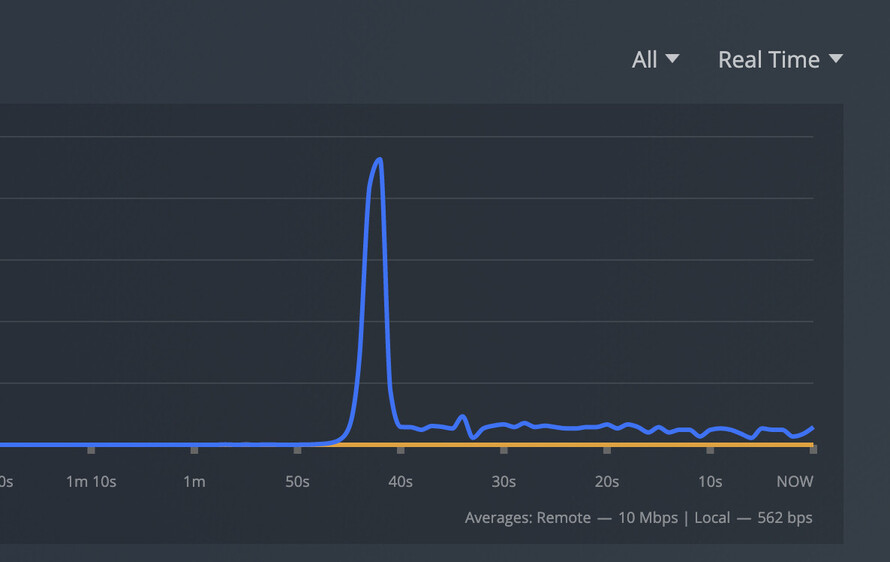
I also tried restarting and making sure latest plex server version is running, and reinstalling ios app and no changes in speed.
There is a speed spike at the beginning of the app starting, then stabilizes at <10Mbps. I also tried remote (still on a gigabit connection to the server) and the download speed seemed slower as shown in this screenshot (two episodes in process of downloading)
I just wanted to update that I deleted all my synced movies and uninstalled/reinstalled the app. That seems to have solved all my issues. I just did a test run and downloaded a movie and it went rather fast. This is on a new iPad.
Interesting. I had done that as well (deleted app so also deleted old sync’ed content).
I wonder if having other clients with legacy sync’ed content could be the culprit. I’m not sure how to check the server to see if other clients still have legacy synced content.
Having old synced content should not matter. However, if you have Synced smart playlists or “next unwatched episodes”, anything that will try to update, these may cause issues.
Feels like the new Downloads is a total mess.
I tried on both my iPhone and iPad (running the latest version of the OS and app on both), and when I set something to download with some rules (only downloading 3 unwatched episodes in a season) overnight, it says “download failed on 2 items” and the whole process just hangs. Turns out, it never downloaded anything over the night since it says 0.0KB was downloaded on the display.
I’ll probably keep using the old Sync for now until the this whole situation is fixed… (The old sync still works wonderfully)
Thanks, I switched over to linuxserver docker image and forgot to adjust the user and group ID values. Thats fixed now, I’ve confirmed the WARN message doesn’t show anymore.
It seems the download speed went up just slightly to ~14Mbps.
I am also experiencing the same slowness on IOS using the new download feature. I tried the uninstall/install of the apps and did not notice anything.
For me, it was awfully slow. I am downloading a mp3 playlist of about 1500 titles. It was like one song every 2-3 minutes, even after the fresh install.
So I have restarted the server and boom, I peaked at 70Mbp/s. But after a while, I was down to 10Mbp/s (still better than before but slow). So I have restarted the server again and the performance went up again. After less than 10 minutes, I’m back at 10Mbp/s and the flow is still decreasing.
The server can stream 4K movies, so it’s clearly not a performance issue.
Update: I ended up restarting the server every 15 minutes to be able to download the full playlist.
Hello I’m having the same issue with my Ipad mini. None of the workarounds mentioned above worked for me.
I just wanted to share something that I notice trying to find a solution.
When I download a show with the app in the foreground I’m stuck at 10mbs, but if I open another app and put plex in the background I can see the bandwidth go up to 200-300mbs in the dashboard.
I can share logs if needed, but I don’t really know what to send for them to be useful.
Sorry for my delay, just got back to fetch a new log set.
Restarted plex server (in case you want to find the time at which I started a download a couple minutes after restarting plex)
Wow, that makes absolutely no sense why it would do that. Please send me the ios and server logs when you see the differences in speed so I can check if the app is doing something differently.