I can work with you if you need, I have 500mb down 100mb up, send me a PM with instructions of what you need me to do.
Unfortunately no.
Actually, there is a very weird “kinda of” workaround that was already mentioned here, while downloading if you put Plex app into the background and open another app (Youtube is a good example because it prevents the device going to sleep), suddenly your device with start downloading at much hight speeds, spiking to the upload limit of the server, for example in my case, I can go from 8/10mbps with the Plex app on the foreground to around 40mbps with spikes of 96/98mbps (roughly the server network upload bandwidth limit), with speeds up the download considerably, although the speed is highly unstable as you can see in the graph bellow, while during streaming the speed is very constant at 80/90mbps
With Plex on foreground:

With Plex on background:


Thanks. I had forgotten about that workaround. I was not able to confirm it worked.
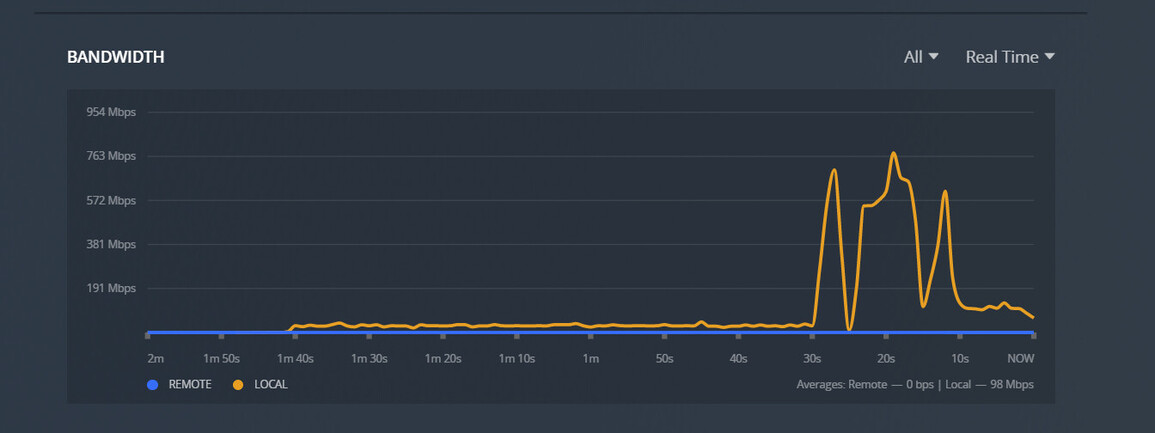
@liamb , I’m sorry but your issue doesn’t look the same as for example, mine… In my case, I only have the slow downloads on remote, if I download local (in the same network as the server) I get pretty much the full Gigabit connection, or as much as the ipad, or other device can muster from the wireless signal (usually around 800/900mbps), I only have this issue on remote, when in another network outside the server network. You are having this problem while beeing local?
@serial_killer69 most of the others in this thread is similar to @liamb where the issue is also happening locally including myself.
I presume remote is being throttled for you.
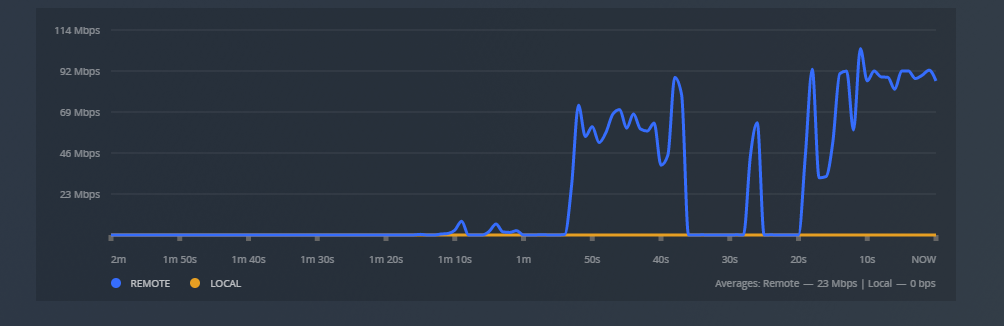
@timpotter yep, only Remote, and only downloads, streaming in remote will use the full 100mpbs uplink limit on the server side…
Speed while streaming a nice 4K HDR content:
hello,
i have been having some speed performance issues with the downloads feature as well and, after it took me several hours to download one single music album, i decided to seek help on the forum.
i use windows 10, and i was downloading mainly music to the SD card of my android phone (the app has been recently downloaded). this is the data for my setup and the logs:
Server Version#: 1.25.3.5409
Android Version#: 8.28.0.30077
Plex Media Server Logs_2022-01-26_22-04-03.zip (5.7 MB)
since i am not knowledgeable on the subject, if there is anything else that i should provide, kindly let me know. thanks!
I believe this threads focus is on iOS only. There are a number of references in the thread to a separate issue with Android and SD cards. Seems like it is a known issue:
And will have to be fixed separately based on this comment:
1 Like
hello,
thanks for the info, i missed the thread being iOS only.
if the download to sd card in android is a separate known topic which will be addressed shortly, then i will just wait for its resolution.
regards,
Still waiting for updates on this. In the meantime, plex is useless on mobile if you wanna take it on the airplace/train where network coverage is crap. But hey, at least you got us to pay for plex pass!
2 Likes
Any updates on faster speeds on iOS?
There was another thread on the subject where I posted my thoughts on this so please, do not downvote me for “cross posting” - this is unintentional.
Downloading speed was only one of many frustrating little things that pushed me over the edge the other day and in search of alternatives for my android phone, I found a little app dedicated to music: Pulsar. It is Android Auto friendly and does everything that Plex does not. I’ve been using Plex since its early days and I am a lifetime Plex pass user so no, I am not software hopping as I have a vested interest in Plex. However,
- Download/syncing speeds have been a long time a problem which never got adequately resolved and venting on various boards/threads no longer served any purpose.
- Plex on Android Auto is unreliable. It might be Plex on Android Auto but at this point I no longer care.
- Unplugging Plex from my car (Android Auto) results in losing “resume” function to pick up where I left off.
- Inability to simply play my content without being forced to pick an artist or album is simply ridiculous. I just want to randomly play what I have, is it so hard to ask? This is in Android Auto content, mind you.
So, after putting Pulsar on my phone and getting all my audio library on it without any problems, unlike Plex, al the things that Plex could not do are done without any issues with Pulsar.
So this is the end of my journey with Plex on Android. I am tired of waiting.
3 Likes
For music Plexamp works perfectly fine.
Think the issue ppl are having here is downloading video files and mostly iOS unless I’m very much mistaken.
Thanks for the suggestion though!
Nope. No video downloading, just music (large library).
So is there any working fix for this problem?
I am trying to download episodes from my PC Plex server to my Android phone’s PLEX app.
This is being done on the local home Wifi, not Cell, so I am not roaming or Remote access.
There is no Transcoding happening, I am trying to download in original format.
Episode is only 200MB, but it takes hours, and never finishes.
It is not a Wifi/Networking issue, I have plenty of speed, and playing the episode from my server to my Android phone works fine. But when I select a show and ask it to download, I feel like it’s working at 56Kb transfer speed, and after an hour or so, it just gives up.
Sync used to work just fine, transferring the same show in minutes, but now with this Download function, nothing works. I’m resorting to plugging in a cable and transferring the shows manually (which takes seconds).
I have uninstalled and reinstalled the app on my phone, and the server is up to date on it’s version
Is there any fixes for this problem? Anything for sure might fix this?
I find this new Download function useless now, so I can’t preload some shows to watch when I’m offline, without doing it manually
“There, I fixed it!”
Plex was acting very funny suddenly today.
First it was taking hours to Download to my Android phone, on my local Wifi network.
Then I noticed that I could not play on any Plex Device in the home (2 Roku sticks, Android phone), it would only load the show to 13% and then sit there forever.
What the heck was going on?
After several searches for similar cases, one easy solution someone said was "restart PC which has the Plex server on, because something with the Transcoder wasn’t working (hint, it only loading to 13%). I know I wasn’t transcoding anything, as I had Direct Play/Direct Stream, and my playback settings was for Original bitrate, so there shouldn’t have been any conversion happening (and when I check the dashboard when playing, there is never any Transcoding happening). I had stopped and restarted the Plex Server a few times trying different things, with no luck
But I figured it can’t hurt to restart the whole PC (I usually do it at least once a week anyways), so I did that, and VOILA! Everything is working perfectly again. All Clients are now playing normally, and when I try to download in a client from the Server, it once again takes only 5-10 seconds per show, instead of hours and failing.
The power of the internet fixes it again, and all I needed was a reboot.
Thanks everyone, even though I found the answer myself
Bye
Ah, glad that fixed it for you, but a server estate was one of the first solutions I’ve tried. Sadly no dice !
