Refresh rate switching is already off. And yes, we’re throttled to 720p and 2Mbps on the server side, I believe.
Yep. OK.
Ask Scotty to beam you over there and crank up the volume…lol
1 Like
Not without logs.
Unfortunately he’s separated from his logs by some distance.
Well, I can download the logs remotely through the Plex settings. Will these help? I’ve got my laptop here so I can tap in and adjust settings on the server itself. I came prepared. 
Oh yea - @anon18523487 can’t wait to see them.

… and I am The Idiot’s King - 'cause you can, in fact, open up the throttle in that way as well - duh.
So - Open up the throttle. Correctly Estimate your upload bandwidth and enter that. Then Throttle a single stream, or don’t, at a rate that’ll give you plenty to fit your material - Plus 25%. We can adjust Remote Quality at the app. <—during a break in the Family Out Weekend.
All right, so here’s where we’re at.
On the server settings:
- I’ve already set the upload speed to 10 Mbps. That’s been that way for a while.
- Based on what you’re saying here, I changed the “Limit remote stream bitrate” to “Original (No Limit)”.
I just ran a speed test here, and we’re at 1.98 Mbps download/0.35 Mbps upload right now. Pretty doggone slow, but hasn’t been a problem for any Prime streaming or YouTube streaming.
In the Fire Stick app:
- I made sure “Adjust automatically” is on.
- I set the streaming limit to “0.7 Mbps 320p”. Again, quality isn’t necessarily a concern here as long as it runs smoothly, even though 1080p streams just fine in other apps.
Results:
- I’ve been testing this with the same episode of Friends now, which is a 720p file.
- This time, it started up and the picture froze again about 45-60 seconds into the stream while the audio continued. The picture garbled pretty badly for another 30-45 seconds, and then recovered and played smoothly at the 320p quality for a few minutes.
- As I was writing this up, a few minutes into the stream, the whole stream has locked up. It’s frozen, including the audio, and has not recovered after several minutes.
shrug
Doesn’t make a lot of sense, does it?
I do wonder if those logs show anything…
Actually I need the log from the Fire TV. However, on a hotel WiFi, the device is isolated from the network so you won’t be able to grab the logs so easily.
You’ll need to get the Fire TV and a computer/laptop or phone onto the same network. So you’ll need to recreate the issue first on the hotel wifi, then connect to this other network to pull the logs.
Hmm. Okay. That’ll be tough right now. We’re back home from the trip, so no real way to reproduce the problem at the moment.
I’m traveling again for 10 days in a couple weeks. I guess I’ll have to check back then. Looks like I would need to pull the logs immediately after the error, according to Plex’s support page on pulling logs from the Fire TV Stick.
Just for the record, I did try to watch the same episode through my Android phone while on the hotel WiFi and had the same problems/behavior, so it doesn’t seem to be limited to the Fire Stick itself.
My aim is just to have the behavior be similar to what happens when streaming any other streaming app - have the server do the heavy lifting and adjust as needed to account for speed. So if the speed is only 1Mbps, the server downgrades the quality of the stream and sends out one that the limited connection can handle. I know it’s a completely different setup from, say, Amazon Prime streaming, but even if we can just manually crank down the stream enough to send it through, I would think that would be fine (again, the quality of the stream doesn’t matter to me nearly as much as just the playing of it - I don’t need Plex to stream HD, but I just want it to stream, and that’s not happening right now, no matter what I do).
But if we need the Fire logs to do that, I’ll have to make myself a note to do so when we get on the road again later this month.
The app can do that. From your PMS logs it appeared that it was working. My guess on your issue is that the bandwidth available through the Hotel WiFi was not consistent. This caused the app to keep changing the speed, in some cases up, but when the connection slowed, it took a while or failed to adjust. Unfortunately, there is a max setting you can set to prevent the automatic adjustments from going too high.
I would recommend turning that off and leaving the quality setting at 0.7 Mbps.
Yeah I tried running without any limits on the server side and no dice.
The weird thing is that, despite two different trips to two different hotels with two different WiFi systems that ran at two different speeds… the behavior was exactly the same. It would run for a minute or so, then the image would freeze up and the audio would continue. And streaming from any other source worked fine - and during the second trip, had no problem streaming to 1080p through Prime.
So whatever it’s supposed to do and is set up to do… it’s not. Getting to the point where I should probably just give up trying to make Plex work on the road because it just won’t get there, for some reason, no matter the settings or what it’s advertised to do. I’m sure it’s a user error in here somewhere, but geez. I have a reasonable understanding of how this stuff works and I can’t solve this to save my life.
Thanks for the input anyway.
No, the settings I’m referring to are on the Plex for Fire TV app. Were you setting these in Plex Web for your server? Those are the settings for Plex Web, not the server, so that would have had 0 impact.
He knows what he’s setting.
We’ve been through that already.
Okay, so I’m out of state this time, and due to a combination of sharing a room with my kids and forgetting the remote for the Fire TV Stick, I’m trying to watch Plex on my laptop through Web. Despite a fantastic speed, the web player stopped and gave me the spinning circle after 26 seconds of playback. Here are the settings that popped up when I checked the video:
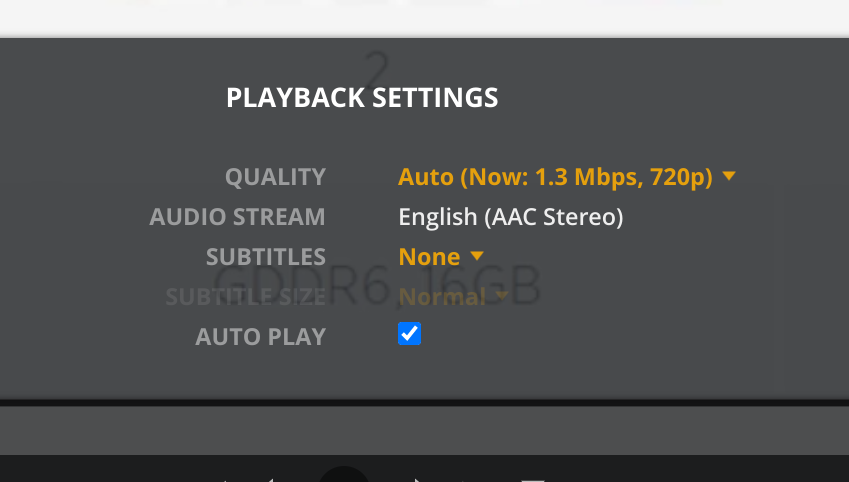
And here is my speed test results:

Sooooooo… shrug
Another interesting/confusing bit to me: I tried it again and it paused at exactly the same spot - but look at the progress bar. It looks like there’s plenty of buffer ahead of the current spot. Why would it pause indefinitely?

If it’s stopping at the exact same spot, that can often mean there is an issue with the file. Try another episode.
Nope, issues persist regardless of the video I try to watch.
Okay, fellas, I think I’ve hit on a combination that works.
My wife’s family has great internet speed and a Fire stick. During downtime on this trip, I slapped Plex on there and started fiddling with the settings more, since there were still quality issues.
Then, once I got it working, I set up similar settings on my Android phone, and I’ve been able to stream with zero buffering even on hotel WiFi throughout the remainder of this trip.
Here’s what I did:
- Turned off the automatic quality adjustment.
- Limited the quality to 720p at a high bitrate. On both devices, regardless of the video file, the freezing kicked in whenever I crossed over into 1080p.
- In the Android device app, I turned off the “play smaller files at full quality” setting.
Before I call this one solved, I’m curious as to why the 1080p would cause the hiccup. Most of my content is in 720p anyway, but limiting the quality is a little noticeable on the big screen.
On my phone, it’s been amazing, and I’m thrilled to have this as an option finally. It’s saved the vacation.
But is this just a hardware limitation?
This topic was automatically closed 90 days after the last reply. New replies are no longer allowed.
