Server Version#: 1.19.3.2852
This past weekend, I stayed in a hotel that had very slow WiFi (1-2Mbps max). I used my Fire Stick so that we could watch TV/movies. I attempted to stream via Plex, but could only get through the first 10ish seconds of a show before the screen would freeze (audio would keep going). I tried fiddling with the video quality to no avail, and turned on/off the automatic quality adjustment setting.
We wound up just streaming stuff from Prime, which worked flawlessly.
I have a pretty beefy server that can transcode 4 simultaneous streams with no problems. Nobody else was streaming at the time, and it was not 4K content.
We’re heading out to another hotel this weekend and I’d like to try again. What am I missing in the settings here that could help me get a watchable stream through Plex on my Fire stick? I posted this in Reddit and got a bunch of “bring a travel router”-type solutions. But I’m looking to just offload the heavy lifting onto the server so that a watchable, compressed stream can be sent to the stick.
Thanks!
i am guessing you are trying to use the plex app on the firestick. You need to adjust the stream quality setting on the server side, not the web player settings on the server side. Not sure what you have it set at now but i am guess it is set too high on the server side for the available bandwidth of where you are connecting from. You probably have to play with settings there and see which setting works best.
You hope this works - and so do I:
You adjust the ‘Remote Quality’ in the app to 2Mbps @ 720p.
‘Adjust Automatically’ is enabled - in the app.
This is what you hope happens:
The stream starts out transcoding, hopefully because the material you’re playing is bigger/fatter than that - right?
With Adjust Automatically ON, the transcoder will adjust the stream to fit the conditions and unless the WiFi fails all together the stream may get down so low it looks like Apollo 11 Live Moon Landing Footage - 1969 - but at least it should continue to play.
I have a friend with some superiorly crappy internet and it works like that for him.
It ain’t nice to look at sometimes, but it’s the best we can do until he… upgrades.
You can’t upgrade crappy Motel 6 WiFi - so that’ll have to do.
As far as Server Settings - there is only one: It may be beneficial, before you leave, to limit an individual stream (which will be you at the No-tell Motel) to 720 @ 2Mbps at Server/Settings/Remote Access. Here’s why:
Adjust Automatically ONLY works if the stream starts out in transcode. The transcoder can then adjust the stream according to the conditions.
If the stream starts out in Direct Play - no adjustments can be made and if the WiFi craps out - “Orange Wheel Keeps On Turnin’. Orange Proud Mary”… well you know the words…
1 Like
Thank you so much for the info!
I’m going to bet that this will work. I don’t care so much about how it looks - if it has to downgrade to cloudy, so be it. I just hate that it stops entirely.
I did see that my remote settings were not adjusted down on the server side, so I’ve set it at 3Mbps and 720. I have some remote users who have also had buffering problems so I’m wondering if this will be the secret sauce to fixing that problem as well.
I’ll report back after the weekend and see how it goes!
Thank you! Between your feedback and the other comment below, I think we’re onto something here. I knew there were settings that I must not have set up correctly, but we might be at a solution. I’ll check back after the weekend and let you know how it goes!
Super.
This could be the cure to having ‘other’ users with similar problems, but remember:
You shouldn’t needlessly throttle your guests if you don’t have to. You can throttle yourself if you have to.
Meaning:
If you put NO LIMIT on a stream at the server, but have your friends adjust their Remote Quality and turn on Adjust Automatically they can limit the stream to whatever works for them.
You can as well - and that will mean any friends who can Direct Play the material will (taking a lot of load off the server - so you can use it at the Motel) - and those that can’t, will eventually find their own ‘Sweet Spot’.
Does that make sense?
Hmmm. No dice. Everything is really snappy and we have a solid 3Mbps connection. Videos start instantly, but after about 30 seconds the video freezes and the audio continues. I don’t know?
Turn on Adjust Automatically?
Yeah, that’s on. I did manually drive the stream down to 0.7Mbps and so far that’s working. Maybe I just have to crank it down until it works. Don’t know why adjust automatically doesn’t seem to adjust enough.
The thing has to start in transcode or adjust automatically won’t work.
Display Information - ON
Enable New Player - OFF
Set the remote quality at 720@2mbps.
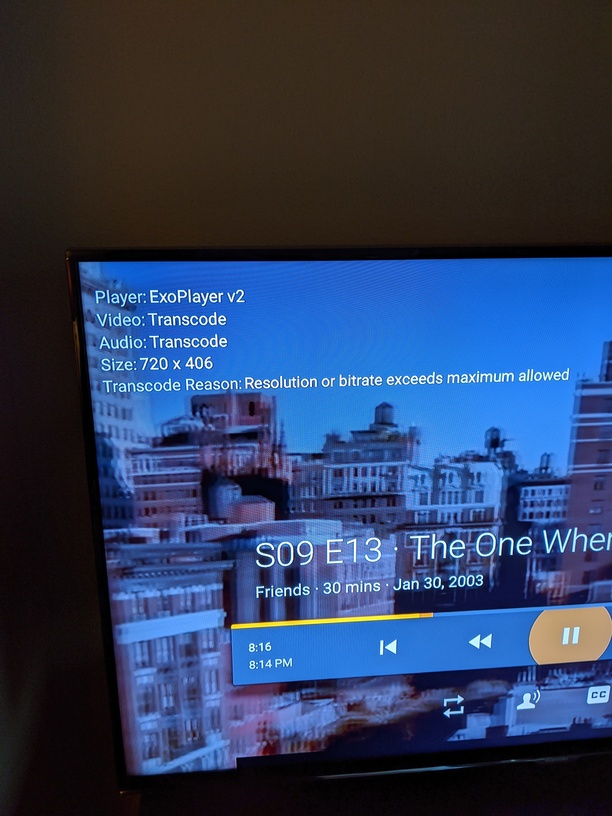
Restart the stream, bring up the OSD and read what it says about the stream.
I will a little later. Thanks so much for the help. Got it working for the wife, now taking my son to the arcade. I’ll check in later. 
1 Like
… let me talk to ‘the wife’… lol… no, no… enjoy yourself…

1 Like
Okay, here we go. Followed instructions. This is a 720p episode of Friends. The picture is frozen after a handful of seconds. Audio is still going.
Well - that must be some extra crappy wifi…lol
ADSL I would imagine…
We may have done all the damage we can do, but keep adjusting down and see if you can trickle something in to watch.
Or there’s always drunk mud wrestling on Tru-TV…
A big hit with your son, I’ll bet…
1 Like
What’s weird is right now the WiFi is getting 7Mbps down, 7 Mbps up. I would think that’s plenty to get a watchable stream. But now even cranking it back down manually isn’t working. It’s still freezing up on me. 
That’s odd.
We have exhausted the tricks in my bag - unfortunately.
And watching Parks and Rec through Amazon Prime is streaming flawlessly at 1080p
That’s okay, thanks for your time!
There’s something I’m overlooking.
I’m annoyed I don’t know what it is, but someone may happen upon us that’ll know.
Finger’s crossed.
Go to the app settings and turn off Refresh Rate Switching - if it’s on.
(shot in the dark - looking through my FireTV Settings - wondering)
You have things throttled back at the Server, right?
Let’s see if @bigwheel or @anon18523487 have any ideas.