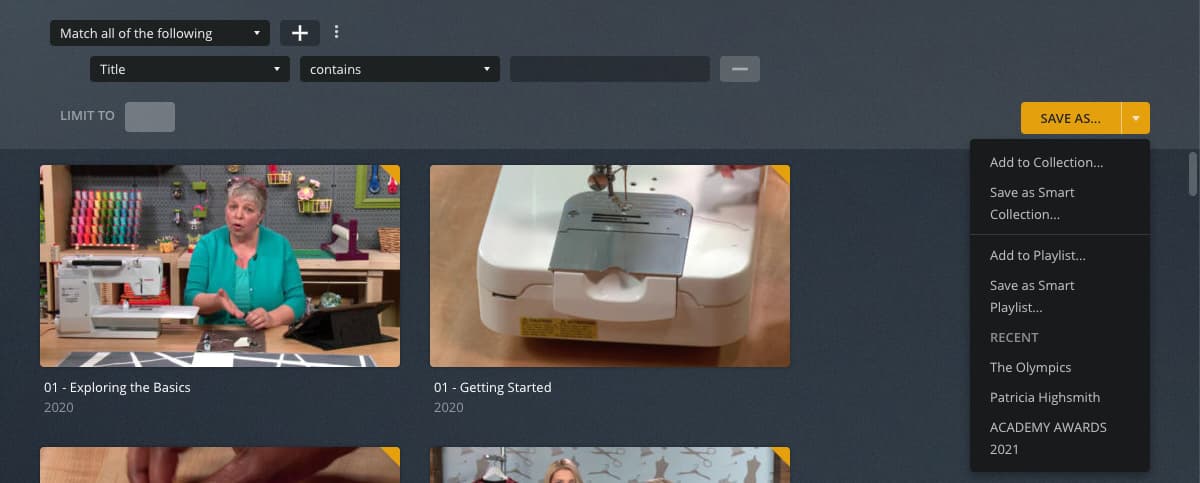
I do not see “Smart Collection” (nor “Smart Playlist”) from https://app.plex.tv/desktop/#!/ > Movies > A Movie > … (More) > Add to. I do see “Add to Collection…” and “Add to Playlist…”.
I am NOT using an IP address in the URL. I HAVE updated to the latest version. I HAVE logged-off, cleared cache, cookies, history, logged-on.
Sounds like you’re doing it correctly. You just need to name the collection. Then press create to finish. The tags section of the edit metadata will not display a tag under collection for that item as it is a “smart collection.” That being said make sure you’re using “create smart collection” and not “create smart playlist.” While similar function they are a bit different in usage.
Screenshot 1 - Result of clicking on Add to… icon
Screenshot 2 - Result of clicking on Create Smart Playlist option
Screenshot 3 - Result of clicking on SAVE AS button. Results in Create Collection dialog window
Screenshot 4 - Result of clicking on SAVE AS disclosure arrow instead of SAVE AS button. Results in multiple options window
Not necessarily a pretty way… I suppose the more obvious approach would be to trigger this from the advanced filter. However… given Create Smart Collection (and Create Smart Playlist) open exactly that, it appears that base is covered.
As for the sequence… that’s still working fine for me and after saving the new smart collection (as per your screenshot #3 + clicking Create), I’m getting my new collection stored as a smart collection.
Not sure about your screenshot #4 and what you mean with “clicking on SAVE AS disclosure arrow instead of SAVE AS button”
I wanted to create a Smart Playlist. I thought my screenshots clearly show what I originally posted about. One wants to create a Smart Playlist, but when clicking on Save As you don’t get to save the Smart Playlist - you get to save a Smart Collection. You can only save the Smart Playlist if you DON’T click on Save As… but DO click on the arrow - NOT INTUITIVE.
When you click Save As… it’s not giving you an option between Collection or Playlist, it’s defaulting to a Smart Collection. You are suggesting that by defaulting to Smart Collection rather than offering an option of Smart Collection vs Smart Playlist it’s not intuitive. Do I have that right?
I think you have a fair point… “save as” as a button typically provides options vs defaulting to a specific option. I think it might be useful if that entire button acted like clicking the down arrow perhaps?
Ok… finally got your point. This seems to be a super specific use case where you initiate the advanced filter through the Add to button on the library itself.
I typically build my Smart Collections using the filter at the library and then use the yellow Save As button shown here but I’ve always clicked the arrow on the button myself. I’ve never used the Add to button but I also never make playlists and I always equated that button to playlists.
It looks like if you use the Add to button it will prompt for what to use but if you just click Save as it defaults to a Smart Collection unless you click the little down arrow.
The Save As button doesn’t seem to show unless you use advanced filters.
The screenshot in the Smart Collections section of the Collections documentation kinda highlights the two different buttons but says hitting Save as and Add to should function the same.
Might be a small thing but it might be useful to have someone take a look at those kinda duplicated but not equitable UI\UX functions maybe? Or clean up the documentation to say that button defaults to Smart Collection?
 instead of “Save As…”