I have a several seasons of a show and it will sync pretty much all of them except for some and I have clicked update libraries and and it won’t touch the ones that need to be synced.
Please I need help with this issue.
You mean it won’t ‘match’, right?
‘Syncing’ is something else in Plex.
Please start by telling the file and folder names you used.
Maybe look up your tv show if it is listed at all at https://www.thetvdb.com/
Do you know https://support.plex.tv/articles/200220687-naming-series-season-based-tv-shows/ ?
I don’t know what you mean by match, but these are episodes of a TV show, South Park, and all the seasons and episodes are all there except for seasons 19 and 20, they only have one episode. The format is MKV and it’s set up like this for example, (101)Cartman Gets an ■■■■ Probe.
Yes, that is not supported by Plex. It may work for a while - until it is not.
Rename your files and folders as shown in the link I set above.
There is software like Filebot which can help with that.
Plex edited out one word of my post of the episode name, so this is confusing, what is not allowed? The word ■■■■ or the way I named my file? Also I changed the categories to ```
/Media
/Movies
movie content
/Music
music content
/TV Shows
television content
How do I clear everything in plex since I moved all my content.
I know the title of the episode 
And the censored word is not the issue.
The issue is the way you named it. It must follow the same schema like in the link above.
TV Shows/South Park/Season 01/South Park - S01E01 - Cartman gets an ■■■■ probe.mkv
If you moved everything, it is probably the best to erase the libraries in Plex and recreate them.
Thanks, so FileBot will rename the files to be Plex friendly?
Yes. I use it myself. Keep in mind to configure File it to use the Plex naming schema. Because by default it uses the Kodi style, which is similar, but not quite the same.
Will Filebot also rename the metadata as well or do I have to go into MKVToolNix to do that again?
Plex doesn’t care about meta data in MKV files. These are only an issue in MP4/m4v files. And I seem to remember that Filebot can take care of these as well.
You should be able to find out on their website.
Yeah that’s cool, I just like for the metadata to be correct.
Then, in theory they should already be correct in your files. The file name has nothing to do with embedded metadata.
There is no meta tag which needs to contain the file name.
Well if I"m going to rename them with Filebot, I want that name to match the metadata.
I downloaded Filebot, how do I select Plex mode?
I don’t understand I right click and it gives me this, and there is no Plex option there. https://imgur.com/a/hFUg7ZQ
Second item from the bottom ‘Edit Format’
I don’t understand what I am supposed to do here, what option to I pick?
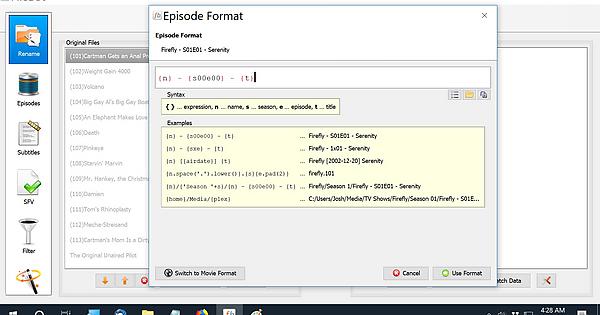
Start with the one that says {plex} (i.e. the last one) and then modify it to your needs (i.e. you might want to replace {home} with the path to your media folder).
