Hello!
I have PMS 1.32.0.6973 (early verison has the same problem) running on Synology DS1515+
and some Cartoon series are not showing in a library after adding it to the NAS.
at that moment I’ve found only Aladdin is missing.
at the left side there is a network share and at the right side there is a library pointed to this share (“Cartoon_series” only).
Only one folder (or Series) is not visible - Aladdin.
I’ve tried to rename it, move outside the share - scan library - move back - scan once again - metadata cleanup - database refresh - power off - power on - version update, and nothing.
no Aladdin.
I’ve checked some log while was trying to debug it by myself but can’t get the reason.
here is some part of the log
The main question is: how to find the root cause? and the second question is: how to find all other Films or Series that are lost in PMS? I have hundred of films, series, cartoon (and cartoon series) and can’t find lost only with my eyes.
“Disneys Aladdin The Series” is not the actual name of the show. It has to match exactly what the TVDB or TMDB has. The year is also important for some of these shows because there are other shows with the exact same name
It should just be
Aladdin (1994)
Season 01
Also shows like The Tom and Jerry Show should not be individual folders quite like that. Rename those just Season 01, Season 02, Season 03 ect… and put them all in one folder like this
The Tom and Jerry Show (2014)
Season 01
Season 02
Season 03
and so on
Also make sure Plex is pointing at the Cartoon_Series folder. Nothing before or after that
that isn’t correct. Plex can’t Match it - this is true, but why Plex is hiding unmatched films? early all unmatched films or series were shown with Folder name only, but now is missing (or hide). this is not correct behavior cause user have no idea what’s going wrong.
If you can see a movie or show but no metadata gets pulled that’s one situation. You can see that so you know it’s there, just not working right
The 2nd situation is if something is named so poorly that it just doesn’t show up at all. These are the videos I’m talking about. For instance, if you put a TV show inside a movie library, nothing at all shows up. It is on your file system but totally invisible to Plex. You cannot use Plex to find these
Sometimes things can get combined as duplicates. As far as you can see, nothing at all is being added to your library but it might be. It gets matched to another show you already have and it’s invisible to you.
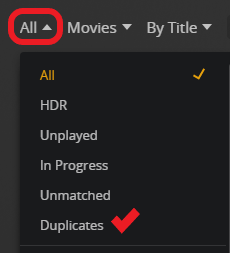
You can check for duplicates.
Where it says “Movies” here it will say TV Shows in a TV library. You have to change that to “Episodes” if you’re in a TV library before you look for duplicates
Anything you find in that filter, click the 3 dots and choose “Get Info”. That will tell you what files are being combined so you know where to look
I’m talking about a little different story, but my English is not my best, so I’ll try to explain a bit longer.
Totally agree with you on both scenarios - the root causes are bad naming or bad placing, so both are “human factor”. lets move forward with those scenarios and imagine next case:
User has PMS library “Movies” with 178 Movies. He downloaded new 25 (or 18 or 100 - doesn’t matter) Movies and moved them to a PMS library point, after Library Scan he has got 200 movies. where are 3 movies? how to find them? Which movies has bad naming or aren’t movies at all?
The PMS Library has filter for that case - “Unmatched” and any thoughtful user will first look to Unmatched movies to check if he isn’t an idiot. but there is nothing in Unmatched movies. Conclusion? - Log, debug, stupid duplicate questions at forums and so on. Just because Movies (things) were hided while they were just Unmatched and must (!) be shown with “Unmatched” filter.
no time waste with run around in circles.
here is an example what I’m talking about - this Cartoon Movie is not hided, but Unmatched and I can fix it.
Check for Duplicates. If a file has a bad title, it’s quite possible it might have gotten matched against an existing movie, so Plex thinks you have two copies. It will then combine both of those into one entry, so you will appear to be “missing” some files.
When I add content, it’s best to add in small chunks, scanning the library in-between adding. Look in the “Recently added” hub for the library to make sure that the movie you just added actually shows up, and is correctly matched. Nothing sucks more than adding a movie, having Plex not match it correctly, and not noticing that for several months.
If you find one movie that Plex just flat-out didn’t pick up, tell us the name of the file. I’d like to know if a particular quirk of Plex is happening here (ignores files it thinks are part of a series).
I have absolutly another case. Movies are missing without a reason. they must be filtered as Unmatched if anything goes wrong (naming, placing, UFOs activity and so on) but they aren’t. Plex just hiding them. this is not correct behavior becase is leads to the impossibility of finding them. Imagine very simple situation: you have 200 movie-files at filesystem but only 187 Movies in Plex. Which movies are lost?
You were jumping between tv shows and movies several times in this thread.
My point is this: 99.9% of all trouble with non-recognized media files is caused by improper naming. Check your file names and their folder organization and you can solve almost all issues.
For instance: the second screenshot in your first post above is showing an unsupported naming: ...SE01EP23.ts is not supported.
You would have no trouble if you used the required ...S01E23.ts instead.
That’s why you get all those responses with links to the naming guides.
That’s why we always ask for your file names. So we are usually able to quickly point out the problems with them.
nope. the first post have two different questions.
the main (first) question is:
Why Aladdin series are invisible in the PMS library?
All the responders telling me about naming and placing rules to be sure that PMS can Match content (series, movies, etc).
But the question isn’t “how to name files them to be matched”? I use PMS for many years and really understand how to name files and where to place them. Aladdin naming is a “human factor” mistake. and once again - I’m not asking why these series are Unmatched! I’m asking where are they? If PMS can’t match movie it must be Unmached, isn’t it? look at the left side of the first screenshot - there is Windows Explorer and 12 folders and now look at the right side of the first screenshot - there is PMS Library with 11 Folders. once again: where is the twelfth Folder?
if PMS is unable to match movie or series why they became invisible and uncounteble?
the subsequent (second) question is:
how to find all media content (movies, series, whatever) that are invisible?
Did I accurately enough described two different questions?
The reason you may not be getting direct help here is that there is a VERY specific naming scheme that Plex supports. If you do not follow this scheme and prove that using this scheme you still have issues, we cannot really help, as any kind of tiny quirk in the Plex detection algorithm can render a movie/show invisible.
I asked if you filtered for duplicates. Did you check? For me, that is the BIGGEST source of missing movies/shows, as Plex thinks one folder is an alternate of an EXISTING show, so combines them. This will make entire TV Shows appear to not be detected, and movie counts to be off.
Plex - unfortunately - only supports English naming schemes for files on the disk. Once Plex detects the files, you can rename the show in your local language, as I see you already do (most likely because you set your library language). But your TV Show folder names MUST be the same as on TheTVDB/TMDB, as repeatedly stated in the naming guides we repeatedly link.
I know it can be a pain, but please humor us on this at least a little bit. Make a new library temporarily. Make a new library pointing to it. Put one movie or show into it that you know is missing. Prove us wrong by following our advice, showing that you did so, and showing that your shows/movies still don’t show up accurately.
that’s really something new. why does bad named series are invisible? Plex “see” media file but can’t match it by any reason (bad naming, wrong library type, foreign symbols in the path and so on and so on and so on) -just keep it Unmatched and user will notice it and maybe do something.
I’m completly sure that this library contains only 11 cartoon series and none of it is “Aladdin: The Series”. it was the twelfth. like other libraries did not contain it before or do not contain it now.
I’ve got it, thanks. To Plex’s credit, I can say that it works perfect with Russian folder names. I think it’s because of Unicode usage in all modern OSes.
I copied season1 to another folder, renamed all episodes to wrong names (as they were in the first post), created new TV Shows library and point it to new temp folder. And got Unmatched series as expected - this is how is have to be.
Unmatched TV series unfortunately do not show as such at the show level. You have to change the filter to “Episodes” first in order to see what is unmatched.
Another note (and I forgot to mention), is that “Duplicates” is a filter only for episodes, not on the “show” level. This means you must change the filter from “TV Shows” to “Episodes”, and then you get a new filter under “All”, called “Duplicates”. This will tell you if it thinks one (or all) of your Aladdin episodes are thought to be duplicates of another.
This can happen if your media is not organized well (such as you having 3 folders for 3 seasons of Tom and Jerry on the root of the TV Show folder), Plex can combine two shows into one.
If there are any duplicates, you can choose to “split” the show by clicking the triple dot menu ... on the show itself.