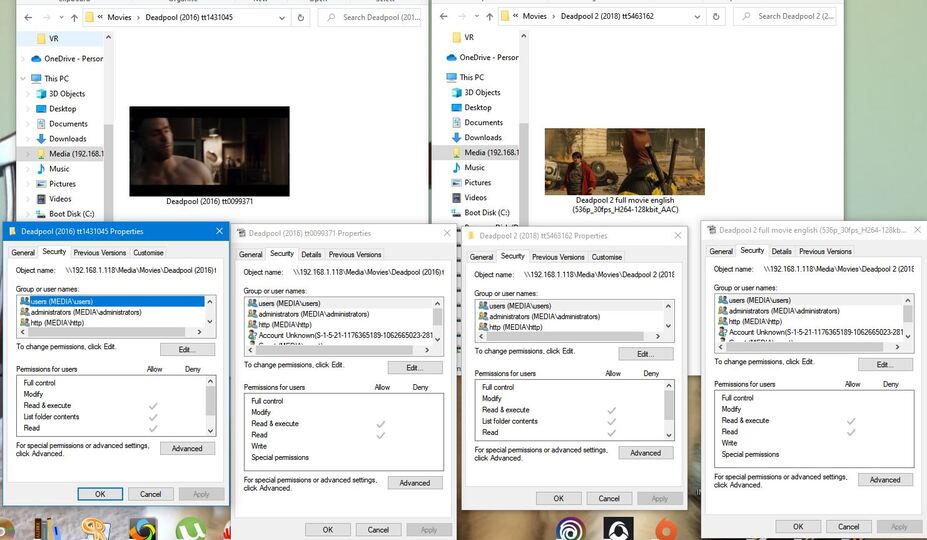
I’ve recently transferred my movie collection over to a Synology NAS and have installed Plex as my HTPC software. I’ve completed importing my movies.. but a fair chunk just are not being picked up.
I’ve checked the support articles and I none of the missing are disk image, named like TV episodes or blocked by permissions.
Deadpool is one movie I’ve seen that isn’t being imported. Deadpool 2 is fine. Far as I know naming is fine (and changing the name on Deadpool 1 doesn’t appear to have any effect). Permissions on folders and individual files are identical… both are in the same parent location.
Can anyone tell me why one is found and not the other… and what I can do to fix this?
Thanks in advance
Have you already checked the common pitfalls – e.g. filtering your library for Duplicates or Unmatched items, sorting the library by Date Added to compare new additions against the files you actually added?
If your server is actually running on the Synology, you’ll need to review the permissions on the NAS itself (not how shares are mounted on your desktop.
In general you might want to review your file naming; e.g. the matching hint should be included in curly brackets → Deadpool (2016) {imdb-tt1441045}; put any technical “additions” in your file/folder names in square brackets for Plex to ignore them and not get confused → Deadpool 2 (2018) {imdb-tt5463162} [full movie english (536p_30fps_H264-128kbit_AAC].
Permissions have been updated… needed to do that to get ANY movies to appear.
The unmatched thing sounds like something I definitely need to take a look at… how do I do that?
OK - found that. It’s not seen under unmatched or duplicates. Interesting that Deadpool 2 does have duplicates… Plex is seeing the Super Duper Cut and Once Upon a Deadpool as duplicates. Guess at some point I’ll need to find out how to split them up… but more worried about the completely missing ones.
OK - all permissions reapplied. No change.
What has worked is converting from .mkv to .mp4 so I thought maybe it’s a file format issue… except checking the formats in the collection and I can find plenty of mkvs that have been picked up fine.
Plex will read MKV files just fine.
What you could do is:
Switch the library display mode to Folder
Navigate to the Deadpool (2016) folder
Check what item Plex is showing inside – if it was mismatched as a different item, this item should be showing in the folder instead of the expected one.
If the movie was mismatched you should be able to split that item apart and manually correct the match for the Deadpool 1 item.
I’ve found that making the names perfect BEFORE I give them to PMS to be the key. It never gets anything wrong after that. and YES, I had to get ALL my names in line up front too (P.I.T.A.)
Given you have only 50 out of that many… It’s not practical to rebuild the library
If you were to fix the names on everything (aka, adopt the more robust naming), I can help you automate so at least manual labor is minimized.
If you do this, PMS will need to “rematch” to the new name but it’ll do that all in one “Scan Files” pass anyway.
What are you thinking on how to taking this short term problem and then the longer term game plan?
This is also a good one. This link is a free version
TV show format
Show Name: ${showTitle} (${showYear}) {tvdb-${showTvdb}}
Season: Season ${seasonNr2}
Episode Name: ${showTitle} (${showYear}) s${seasonNr2}e${episodeNr2} ${episode.title}


Movie format
Folder format: ${title} (${year})
File format ${title} (${year}) {imdb-${imdb}}
This one is also good for TV shows if you like the TVDB show order
Thanks for all the help. I don’t know that I’m going to go through the whole set renaming everything just to correct a handful.
Now I know how to identify unmapped… I can deal with those. Duplicates under different names and multiple editions… those I think I can deal with also thanks to all the help.
The challenge are the mismatches. I think first thing I need to do is to identify which have been mismatched (as opposed to unmapped or duplicated). Is there an easy way of identifying those… or is my only real choice to go through in folder mode looking at each in turn for films with multiples in the info tab?
Finally got every entry present and sorted… took using every free hour from then until now… but every movie has the correct ID and a suitable poster attached.
Took a lot of time… but probably easier than figuring out why a full third of the collection didn’t get picked up by Mediaportal when everything was moved to NAS. Hence the switch to PLEX… the community here seems a lot more active and helpful than MP seems to be these days. So thank you all for the help.
Next up… deciding it I want to bother going through tidying up/adding more genre/subgenre tags. Is there a way to filter by genre in a similar way to Collections? I notice that various people have added genre/category entries in TPDB… but if you simply filter by genre, you’d never see those?
You can use the regular library filters.
There’s also a dedicated tab for each library labeled Categories – there you’ll find 1 section per genre – same as for collections on the Collections tab.