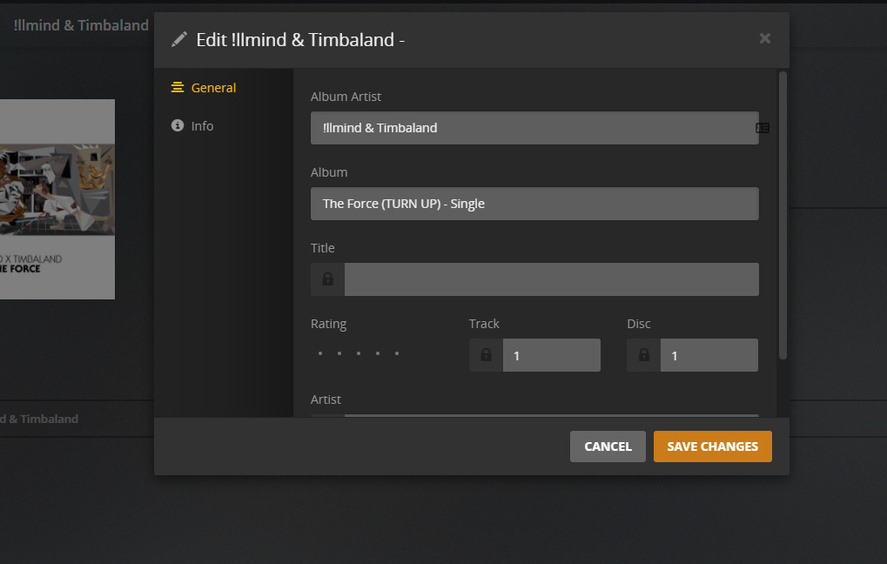
I recently upgraded my music library to the new metadata system and am seeing some tracks that have no track name in Plex. I chose to “Prefer Local Metadata”. In the Mac app, the track name is just blank, whereas in the iOS app the track name says “Untitled”. The tracks in question have full metadata in their ID3 tags, including track number, title, album and artist.
It was mentioned in the support article that the new system expects those tags, and in this case they are, in fact, there. It was also mentioned that you should have separate folders of files for each album. Now, my organization structure has been I do that for full albums, but I just put singles (which would be from different albums) in the same folder. So I thought that may be the issue, but I’m not so sure it is because most of the singles I have show the track name just fine, so it doesn’t appear to be the cause of the issue.
Also, I should note that if I rescan metadata on the tracks with no track name/title, it will find it and then show it. However, if I do a full scan or Plex does one as part of a scheduled task, it wipes them out again.
Anyone? This really sucks that my library is all screwed up; I have people in my family trying to play music and wondering why there are no track names on some tracks. I can’t really think of any reason, technical or otherwise, as to why the track name wouldn’t be read out of the ID3 tag. Just doesn’t make sense.
There’s no known issue with that at the moment. Can you reproduce if you make a library with just the tracks in question? If so I’d love a zip so we can look into why the tags aren’t being read.
@elan I made a test library where all these files are in the same folder (they are all singles). The tracks have titles now, but now they all show up under “Various Artists” instead of by each artists name (all have different artists tags). Also, they all show under one album (all have different album tags). See below…
As I mentioned before, I previously thought it had to do with the fact that they are all in the same folder instead of separate folders, however I have other singles that are in the same folder and those are fine.
Here are the files in case you want to take a look at them.
See, to me, that caveat is a fundamental problem. Not only for me, but I could see that being an issue for a lot of people. I can definitely say that every person’s media collection I have ever seen, had a lot of singles and they were all in one folder. To me, that is just an unreasonable requirement.
Now that I think of it, if you choose “Prefer Local Metadata” why would that even be case…? That just doesn’t really make sense. The scanner should be reading the metadata straight out of tags and displaying as you’d expect. I don’t understand why that requirement would apply if you choose “Prefer Local Metadata”. Couldn’t that relatively easily (for you guys) be added to the scanner? I could totally see that as necessary if you choose not to use that option and want to use MusicBrainz metadata instead though.
Just wanted to say I’m seeing the same thing here. Mostly it appears to just be music I added in the last month or so, but all the music has tags, but it is coming through empty in all the apps (aside from the art).
When a scan completes, it is wiped out (from the perspective of the clients.
I didn’t change any agents, ordering, etc I had already been using.
Edit. I just realized its a lot more of my music This is pretty broken.
Is there a way to revert back to safely a working server build to undo this issue?
FYI, I was able to fix this issue by reorganizing my music library into a /Music/Artist/Album/Track type structure. If you want to use “Prefer Local Metadata” I highly recommend you organize it like that. Fortunately, an app called Bliss made it fairly easy.
Add me. I went all plex, no itunes, and got zapped by this bug. Your files must be structured in a very specific way or you won’t see your tracks. Doesn’t make sense as Plex is supposed to simplify the process. I’m positive others are having this issue and they probably don’t even know it until they start looking for a specific track.
EDIT: I did some more trial and error and this is a super ugly bug. If you fix the file structure, Plex doesn’t seem to update your library unless you remove the whole artist folder, then put the artist folder back in again. Just updating the metadata and putting the file in a matching album folder doesn’t seem reliable. The only way I could get track to show up each time was to remove the whole artist folder, update library, put the artist back. OUCH
EDIT 2: I went back to itunes in hopes that it would organize things properly. It does for music, but itunes puts Audiobooks into a folder under the artist. It doesn’t breakout by album, so this bug slams your audiobooks if you use itunes.
EDIT 3: The “Plex Music” scanner gets untitled tracks. The “Plex Music Scanner” gets the titles of the tracks, but wipes out the Genre info. …sigh
Yeah - super annoying. My Music library is fairly large - and I notice it’s done this to all my singles (well, from creation of the library to about a month ago). It’s just removed the ‘Title’ field for all of my singles:
If you put them in a folder names as the album, so like /Music/Artist/Album/Track then you won’t have to do that for each one and will pick it up if you ever have to delete your library and make a new one. I used Bliss to do it and it made it pretty easy.
Same problem, switched Artists agent to Local Media Assets (Artists) and switched the scanner in the library to Plex Music Scanner. After a rescan, track names came back. Did not have Prefer local metadata checked.
Fairly large collection myself, had downloaded Bliss in preparation for restructure, but turned out to be unnecessary.
I am experiencing the same issue. Most of my track titles have disappeared. Several of the album names are mixed up and much of the album art is not working either. I use MediaMonkey as my ID tagger and my entire library is systematically organized and tagged. Not sure why the folder structure should have any bearing on how the tracks show up in Plex. I have “Local Media” checked so shouldn’t it just read the ID3 tags? That’s kind of what they’re for, right? Please Help! Thanks.
Also having this issue. I find that when playing “Library Radio” in the Plex iOS app, every track it plays will read as “Untitled.” When I then go to the Plex app on my Mac, not only does the track I played show no title (it does not have “Untitled” as the title; it just has no title at all), but all of the tracks in the library by that artist are also without title. I have to refresh the metadata to get them back.
I have had no end of trouble with metadata since the switch. This is just one of several, no doubt related, issues.


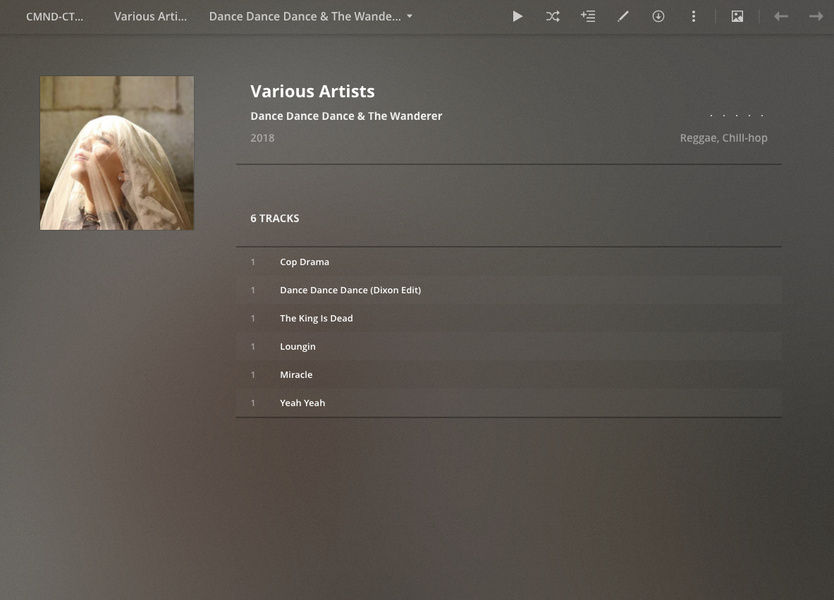
 This is pretty broken.