Troubleshooting help - thanks in advance - I’m on Mac OS, I’ve downloaded and reinstalled plex numerous times (It worked fine previously) and I’m receiving the: (“Something went wrong” There was an error loading your home screen. Please try again in a few minutes.) error message. I can see my local media files in the browser but I can’t connect my macbook to the plex app on my tv (fire stick) - I only see my computer name with the triangle ! error sign. What do I do? Help much appreciated.
Can you provide your server logs? I suspect you have database corruption issues.
Are you using a VPN product?
If so, what version of MacOS have you installed at present?
Tagging on to the original post… I am now having this issue, too. I just did a Mac OS update and Plex was working fine until I did that, about 30 mins ago. I’m on Catalina 10.15.7. I have restarted plex a few times hoping this would resolve it, but no luck. I appreciate any help. I am not super tech literate when it come to plex so bare with me.
I have downloaded by server log and believe I have attached it below.
Plex Media Server.log (505.8 KB)
I have a VPN and I’ve tried it both on and off the computer and on/off through the tv (or through the app in Fire stick). I can’t get the tv app of plex to connect to my computer. It just shows the triangle error.
Plex Media Server Logs_2022-06-12_06-45-15.zip (345.8 KB)
Are these the logs you’re looking for?
@suckmykiss1821 That is just one log file, there should be a bunch more.
@dupont41 That contains some of the needed log files, but looks like the critical logs I am looking for are not there.
Both of you see the instructions for getting your server logs
EDIT:
@dupont41 I am seeing one key log for you, its showing communication issues with the plex servers. Im seeing references to cloudflare, which means you might be getting a captcha that Plex is choking on.
@dbirch thanks very much for taking a look at this. If cloudflare/captcha is the issue, could you kindly suggest some troubleshooting steps to take? (taking into account I’m only mildly computer literate).
If Cloudfare Captcha is the issue, try 8.8.8.8. To prove or disprove this theory.
I use Cloudfare 1.1.1.1 without issue on my LG TV and a Mac server with a active VPN and everything Plex as a Exception with Split tunneling using the VPN’s default DNS.
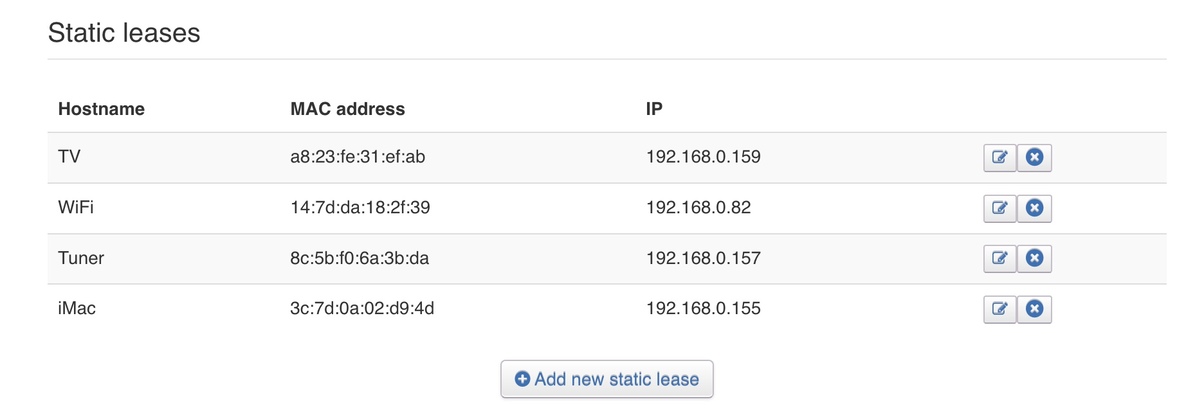
Start looking at Manual Server settings on your client’s settings, Reserve / Static your TV and Server LAN IP address in the router. Add your Computer’s LAN IP address to Plex Server settings.

Look at your Network Interface settings

All this should simplify your hardware LAN connection issues.
Thanks for this… much appreciated. I’m not sure I fully understood it all, but here’s what I did, could you let me know if I’m on the right track?
-Preferred network interface is set to “Any” - confirmed.
- I added both my ip address and my mac address to the list that are allowed to without auth. Is that correct?
- My VPN is off
- I’m unsure what reserve/static my TV means
Next steps? Thank you.
Still getting the error triangles and “There was an unexpected error
Please visit our forums if you continue to experience problems:” message
Can you expand on Mac Address. Do you mean your computer LAN IP address? or Mac address?
Your IP address, Is that of your Router?
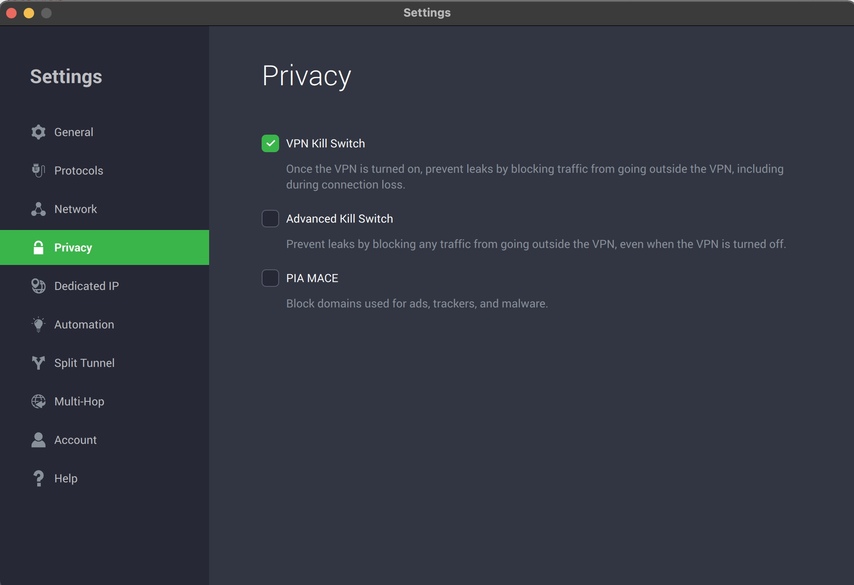
With your VPN, does it have a Kill switch?
Example: Advanced Kill Switch
Your Router settings.
Example:
You have not confirmed you have added your Server’s LAN IP to Client / Fire stick settings in the Plex app. Found in Advanced/Manual Connections settings. Port should be 32400 by default. Enable Manual connections.
Which VPN service do you use?
Have you changed your TV DNS from / different to the Router’s default or 1.1.1.1? Found in Network settings.
@SE56 Sorry for the delay, I was away for work. I’ve walked through all these steps I’m totally at a loss. Although as a last ditch, I tried the plex app on my smart tv (not via Fire stick) and it worked, for 5 minutes and then the error messages are back.
Honestly, at this point, I’ll pay for troubleshooting assistance. If someone will skype me, walk me through step by step and get it up and running and working like before… I’ll venmo/paypal you $50 bucks. It’s worth it for my sanity.
I feel like I have gone completely backward - I’m now having complete Plex failure. I’ve started from scratch, restarted computer and signed up for new Plex account. Downloaded latest version of Plex server, installed it and when I “open plex” I see the screen below. Download. Install. Open. Error Message. Repeat.

-
Running Mac OS 12.4 Monterrey
-
Plex version: OS X 10.9 Mavericks or newer
1.27.0.5897-3940636f2
June 13, 2022 -
Using Nord VPN (seems to work better with VPN on)
-
Everytime I download and install the plex server, and ‘open’ it, it takes me to the page above asking to “get plex media server” - I’m baffled.
-
Logs now unavailable as server can’t download/open/work
-
Have a samsung tv, searched through all the settings apps, can’t find a sign area that allows to create insecure connections locally
Seriously, what should I do here? Should I start over once more, step by step?
