Never mind. It wasn’t the question mark. I wound up converting the MP3 to AIFF (to nuke all metadata) and then reconverted it back to MP3 to put on the server and now it scans fine.
You are aware that you reduced the quality of this file by doing so?
My server has been running sonic analysis since the feature was announced and all I have to show for it is this:
Sep 24, 2021 09:26:42.340 [0x700000f24000] DEBUG - [Butler] We found 13565 albums in section 4 which need sonic analysis.
Sep 24, 2021 09:26:43.654 [0x700000f24000] DEBUG - [Butler] Activity: updated activity 7a7d1d98-728c-45f3-8eb6-816e4c9728d3 - completed 0.0% - Sonic Analysis
There are no Plex files in the system tmp folder (I’m on a Mac, if that makes a difference) and I’m completely stumped as to how to fix this issue.
Waiting four weeks to the day, I can feel it in my bones

ONE PIXEL left
Is it done?
Or is it now taking forever to rebuild the Artist Index, haha.
I’m at 365 albums. Soon it shall be done, very soon!
(I’m just glad it’s gonna be finished before next weekend lol Thumbs held!)
How do i know sonic scanned my music library?
Quite aware. Considering that the file in question is a leftover from the Limewire days I didn’t do anything to that song that hadn’t already been done to it and far worse before it got to me. I’m already looking for a lossless copy of the album the song came from through legitimate means.
Mine finished scanning on the weekend and it was both exciting and anticlimatic since I don’t really use plexamp so any mix making features aren’t happening. Aw well, I guess I’m future proof until plex nerfs it and makes something else lol.
I added some music since and then set it to only sonically scan as a scheduled task on the off hours since it took about an hour or so to sonically scan my added 20 odd albums.

So, I my Plex server runs on a ancient machine.
1st gen i7 860! I’m sure some will laugh, but this allows 5 family to direct stream at same time and 2 people to transcode at 1080p. That is all I need, if it ain’t broke don’t spend on it haha.
Anyway, my library which has been growing since the days of Napster is over 250k of albums. It’s a complete mess not going to lie. It’s at the size now where trying to tag it is just not worth it, anyway I digress.
So the meta for the library is done by the Plex scanner and there was little to no local metadata other than file names. I was looking at Sonic doing around 1 album every hour!!!
So I spent a day making a new music library and tagging with MusicBrainz Picard. I added 1000 albums. I set that library to prefer local metadata.
I stopped all other scanning and started on the new location. The sonic analysis per album was down to around 10mins per album.
I know this is still crazy long. But gives me something to work from.
I am going to let it take the weeks to complete and trial it with Plex Amp. If I think what it brings to the music is worth it then I guess it’s time to drop some coin and upgrade. But I feel the pain of many who have machine not 2 years old and very much struggling.
I think the slogan for Sonic Analysis should be “It’s a war of attrition… just keep going!”
One other thing, so after a server reboot the album count completed for SA has gone back to 1000 pending?
UPDATE — Sonic Analysis processing completed on Oct 3, 2021 at 23:58 EDT:

Following completion, I have observed some additional sonic analysis activity, likely caused by media added after I initially launched the process on Aug 22, 2021:
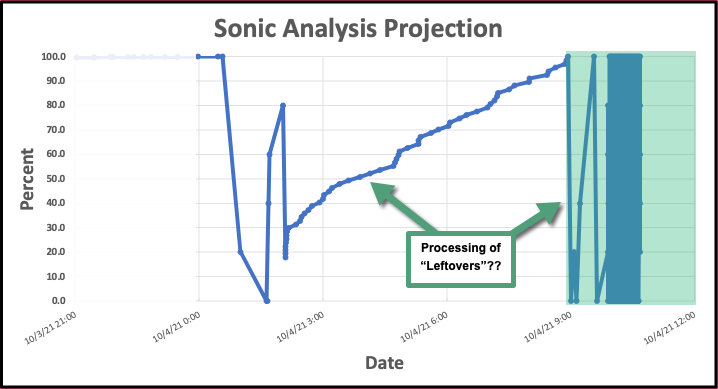
Nice Graphs… I am in the same boat but damn yours was slow… I see your processor and now know why. I am also running this on my NAS (QNAP) (Celeron Processor J3455) I bumped up my cores to 4 instead of 50%, its running at 100%. I started on Aug 31st. It can get done about 28 albums and hour on average. I still got 7700 left out of 25500. With that math, only doing like 525 albums a day but seems to be more than that.
I still got a good 10 more days Plus… and then like you said… back to scanning more albums I have added in the last month.
I still think they should add a number to Scan the data in batches… 100/500/1000 or something like that. I want to SEE some results… and have it get better (more items matching) over time. Did they really not think some of us who have been using plex for like 8 or so years would have this amount of items?
Anyway, glad it’s processing and glad it worked for you… interested to see the results and interested to see if I am actually going to use this more then 3 times a year. 
I thought mine was done but I see it trying to do 1 album as an over night task. I have no idea how to find out what that one album may be. I checked the logs and couldn’t see any information on the album or artist name next to the process. I’m not losing sleep over it haha.
First I want to say that I am VERY exited with this new Sonic feature! Thank you very much Plex team!
I enabled Sonic Analysis on my Plex Server installed on a QNAP NAS. I have around 4700 ablums, I waited patiently (I bite my nails!) and it took about 15 days to process.
Then it built some indexes and now it seams that the analysis is compleated, CPU usage is not at 50% any more. BUT… the “Rebulding artist index” it’s been stuck at arround 78% for more that 24hs already.

Shoul I just stop and restart the Plex server on my NAS or should I check something first? Can you please help me?
Here is my log:
Plex Media Server Logs_2021-10-05_18-55-08.zip (6.9 MB)
Thank you all very much in advance!
If you are on Linux, do ps -ax|grep plex. If you are on Windows, get Process Explorer. Both will show you all the running processes and there may be one Plex Transcoder process that is stuck on one specific file.
Look for a subfolder with WAV files in it, in the general “temp” folder of your system.
By listening to the wav files you can probably id the album.
By looking for the track number of one track which has a comparably small file size you can probably even id the track which causes the transcoder to hang.
I have a qnap for the server and can’t figure out how to actually access those folders. I think I need to download a viewer for my laptop to access the folders or something. I’ll maybe poke around on the weekend.
I’m not worried about it, it did complete so I have the sonics showing. 
Thanks for the tips.
I SSH into the system… as I did not create the Plex Data folder that would allow you to see those folders… I like to keep them hidden for some reason. Then in your SSH program (winSCP) or whatever, you go to the path for the QNAP.
/share/CACHEDEV1_DATA/.qpkg/PlexMediaServer/Library/Plex media Server
