Thanks for the answer. Please can you explain what exactly “Track has no audio stream” means in this context ?
Aug 17, 2021 00:01:00.820 [11372] DEBUG - [Butler] MusicAnalysis: Analyzing album 1707 (Depeche Mode - New Life).
Aug 17, 2021 00:01:00.822 [11372] DEBUG - [Butler/MusicAnalysis] Decoding 3 files for input to the analyzer. Aug 17, 2021 00:01:00.822 [11372] ERROR - [Butler/MusicAnalysis] Track has no audio stream.
Aug 17, 2021 00:01:00.822 [11372] DEBUG - [Butler/MusicAnalysis] Killing job.
Aug 17, 2021 00:01:00.822 [11372] DEBUG - [Butler] Sonic analysis group complete (processed: 78/4701)
I remade my music library, let all scans other than SA finish, and then turned Sonic Analysis back on when I was pretty sure PMS was mostly idle. It does seem to be going faster than on my first run when I think PMS was analyzing video files at the same time.
PMS created a bunch of temporary WAV files… over 700 and climbing. It looks like it creates a bunch of files, then does some analyzing, then makes more WAVs. But the overall process is not at all clear to me.
Last time, adding new media during SA borked it. This time, I will let it run and not touch the music library at all.
I don’t know exactly what it means, but check out that album and start by seeing if all the tracks play OK. It could just be a bad file.
I set up my library maintenance to run from 11pm to 8am, but this sonic gimmick has ran 24hours a day since Sunday 11pm. Performance wise my Nas seems fine as far as I can tell, though I also have been trying to make sure I don’t stress it and also not playing music from the music library it’s processing.
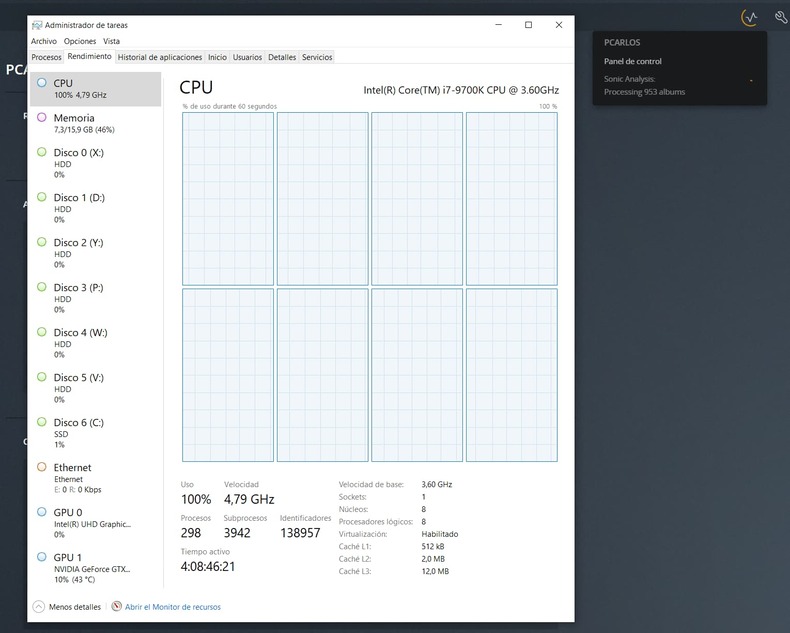
From 8:20am yesterday to 8:20am today it’s processed 275 albums, roughly 11-12 an hour. Is that a typical going rate? Is there a way to stop it and restart it to see if it goes faster, or will it begin from the very start again? I have 4200 or so albums to go, that’s another 15 days of 24 hour a day crunching which I’m not really a fan of. I don’t mind this slowly building for months at a time a few hours a day, but around the clock high processor usage (it bobbles between 60-85%) feels like a bit much?
I have Plex running on a Western Digital PR4100 NAS. I started the sonic analysis on Friday. It is scheduled to run for 17 hours a day. I still have 1408 of 2579 albums to go.
My CPU usage listed on the Plex web Dashboard shows my CPU usage for both plex media server and the system at over 90%. When I look at the CPU activity shown by my NAS software it stays under 60% and fluctuates a lot.
My sonic analysis is taking about 20 seconds per album on a DUAL Xeon E5-2697 v2 12 core 24 thread @ 2.70GHz with 24 CPU/16gig ram assigned to the VM using about 50% of the assigned CPU power. Files sit on a Raid 10 SAS2 array and the database sits on an Intel P3700 NVME drive.
Tasks are not running at a lower priority. At this rate it will take about 14 hours to process ~2500 albums.
I’ve been using the feature extensively, and really enjoy it. Not sure gimmick is a word I’d use to describe the feature!
Your performance will vary significantly based on your CPU’s performance. The analysis uses half your available threads, and processes an album at a time in each thread. The more threads, the more concurrent albums get processed. The faster each thread is, the quicker it’ll get through each album.
Stopping and restarting the server will do the trick. The analysis will pick up where it left off.
Importantly, if you manually triggered the analysis (e.g. by scanning the library and having the “when new music is added” preference set), the analysis will run around the clock. Otherwise, it’ll run only during your maintenance window.
Ok for my 1682 albums (which I feel bashfully inadequate for now, thanks you guys ) it took 2 nights (12am-8am scheduled maintenance) to finish two thirds of my music. Still had 469 albums to do as of 8:30 am this morning. So I said F’ it and forced a scan to trigger it to complete. No one was using the PMS today anyway. Watching it was doing roughly 10 albums every 15 minutes so it took another 12hrs to complete. Checked the logs and it said 100% complete. Then I added 15 more albums and it took about 8 min to process them with Sonic. But the rate it took to match the band and add it to my Music library seemed much faster than before the Sonic being applied.
Now to test the radio mix
This Sonic Analysis sounds suspiciouly like it’s using MusicIP under the hood.
I have for awhile now been using MusicIP Analysis to create mixes. This software stores the results of the analysis as ID3 tags such as the example below. This has the advantage that the sonic metadata travels with the
FLAC or mp3 file itself rather than storing in a separate database.
Q: can PLEX scan and make use of this musicIP precomputed data for its Sonic Plexamp plugin? It already took me weeks to generate it, now here we go again LOL
I looked at the PMS processes with Process Explorer. Plex Transcoder looked stuck on converting one particular MP3 to WAV. I checked the MP3 file with a couple of Windows tools, and it was fine–yet, the transcoder was chewing on it for a couple of days. So, I just said “F it” and I killed the process.
Immediately, Sonic Analysis lines started to appear in the log and the album countdown resumed.
@waltonbruce01 thanks for the MusicIP info, that looks amazing.
Mines been running non-stop since 11pm-ish sunday at 4825 albums and as of right now, 2:50pm thursday, it is at 3892. So not quite the first one thousand done.
I think tonight I’ll stop and restart plex and if it runs during maintenance or not I won’t worry about it. I don’t use plexamp a ton anyway, and I can wait it out with what it fully effects (if anything) in the regular plex apps. My main interest was curiosity and “future proofing” my collection in the event of plexamp features merging into the regular apps. I mostly use chrome browser at work (not allowed to install plexamp on my work pc, the buggers!) and PS4/5 apps at home
Sorry, but don’t take it so seriously. I use it all the time in the “wrestling” way where performers live and die by the success of their “gimmicks”. No intention on my part of lessoning the work on this Sonic project.
Side question, I wonder if file types are causing some to take longer. I have everything from MP3 to hires flacs. If it’s converting all that, no wonder it takes ages and some hours see less results than others.
Everything gets bounced back to .wav for the processing so this could have an effect based on how long the FLAC->WAV conversions take on your particular hardware but is probably negligible compared the actual analysis itself
Frank, the Dead and Phish easily account for over 1000 albums in my collection too.
Sonic Analysis throwing Advance Romance solos off Shut Up And Play Yer guitar in my Stevie Ray Vaughan radios is chefs kiss though, it will be worth the wait I assure you!
First of all, thank you for this great update.
I would be interested to know how Sonic Analysis compares to Valence recommendation technology from Roon.
In Roon, it is described that Valence is based on a cloud database that uses machine learning algorithms and learns through the community of over 100,000 listeners.
Plex, on the other hand, does not use a cloud-based database, but performs the calculations locally and does not share this information with the community either.
Now I have read in previous comments that sharing the information causes a privacy issue. How does Roon make it not be a problem there?
I personally don’t mind sharing my music taste and preferences. I already do this every day when I use Spotify and the like!
Does Roon only use the local data of the listeners for the algorithm or also the data from Tidal and Quobuz?
And if Plex refines the algorithm, would the calculations have to be done again? In the end, the Plex algorithm is “stupid” because it only applies what it has “learned” once. Roon, on the other hand, can learn continuously in the cloud. Isn’t this a huge disadvantage for Plex?
Couldn’t one program a decentralised A.I. Cloud to which every user contributes something?
For example, that each user of Plex Music analyses one album a day and then shares this information with the community? That would definitely be cheaper than a central cloud database that uses artificial intelligence and everyone would contribute something.


 ) it took 2 nights (12am-8am scheduled maintenance) to finish two thirds of my music. Still had 469 albums to do as of 8:30 am this morning. So I said F’ it and forced a scan to trigger it to complete. No one was using the PMS today anyway. Watching it was doing roughly 10 albums every 15 minutes so it took another 12hrs to complete. Checked the logs and it said 100% complete. Then I added 15 more albums and it took about 8 min to process them with Sonic. But the rate it took to match the band and add it to my Music library seemed much faster than before the Sonic being applied.