This is a good thing in a way but we should be able to decide whether to enable similar artists OR sound recommendations. Otherwise, merge the two features. Too many lines kills the ease of use of Plex. I want to remain in control of what I offer on my server and offering the choice makes everyone happy.
Do you think that Plexamp features such as “On this day” will soon be available in Plex?
Will the translation of the phrase “Sonically similar artists” be translated soon for other countries?
I’ve downloaded my logs, and scanned them all for the word Sonic. Nothing found. Running on AMD Turion™ II Neo N40L Dual-Core Processor with 8gb of ram. Library and Server switches are on?
My Sonic analysis has been stuck all day. I read here that it could be a corrupted file, but how do I find out which file it is? The scanning was taking long enough already… Help! Plex Media Server Logs_2021-08-28_17-12-38.zip (6.3 MB)
If you use Windows you can look at transcoder processes with Process Explorer. If a transcoder process is stuck on a file for a long time, that’s the one.
I am sure there are other things that can go wrong with SA but that’s what worked for me.
I updated to DSM7 a few weeks ago now, but this Sonic Analysis feature doesn’t seem to be working for me. As far as I’m aware all the settings are active, but nothing has updated.
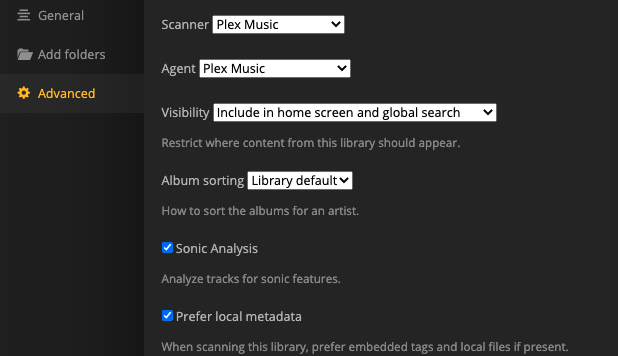
By default, the sonic analysis will only take place during scheduled maintenance. What I did to make it work on mine is to set “analyze audio tracks for sonic features” to "as a scheduled task and when media is added. I also set my maintenance window to run all day, and used a manual scan to kick things off. It took a long time to finish though.
It’s probably worth reviewing the Plex logs to see what’s going on.
Hey, thanks for the reply. So funny enough I looked through my settings and they were fine, but I changed the ‘analyze audio tracks for sonic features’ to a scheduled task and when media is added. It now seems to be doing the Sonic Analysis, I guess it just needed a push? Odd though as I had the options activated for weeks and it wasn’t doing anything.
Anyway, I’ll let you guys know if anything goes wrong. Thanks
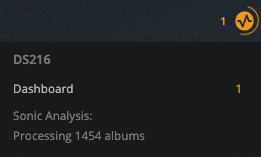
I have 1,200 albums. So far it has taken 6 days and I’m letting it run constantly (got plenty of CPU). Right now there are 277 albums left. So, for me, it is average an album every 10 minutes or so which seems to be on par with a lot of other users here.
I have mine regulated to running as a scheduled task and it appears stuck. The number hasn’t changed after 9 hours. I had a hardware crash over the weekend while it was running so I’m thinking it’s botched. Is there a way to reset the analysis? Can I just turn it off in the MUSIC EDIT ADVANCED tab and leave it a few days before turning it on, or should I just keep letting it go?
I deleted this part, I saw the setting to run it as a sched task only.
The sonic analysis uses a separate sqlite file. It might have been corrupted by your hardware crash.
You can try this:
shut down the server
then delete this sqlite db.
It will be restored after the next analysis run
You can find it in a subfolder Music Analysis n of the folder which houses all the server databases. Clearing out the subfolder Music Analysis n should do it.
Same here. The scheduled task alone didn’t start it (although the activity thingie said it was scanning), but changing it to ‘when media is added’ did the trick here too, so I left it that way.
Only 3755 more albums to go (out of 21,000) and I’ll know if it’s worth the wait…
I run my Plex server on an “old” Intel Core i5-3,5 GHZ with 16 GB RAM and a SSD disk and on my
System Sonic takes an average 1.5 min to process an album wich means about 1000 albums in 24 hours! So my system has about 30 days before the process is finished.
I have mine set to only run during the scheduled task time frame.
No matter what I do it’s sitting there everyday morning (and has been for the last 4 days) saying processing 4377 albums. The number never changes. If I reboot the PC it won’t run again until the next schedule maintenance but once it starts it will run last the time window and say processing 4377 albums. I’ve left it doing this for 4 days now, and it still says the same thing.
I have a Ryzen 7 2700 for just plex, it has 16 cores, plex is using 5% or less. Nothing seems to move or or progress it, it just sits there all day saying the same number 4377.
For me it would only start when the setting for sonic analysis was “as a scheduled task and when media is added”. With just the scheduled task nothing would happen either, but with this setting it would kick in a few moments after adding some new music to the library.