Server Version#: 1.21.1.3766
Player Version#:8.10.0.21911
It seems recently, when I go to my TV Shows library, I cannot drill into the info for the Series and see the individual seasons and then individual episodes anymore. Let’s say I wanted to go to Doctor Who to Season 5 and then play Episode 6, I cannot navigate there. When you select the Show, it immediately starts playing from the first unplayed episode. If you mark the show as all unplayed or all played it doesn’t matter. Why? it was working fine. And why can’t I Pin my server to the home screen instead of having to go to more every time.
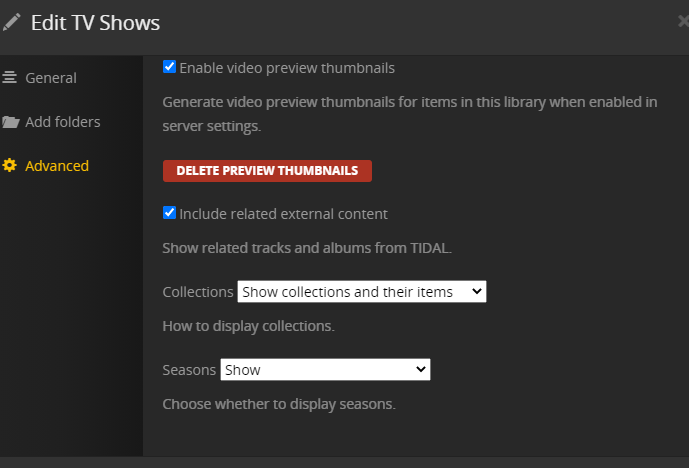
Show Seasons is selected on the server, and it works Beautifully on the Web client for the server. ![Captureaa|690x429]
If I select a TV Show, then press Play, it begins to play.
If I hit Back, it comes back to the TV Show.
If I hit Play again, it begins to Play.
If I hit Back again, it now shows the seasons.
If I select a Season and hit Play, It begins to play.
If I hit Back, it returns to the Seasons.
If I hit Play again, It begins to Play.
If I hit Back again, it now returns to the episodes of that season.
Now I can select an Episode and hit Play and it Plays that episode.
That is way too much navigation for get to one episode.
It used to be select the Show and the seasons showed up,
Select the Season and the Episodes showed up.
Select the Episode and hit play.
Server: 1.21.1.3766 on DS918+
Client: 8.11.0.22186-beta on Shield 2015 Pro
TV Show navigation has changed recently.
Does the TV remote have an OK or Select button, as opposed to a Play button? If so, it might make things a bit easier.
Here’s how I navigate TV shows on my Shield, which also runs Android TV. I use the “OK” button instead of the “Play” button on my remote.
Select the desired TV Library.
Navigate to desired show, press OK. This takes me to the show pre-play screen.
Navigate to desired season, press OK. This takes me to the selected season, displaying all episodes for that season.
Here’s where things changed.
Episode 1 is automatically chosen, and the Play button is automatically selected. (*) To play episode 1, I press the OK button on my remote.
To choose a different episode, I press the up button twice. This changes the selection from the Play button to Episode 1. There is a gold outline around the episode, indicating which episode is currently selected.
I can then navigate right/left to the desired episode.
When I reach the desired episode, I press OK and it plays. Alternately, I could press down twice, which takes me to the controls so I could select a different audio track, subtitles, etc.
(*) Choosing Episode 1 every time might be a bug. It makes more sense to choose the first unplayed episode in the selected season (at least to me). However, Episode 1 is always chosen, regardless of its played/unplayed status.
 ![Captureaa|690x429]