Server Version#: 1.18.0.1913
Player Version#: 4.10.1
Since a week now, maybe a bit longer, I can no longer sort albums by their given rating (in music). I use this all the time, so I know it’s something recent.
When I filter on year 2019 and sort by rating, nothing really happens. When I clear that filter however, the sort by rating still does some kind of sorting, but it shows percentages for 10 (of my 7k) albums of some kind, I have no idea what that means or where that came from.
All other sort options do seem to work, and I am able to custom filter on rating (ex.: all albums with a rating higher than 3 stars).
Nobody else sorting music by rating here?
The Rating it is sorting on right now appears to be one collected from an outside source by Plex itself. When you open the album view of one of these rated albums, you can see that other rating next to the 5 stars you can give it yourself.
Just updated to 1.18.1.1973 and was pretty shocked to find my album ratings from the Library listing replaced with an external rating. I rate the music I listen to and heavily rely on this both with Smart playlists and regular usage in the Library…
The biggest joke is that my collection has 2453 albums atm, and only 12 albums currently have this shiny new external rating :). Very useful. And there is no indicator or tooltip telling you what is the source of the external rating.
Having external ratings is ok (as long as they work better than they do now), but distinguishing your own from external in smart playlists and the library view is a must.
There is now a distinction between ‘Rating’ (that is your ‘stars’) and ‘Critic Rating’.
I have verified that sorting is working after either of these criteria in the web app.
There are also custom filters available for both in the web app.
Always use the hosted web app app.plex.tv
You might have to recreate your smart playlist though.
Maybe @OttoKerner is using a newer version of the server than is available to the rest of us.
To be clear, if I navigate to a specific album, I can see both my rating and the critic rating. In any other view, the critic ratings are the only ones displayed, and the critic ratings are the only field I can sort by. Personal ratings for an album are not available as a choice to sort by.
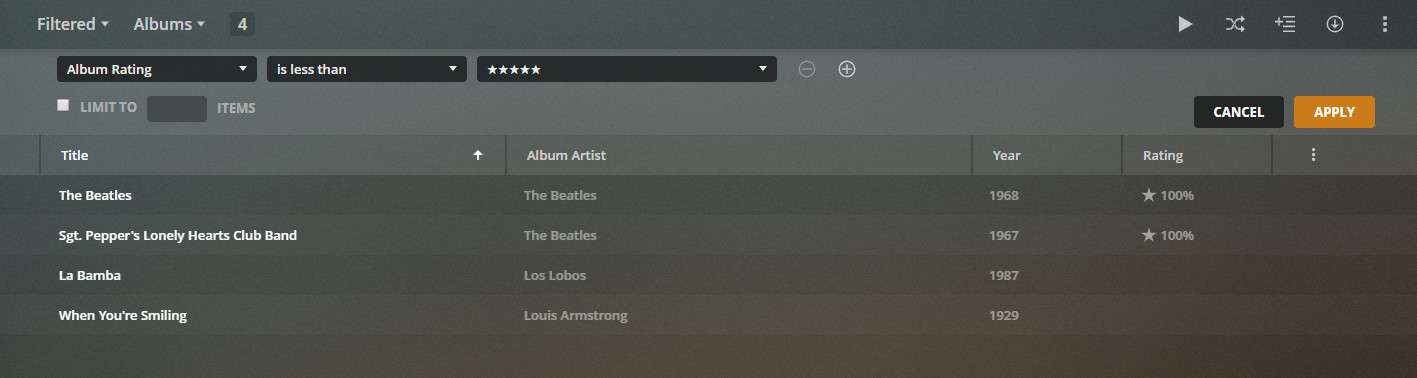
I can sort by my personal ratings with a custom filter. However, even then, the only visible ratings are the critics rating, and your personal ratings are not a field your are able to view or select as an option. To make it even more confusing, the “Critic Rating” isn’t even a field I can select with a custom filter, so the returned results are nothing at all of what we would expect to see.
With the filter applied in the screenshot, I wouldn’t expect to see an album with a rating of 100% because I asked to see albums with less than 5 stars (which logically, is 100%)
There are no ‘Track Critic Ratings’. Nor are there ‘Artist Critic Ratings’.
Therefore the only ‘Critic Rating’ you’ll see is that of albums.
The list of quick filters gets adapted to the view mode.
However, there are both ‘Album Rating’ and ‘Album Critic Rating’ in the list of Custom Filters for me.
If they are missing for you, they might be there shortly.
I can confirm the album rating property is back and working in most cases.
There is however an issue when trying to shuffle play something that is filtered on album rating, whether it is through a dynamic playlist or a custom filter in the library itself. Normal play (top to bottom) is fine. The error occurs on albums rated a long time ago as well as on newly rated albums.
The errors from the logs:
SQLITE3:0x964b2289, 1, no such column: parents_settings.rating in "select parents.id,metadata_items.id,metadata_item_settings.rating,metadata_item_settings.last_viewed_at,metadata_items.rating_count,metadata_items.guid from metadata
LPE: exception generating query for invalid path ‘library://x/directory/%2Flibrary%2Fsections%2F24%2Fall%3Ftype%3D10%26album%2EuserRating%3D8%26album%2Etitle%3DSilk%20Panic’: sqlite3_statement_backend::prepare: no such column: parents_settings.rating for SQL: select parents.id,metadata_items.id,metadata_item_settings.rating,metadata_item_settings.last_viewed_at,metadata_items.rating_count,metadata_items.guid from metadata_items join metadata_items as parents on parents.id=metadata_items.parent_id join metadata_items as grandparents on grandparents.id=parents.parent_id left join metadata_item_settings on metadata_item_settings.guid=metadata_items.guid and metadata_item_settings.account_id=? where metadata_items.library_section_id in (24) and (parents_settings.rating=8 and ((parents.title like ‘Silk% Panic%’ or parents.title like ‘% Silk% Panic%’) or (parents.title_sort like ‘Silk Panic%’ or parents.title_sort like ‘% Silk Panic%’) or (parents.original_title like ‘Silk Panic%’ or parents.original_title like ‘% Silk Panic%’)) and metadata_items.metadata_type=10) order by parents.parent_id,parents.id,metadata_items.rating_count desc
Could you write down a series of steps to recreate the error?
Because I can’t recreate it. Please do also update to the latest beta server version, if possible.
Was there anything in particular that was unclear? I can replicate this issue simply by setting up a custom filter with a filter on Album Rating (value and operator don’t matter) and clicking the shuffle button at the top, after which I get an error popup.
When I press play instead of shuffle, there is no issue.
Isn’t there any real issue tracker I could use…? Using forum posts to track a status of a bug is really ridiculous.
I can get behind the idea that something as minor as this isn’t a priority, but there is no way for me to know if the issue has been aknowledged and has been at least assigned a priority-level…
No replies, no follow up, not even a remote sign of interest…