TheLastNerve has been spanked 
You may restart your server.
I have reset your certificate, you may restart the server.
Good day,
I am also experiencing significant issues (since 9/30) regarding connecting to my server from any device other than the local host. I see “CERT: incomplete TLS handshake: sslv3 alert certificate unknown” within my logs and would kindly request that a Team Member review my certificate status for the server named PLEXPRIME to see if a reissue is appropriate. I’ve uninstalled and reinstalled my OS (twice) and attempted to use several different versions of PMS as well as reconfigured port forwarding from scratch.
Please let me know if you need additional information.
Best,
fish3r88
I see you have deleted a couple servers on your account (all deleted within the past 48 hours).
Those servers appeared to be those users you were sharing with.
I took the liberty of cleaning that all up for you.
All your certificates were indeed valid
The most recent one, on PlexPrime, is:
Valid Thu, 14 Oct 2021 16:06:17 +0000 Thu, 14 Oct 2021 16:06:30
Is this the server you’re trying to make the primary now?
Hey ChuckPa - thanks for the quick response.
That’s correct - that would be the server I’m attempting to make primary now.
Best,
fish3r88
Control-F5 from Plex/web will refresh your local browser and make the now-removed servers drop off.
The apps are often better to uninstall and relink but you can re-HOME them to the new server.
First you’ll need to share again with those users. (Settings - Users & Sharing)
All good so far ?
Thanks ChuckPa.
From other devices on my local network I only see a “No Content Available” screen or occasionally “app.plex.tv is unable to connect to “PlexPrime” securely”. The only device where I can see content at all is the host for PMS. I’ve iterated through all three options for Secure Connections in the settings from the host machine, with no difference in outcome from the client side.
Totally understand having to share again with external users - not a problem.
Cheers,
fish3r88
Is Remote Access enabled and connected on PlexPrime?
Without it, the other players won’t see the server.
Also, until the server is known claimed to your account and it recognizes you as the owner (Settings - Server is visible) , it’s not “Your” server. Where does this stand ?
For devices on your local network – you need to make certain they are pointing to the new instance (PlexPrime).
I find it’s easier to uninstall the app and relink it .
Then, when the app starts, I can pick the server I want.
Thanks ChuckPa.
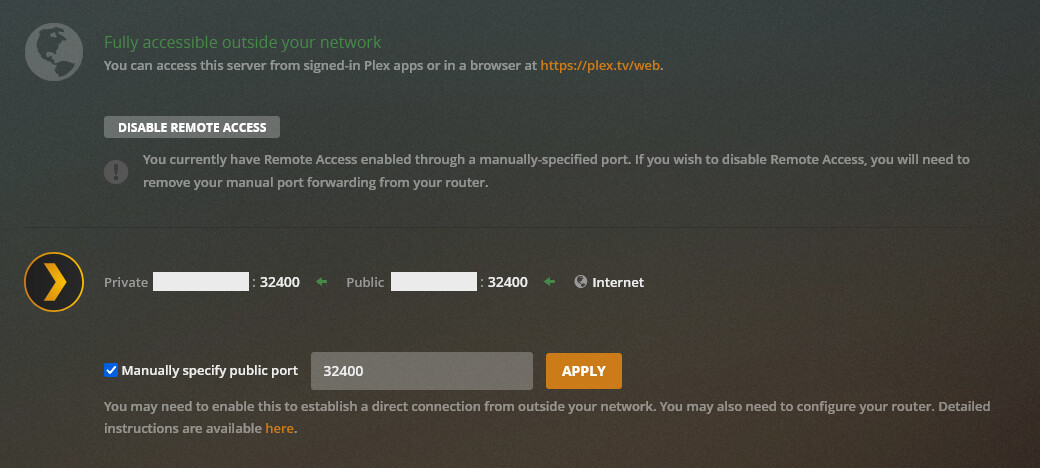
I’ve certainly claimed the server and it associated with my ownership. Remote access is enabled, however it shows green “accessible” for only several seconds before reverting to inaccessible.
To close the thread on this, I eventually solved the problem by physically relocating the PMS host machine to the vicinity of the router and directly connecting the two via ethernet (as opposed to using in-wall ethernet to an unmanaged switch previous) and then disabling IPV6, and releasing and renewing IPV4 dhcp allocation on the PMS host machine before finally setting up port forwarding from scratch (again).
Tbh, I don’t know why the above worked. If anyone has a theory, welcome the chance to learn in public.
Best,
fish3r88
Disabling IPv6 is the most likely solution.
PMS understands IPv6 with clients but does not do as well with the server
I’m fully IPv4/v6 stack here and run IPv4 on the LAN exclusively.
“PMS understands IPv6 with clients but does not do as well with the server” -.-
Good to know - appreciate the insight. Thanks for your willingness to be present here.
All the best,
fish3r88
.1 is my router .217 is my laptop authenticating via app.plex.tv
Should I restart my router?
I also added a manual port fwd entry during my own troubleshooting
Should i remove that and reboot the router?
I would restart the router. Even I have times when restarting the whole network stack is helpful.
Howdy -
Sry to be a bother but I have issues with my server randomly not being available outside of my network. I am wondering if it is a cert issue? Sometimes my server shows Fully accessible after I refresh the page and can access the server remotely using a different ISP/device and other times it is not available outside of my network. Sometimes the other devices outside of my network can connect when it says not available and other times they cannot connect when it says that. I did just get a new modem and reconfigured my port forwards in my router but this was done the same way it was done before and everything was working fine before today. Things seem to work sometimes on some devices and choses to fail at random. I use a manual port 32401 but i also have opened 32400 as well on the router. I verified that the ports are being forwarded in the router and its connecting to the outside world properly.
thx. Z
Thanks for the help @ChuckPa
Everything is working great again
Thx for the cert reset. This issue must be something else because now everything outside of localhost (the server itself) on my local network is saying “app.plex.tv is unable to connect to “SERVERNAME” securely” & outside of the network just says unavailable. I have restarted the server several times, even uninstalled and reinstalled the plex server software from the server. I also tried doing the thing your not suppose to do and disabled all firewalls on the machine and set the server to a DMZ on the router as a test with no changed results. I’ll keep checking the forums. 
Although using roku devices seems to work just fine… strange…
Your cert did not regenerate properly.
I reached out to Operations.
I will be back online in the morning.
You can try restarting in a few hours if you wish. They are EU time
@ChuckPa I was wondering if you would be able to look into my cert as well. I seem to be able to access it from any device, but not those I’ve shared it with. The issue began months ago and I’ve periodically tried fixing it in various ways. I have my DNS set to google’s, my Remote Access is set up properly with port forwarding and claims to be working, and I’ve gone through every troubleshooting article I could find, but even still people are just getting the “unable to connect to … securely” error. My Secure connections is currently set to “Preferred”, but I’ve tried all 3 options in many different configurations.
I think I may be having the certificate problem as well. Could you reset?
The problems are described in my post here: