SSL Certificate Errors

Hello i believe im having the similar issue with my certificate on my Europa Server as my other works fine but the Europa Server will not allow me to connect via app.plex.tv but will let me via the local ip 192.168.30.90:32400

DEBUG - CERT: incomplete TLS handshake from [::ffff:xxx.xxx.xxx.xxx]:1790: sslv3 alert certificate unknown

Your certificate looked ok.

It had just renewed itself (which normally happens before it expires and not after).

To ensure its clean, I reset Europa’s cert anyway.
The other servers are indeed clean.

Please restart Europa.

Hello, Tried restarting same issue getting the “app.plex.tv is unable to connect to “Europa” securely” this worked fine till about i would say 2-3 weeks ago then this all started happening also the logs still indicate a SSL error.

May 29, 2022 06:43:13.422 [0x7f9d5a5d1b38] DEBUG - CERT: incomplete TLS handshake from [::ffff:xxx.xxx.xxx.xxx]:1286: sslv3 alert certificate unknown

Then PMS is legitimately complaining about the certificate from that IP address as being unknown.

Have you, with DEBUG logging enabled, Restarted Plex, Let it run 3 minutes, then downloaded and examined the logs?

As you read down through “Plex Media Server.log”, you will find where the certificate is loaded and “pinned”.

If you have your own certificate, you will also see it being pinned.

I have seen the logs and here is what i got (some data removed for protection)

May 29, 2022 06:40:28.092 [0x7f9d5bd71d50] DEBUG - [CERT] Subject name is /CN=*.2c181959.plex.direct
May 29, 2022 06:40:28.093 [0x7f9d5bd71d50] DEBUG - [CERT] Installed certificate with fingerprint ae:65:x:x:x…

All of this is in the beginning sometime later after some scanning i start seeing the SSLv3 Alerts
May 29, 2022 06:43:10.456 [0x7f9d5a5d1b38] DEBUG - CERT: incomplete TLS handshake from [::ffff:xxx.xxx.xxx.xxx]:1251: sslv3 alert certificate unknown

Funny thing is the address that the xxx.xxx.xxx.xxx is a gateway on my PFSense however its not the same gateway that the Plex server is running on which is strange.

im not using my own certificate, also note that this Plex Server is not meant to be externally accessible it has always been an “Internal” at home server the other one i have is meant to be for external use.

The “Remote Access” has never been enabled on this box and only till recently has this become an issue as previously mentioned.

Ah ha!

sudo bash
cd "/var/lib/plexmediaserver/Library/Application Support/Plex Media Server/Cache"
ls -la

Find out why user plex:plex cannot update file cert-v2.p12.
I suspect something went amuck there.

With PMS stopped, and all file ownership verified correctly,

  1. Delete cert-v2.p12
  2. Start PMS
  3. Wait 3 minutes (again)
  4. Download the logs.

In these new logs, you’ll see it retrieve the cert.

Did that and got a new certificate
May 29, 2022 06:59:57.984 [0x7ff730054b38] DEBUG - CERT: Downloaded new cert from plex.tv; took 12 tries
May 29, 2022 06:59:58.002 [0x7ff730874b38] DEBUG - [CERT] Subject name is /CN=*.bb6764
May 29, 2022 06:59:58.002 [0x7ff730874b38] DEBUG - [CERT] Installed certificate with fingerprint 4b:27:3c

however still got the issue - which again is strange cause the address is a gateway address on my network just not for this network

May 29, 2022 06:59:58.033 [0x7ff730897b38] DEBUG - CERT: incomplete TLS handshake from [::ffff:192.168.195.1]:1450: no suitable signature algorithm
May 29, 2022 06:59:58.053 [0x7ff730897b38] DEBUG - CERT: incomplete TLS handshake from [::ffff:192.168.195.1]:1451: sslv3 alert certificate unknown

The address its complaining about is not the GW its my Desktop just FYI as well 195.1 is my desktop IP

We’ve now confirmed PMS is installing the Plex cert which it recognizes as valid.

What the log is telling us is all those inbound devices aren’t sending KNOWN certificates.

Do you have your own cert?
Have you restarted the player apps ?

Hey Chuck, i do not have my own certificate as far as i am aware.

I tested on multiple Windows Devices and still got the same result. Just Tried using multiple browsers, Chrome/Firefox/IE

check your pm

Hi, i’m having issues with my certificate. I can acess Plex via app.plex.tv normally over LAN, but it’s not acessible over WAN. Log is showing the following:

CERT: incomplete TLS handshake from [::ffff:xxx.xxx.xx.xxx]:61997: sslv3 alert certificate unknown

@arthuraltino

On your account, I see the server’s certificate was updated today.

Has the player been restarted since then?

Thu, 02 Jun 2022 10:04:22 +0000

I have this same error and cannot connect to my server inside my private network or on public network. Please reset my SSL Certificate as well. I’ve provided a screenshot of the error o get on another local network Mac when using plex.app. I have secure connections set to Preferred. If I set it to required, Plex.app just says the server is offline.
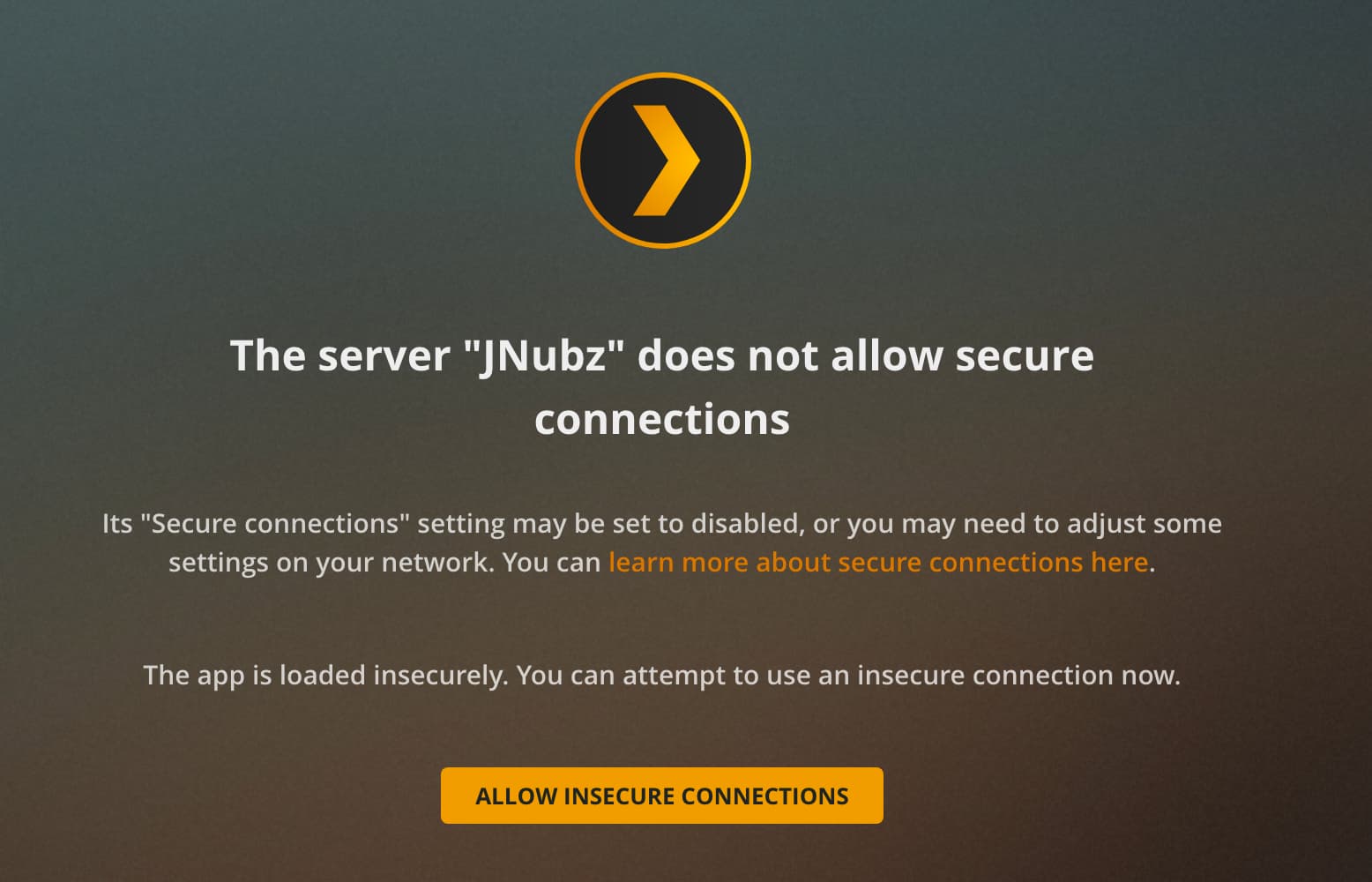

@jarednay

I have reset your certificate.

I see a very clear pattern in your certificate usage.
About every 48 hours, your server restarts and gets a new certificate

Eventually, Plex.tv decided to stop allowing it.

Therefore, it’s important to make certain this is addressed and doesn’t happen again.

The most common issue is damaged ownership & permissions in /var/lib/plexmediaserver

What’s suggested (adjust to your site configuration) :

cd /var/lib/plexmediaserver
sudo find . -type d -exec chmod 755 {} \;
sudo find . -type f -exec chmod 644 {} \;
sudo chown -r plex:plex .

^^ change the directory and user/group as required.

Now restart PMS

I am running this on a Mac Mini. It was migrated at some point. That being said, I don’t have a path for /var/lib/plexmediaserver

Any other suggestions?

I do not know MacOS very well .

This is a problem you’ll need to get help with if it occurs further.

If you stop Plex,

Open ~/Library/Application Support/Plex Media Server/Cache
Delete v2-cert.p12
Start PMS

I deleted the cert-v2.p12 file and now I’m getting an error stating Failed to retrieve cert from plex.tv:429.

You mentioned if the issue persists, I will need to get help. Where do I get support if not from the forum?

Looks like my  tv works again and revoking my iPhone fixed the app on it on cellular. But if I’m on my local network it’s greyed out.

One moment please.

Stop Plex.

Your server consumed 5 certificates in 15 minutes. This is why it throttled you.
Did you restart PMS 5 times?

Is PMS running under your MacOS username?